
CSS / Reference / word-break: Language-Sensitive Breaks Versus Emergency Wrapping
word-break selects word-breaking rules. Keep-all restricts breaks between CJK characters, while break-all can split non-CJK words aggressively; select the rule according to the language and task.
Syntax and value choices
| Property | Initial value | Inherited | Main application conditions |
|---|---|---|---|
word-break |
normal | Yes | All elements; visible effects depend on the text, image, or box conditions below |
Initial values are not necessarily the values assigned to HTML elements by the browser’s stylesheet. Inspect the actual result in developer tools’ Computed panel.
.copy { word-break: keep-all; overflow-wrap: anywhere; }
.identifier { word-break: break-all; }
| Value or category | Behavior and choice |
|---|---|
normal |
Use the normal language-sensitive break rules. |
keep-all |
Restrict CJK breaks while retaining spaces and other break opportunities. |
break-all |
Permit aggressive breaks within applicable words. |
break-word |
Deprecated compatibility value; distinguish it from overflow-wrap values. |
For supported values and conditions, see MDN word-break.
Run the example and compare results
Save this complete code as css-reference-10658-example.html in UTF-8 and open it in a browser. Keep its demonstration styles in that file rather than pasting them into a site-wide stylesheet.
<!doctype html>
<html lang="en">
<head>
<meta charset="utf-8">
<meta name="viewport" content="width=device-width, initial-scale=1">
<title>word-break comparison example</title>
<style>
body { margin: 0; color: #20242b; background: #fff; font: 16px/1.7 "Malgun Gothic", sans-serif; }
#demo { padding: 24px; max-width: 820px; margin: auto; }
h1 { font-size: 22px; margin: 0 0 20px; }
.samples { display: flex; flex-wrap: wrap; gap: 24px; }
.label { margin: 0 0 8px; font-weight: 700; }
.samples { gap: 180px; }
.target, .reference { width: 190px; padding: 10px; border: 1px solid #718096; }
.target { word-break: keep-all; }
.reference { word-break: break-all; }

/* Keep the practice box within a narrow viewport. */
.target, .reference { overflow-x: auto; }
</style>
</head>
<body>
<main id="demo">
<h1>word-break comparison</h1>
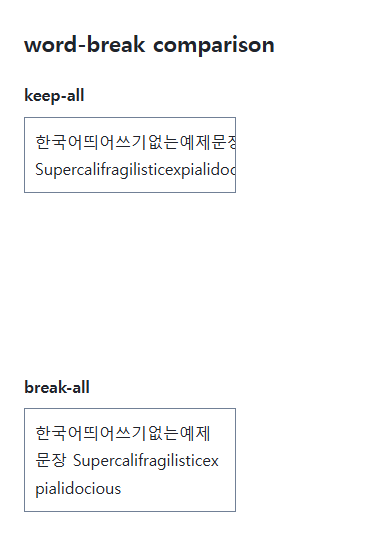
<section class="samples"><div class="a"><p class="label">keep-all</p><div class="target">한국어띄어쓰기없는예제문장 Supercalifragilisticexpialidocious</div></div><div class="b"><p class="label">break-all</p><div class="reference">한국어띄어쓰기없는예제문장 Supercalifragilisticexpialidocious</div></div></section>
</main>
</body>
</html>
Keep-all can leave a long unspaced group wider than the box. Break-all splits applicable long words. For occasional overflow in identifiers or URLs, consider overflow-wrap instead.
Language and exceptions
Keep-all does not prohibit every line break as nowrap does. Spaces remain opportunities, while a long unbroken group can overflow. Combining keep-all with overflow-wrap: anywhere can provide emergency breaks where required.
Avoid a global break-all fix
Aggressive breaks can make ordinary English words harder to read. Restrict the rule to an appropriate field or code display and compare actual sentences. Hyphenation has separate language and dictionary conditions.
The Korean string is intentional language-specific sample text; the labels and surrounding explanation are English.
Change one setting at a time
Use the complete example file above. Change only the specified selector or value rather than several comparison conditions at once.
- Use the same original text and change only .target’s word-break through normal, keep-all, and break-all, comparing Korean and English. Set lang to the document’s actual main language.
- Word-break:break-word is deprecated compatibility syntax. It is not interchangeable with overflow-wrap:break-word for intrinsic sizing. Select an appropriate overflow-wrap value in new code and restore the original example.
Compare normal first. Temporarily replace the same sample with https://example.com/longunbrokensegment and inspect opportunities inside a URL, then restore the Korean/English text and original keep-all/break-all. Do not generalize URL or CJK (Chinese, Japanese, and Korean) behavior to every language.
For overflow causes and usable scroll regions, see CSS Overflow, Long Text Wrapping, and Ellipsis. Related properties to compare alongside these conditions are word-wrap, white-space.
When the result is missing or unexpected
- Check that white-space: nowrap is not preventing wrapping.
- Compare Korean, English, and a long URL rather than generalizing from one string.

CSS / Reference / background-position: Percentages, Centers, and Edge Offsets
Position backgrounds using centers, percentages, or edge offsets. Calculate percentages from the remaining space and account for oversized cover images and multiple layers.

CSS / Reference / opacity: Group Transparency, Background Alpha, and Interaction
Fade an element and its children or make only its background translucent. Check stacking, contrast, keyboard focus, and the difference between transparency and hiding.
CSS / Reference / text-decoration: Decoration Propagation, Underlines, and Link Meaning
Style text decoration and compare parent-originated lines with child rules. Keep links identifiable and separate meaningful deletions from visual strike-through.

CSS / Reference / border-style: Border Patterns, Side Order, and Hidden Conflicts
Choose border patterns for each side and inspect shorthand resets. Compare none with hidden in collapsed tables and account for zero computed border widths.

CSS / Reference / align-content: Flex Lines, Grid Tracks, and Available Space
Distribute available space in flex, grid, and supported block layouts. Compare wrap with nowrap, fixed with auto tracks, and content-group alignment with item alignment.
CSS / Reference / background-origin: Positioning References Versus Painting Boundaries
Choose a background image’s positioning box and distinguish it from background-clip. Compare how padding, borders, percentage sizes, and fixed attachment affect the reference.
CSS / Reference / background-clip: Background Painting Areas and Text Clipping
Choose border, padding, or content painting areas independently of image positioning. Compare visible boundaries and plan readable fallbacks for text-clipped backgrounds.
CSS / Reference / font-weight: Numeric Weights, Relative Weights, and Font Matching
Request numeric or relative font weights and inspect the supplied faces. Compare static and variable-font behavior without assuming every number produces a unique weight.
CSS / Reference / background-image: Images, Gradients, Relative Paths, and Layers
Paint gradients or image layers, resolve paths from the correct stylesheet location, and keep meaningful pictures in accessible HTML rather than background decoration.

CSS / Reference / word-break: Language-Sensitive Breaks Versus Emergency Wrapping
Choose word-breaking behavior for actual scripts and long strings. Compare normal, keep-all, and break-all, and distinguish deprecated break-word from overflow-wrap.