
CSS / Reference / background-origin: Positioning References Versus Painting Boundaries
background-origin selects the box used to position and size a background image. It does not determine where the background color is painted.
Syntax and value choices
| Property | Initial value | Inherited | Main application conditions |
|---|---|---|---|
background-origin |
padding-box | No | All elements; visible effects depend on the text, image, or box conditions below |
Initial values are not necessarily the values assigned to HTML elements by the browser’s stylesheet. Inspect the actual result in developer tools’ Computed panel.
.card { background-origin: content-box; background-position: left top; }
| Value or category | Behavior and choice |
|---|---|
padding-box |
Use the outer padding boundary as the positioning reference. |
border-box |
Use the outer border boundary. |
content-box |
Use the content boundary. |
fixed attachment |
Viewport-based positioning changes the usual origin behavior. |
For supported values and conditions, see MDN background-origin.
Run the example and compare results
Save this complete code as css-reference-10592-example.html in UTF-8 and open it in a browser. Keep its demonstration styles in that file rather than pasting them into a site-wide stylesheet.
<!doctype html>
<html lang="en">
<head>
<meta charset="utf-8">
<meta name="viewport" content="width=device-width, initial-scale=1">
<title>background-origin comparison example</title>
<style>
body { margin: 0; color: #20242b; background: #fff; font: 16px/1.7 "Malgun Gothic", sans-serif; }
#demo { padding: 24px; max-width: 820px; margin: auto; }
h1 { font-size: 22px; margin: 0 0 20px; }
.samples { display: flex; flex-wrap: wrap; gap: 24px; }
.label { margin: 0 0 8px; font-weight: 700; }
.target, .reference { width: 240px; height: 150px; border: 12px dashed #718096; padding: 20px; background-color: #eaf2f8; background-image: url("data:image/svg+xml,%3Csvg xmlns='http://www.w3.org/2000/svg' width='160' height='80'%3E%3Crect width='160' height='80' fill='%23006c9c'/%3E%3Ccircle cx='40' cy='40' r='24' fill='%23ffd166'/%3E%3C/svg%3E"); background-repeat: no-repeat; }
.target { background-origin: padding-box; }
.reference { background-origin: content-box; }

/* Keep the practice box within a narrow viewport. */
.target, .reference { max-width: calc(100vw - 48px - 64px); }
</style>
</head>
<body>
<main id="demo">
<h1>background-origin comparison</h1>
<section class="samples"><div class="a"><p class="label">padding-box</p><div class="target"></div></div><div class="b"><p class="label">content-box</p><div class="reference"></div></div></section>
</main>
</body>
</html>
Compare the shape’s start position. With content-box it starts inward from the padding boundary, at the content box.
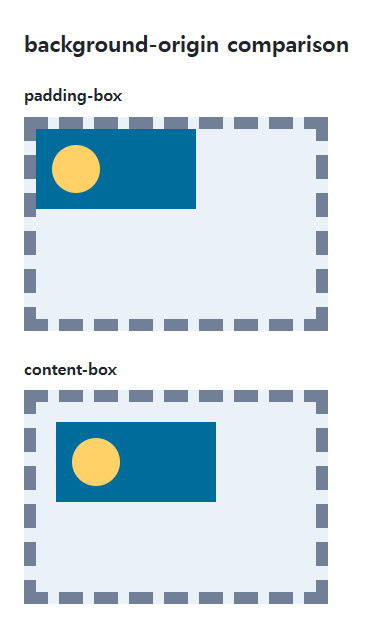
Coordinates versus painting boundaries
origin establishes the coordinate system; clip limits painting. Setting content-box origin does not automatically restrict the background color to content. Choose both properties when positioning and painting need different boundaries.
Percentage sizing and positioning
The reference box matters to percentage background-size and background-position calculations. Large padding and borders make these differences more visible. Do not assume a fixed background follows the same origin behavior.
Change one setting at a time
Use the complete example file above. Change only the specified selector or value rather than several comparison conditions at once.
- Change only .target’s origin through padding-box, border-box, and content-box, keeping clip and color unchanged.
- In the wide example, those reference widths are 280px, 304px, and 240px. Testing background-size: 50% auto also exposes the size-reference change. Restore both origin and size afterward.
For combining background properties in one practical design, see CSS Background Colors and Images: cover and contain. Related properties to compare alongside these conditions are background-clip, background-size.
When the result is missing or unexpected
- Give the box visible padding and borders before comparing its boundaries.
- If image placement changes but color coverage does not, inspect clip separately.

CSS / Reference / text-indent: First-Line Indents and Hanging Paragraphs
Create first-line and hanging indents, distinguish them from paragraph padding, and check inheritance, writing direction, and narrow-screen clipping.

CSS / Reference / background-position: Percentages, Centers, and Edge Offsets
Position backgrounds using centers, percentages, or edge offsets. Calculate percentages from the remaining space and account for oversized cover images and multiple layers.
CSS / Reference / font-variant: Small Capitals and Font Features
Use small capitals without changing the source string and choose specific variant longhands. Compare real font support with synthesized presentation.
CSS / Reference / quotes: Choose Nested Quotation Marks
Choose generated quotation pairs for nested text and distinguish them from literal punctuation. Compare automatic marks, none, and quotation-depth operations.
CSS / Reference / background-origin: Positioning References Versus Painting Boundaries
Choose a background image’s positioning box and distinguish it from background-clip. Compare how padding, borders, percentage sizes, and fixed attachment affect the reference.

CSS / Reference / border-spacing: Separate Cell Gaps and Collapsed Borders
Set horizontal and vertical gaps in separate-border tables. Distinguish cell padding, zero spacing, collapsed borders, and browser default styles.
CSS / Reference / background-repeat: Tiling, Space, and Round
Control horizontal and vertical background tiling and compare repeat, no-repeat, space, and round with the same tile and positioning area.

CSS / Reference / overflow: Visible Overflow, Scrolling, Hidden, and Clip
Choose clipping and scrolling behavior with appropriate size constraints. Compare hidden with clip and inspect axis interactions and flex minimum sizes.
CSS / Reference / font-family: Font Lists, Glyph Fallback, and Loading
Build a font stack with appropriate generic fallbacks and inspect the fonts actually used. Distinguish naming a family from loading files and covering characters.
CSS / Reference / font-style: Italic, Oblique, and Available Font Faces
Request italic or oblique forms while accounting for real faces and synthesis. Separate visual styling from emphasis semantics and inspect font-loading failures.