
CSS / Reference / white-space: Preserve Spaces, Line Breaks, and Wrapping
white-space controls preserved whitespace, source line breaks, and automatic wrapping. Use normal for ordinary text or pre-wrap when source spacing and line breaks should survive while lines may still wrap.
Syntax and value choices
| Property | Initial value | Inherited | Main application conditions |
|---|---|---|---|
white-space |
normal | Yes | All elements; visible effects depend on the text, image, or box conditions below |
Initial values are not necessarily the values assigned to HTML elements by the browser’s stylesheet. Inspect the actual result in developer tools’ Computed panel.
.copy { white-space: normal; }
.log { white-space: pre-wrap; overflow-wrap: anywhere; }
| Value or category | Behavior and choice |
|---|---|
normal |
Collapse whitespace and source breaks; allow wrapping. |
nowrap |
Collapse whitespace and prevent automatic wrapping. |
pre |
Preserve spacing and source breaks without automatic wrapping. |
pre-wrap |
Preserve spacing and source breaks while allowing wrapping. |
pre-line |
Collapse spacing but preserve source breaks and allow wrapping. |
break-spaces |
Preserve spaces with different wrapping and trailing-space behavior. |
For supported values and conditions, see MDN white-space.
Run the example and compare results
Save this complete code as css-reference-10597-example.html in UTF-8 and open it in a browser. Keep its demonstration styles in that file rather than pasting them into a site-wide stylesheet.
<!doctype html>
<html lang="en">
<head>
<meta charset="utf-8">
<meta name="viewport" content="width=device-width, initial-scale=1">
<title>white-space comparison example</title>
<style>
body { margin: 0; color: #20242b; background: #fff; font: 16px/1.7 "Malgun Gothic", sans-serif; }
#demo { padding: 24px; max-width: 820px; margin: auto; }
h1 { font-size: 22px; margin: 0 0 20px; }
.samples { display: flex; flex-wrap: wrap; gap: 24px; }
.label { margin: 0 0 8px; font-weight: 700; }
.target, .reference { width: 240px; padding: 12px; border: 1px solid #718096; }
.target { white-space: pre-wrap; }
.reference { white-space: normal; }
</style>
</head>
<body>
<main id="demo">
<h1>white-space comparison</h1>
<section class="samples"><div class="a"><p class="label">pre-wrap</p><div class="target">First    second
The third source line contains a longer sentence.</div></div><div class="b"><p class="label">normal</p><div class="reference">First    second
The third source line contains a longer sentence.</div></div></section>
</main>
</body>
</html>
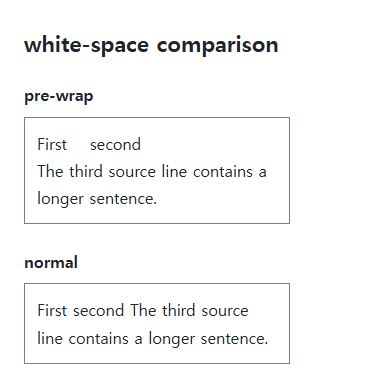
Pre-wrap preserves the repeated spaces and original line break. Normal collapses them into ordinary text flow; both can wrap to the available width.
Separate whitespace from long-word handling
Wrapping permission alone does not guarantee a long URL fits. overflow-wrap and word-break handle breaks inside long strings. nowrap can prevent those wrapping rules from taking effect.
Modern shorthand and established keywords
The commonly implemented shorthand combines white-space-collapse and text-wrap-mode. Traditional keywords express useful combinations. break-spaces differs from pre-wrap for preserved and end-of-line spaces; test it when the placement of spaces is part of the content.
Compare six values on identical whitespace
Save this complete document as css-reference-10597-practice.html in UTF-8 and open it in a browser. Test it as a separate file rather than nesting it inside another example.
<!doctype html>
<html lang="en">
<head>
  <meta charset="utf-8">
  <meta name="viewport" content="width=device-width, initial-scale=1">
  <title>Compare six values on identical whitespace</title>
  <style>
    body { margin: 16px; color: #20242b; font: 16px/1.7 sans-serif; }
    main { max-width: 52rem; margin: auto; }
    h1 { font-size: 1.35rem; }
    .samples { display: flex; flex-wrap: wrap; gap: 24px; }
    .samples > * { max-width: 100%; min-width: 0; }
    :focus-visible { outline: 3px solid #005fcc; outline-offset: 3px; }
.sample { width:220px;max-width:100%;background:#e6f2ff;overflow-x:auto;border:1px solid #718096;font-family:monospace; }
  </style>
</head>
<body>
<main>
  <h1>Compare six values on identical whitespace</h1>
<p>normal</p><div class="sample" style="white-space:normal">One    two
Third	word and a much longer source line.
Four     </div><p>nowrap</p><div class="sample" style="white-space:nowrap">One    two
Third	word and a much longer source line.
Four     </div><p>pre</p><div class="sample" style="white-space:pre">One    two
Third	word and a much longer source line.
Four     </div><p>pre-wrap</p><div class="sample" style="white-space:pre-wrap">One    two
Third	word and a much longer source line.
Four     </div><p>pre-line</p><div class="sample" style="white-space:pre-line">One    two
Third	word and a much longer source line.
Four     </div><p>break-spaces</p><div class="sample" style="white-space:break-spaces">One    two
Third	word and a much longer source line.
Four     </div>
</main>
</body>
</html>
Normal and nowrap collapse source newlines; pre, pre-wrap, pre-line, and break-spaces preserve them. Pre-line collapses consecutive spaces. Long nowrap/pre lines scroll inside the sample. Compare pre-wrap with break-spaces on the same text and width to inspect trailing spaces, then restore the original value.
| Value | Runs of spaces | Source newlines | Automatic wrapping |
|---|---|---|---|
| normal | Collapse | Collapse | Allow |
| nowrap | Collapse | Collapse | No |
| pre | Preserve | Preserve | No |
| pre-wrap | Preserve | Preserve | Allow |
| pre-line | Collapse | Preserve | Allow |
| break-spaces | Preserve, including space at line ends | Preserve | Allow, including after preserved spaces |
For overflow causes and usable scroll regions, see CSS Overflow, Long Text Wrapping, and Ellipsis. Related properties to compare alongside these conditions are word-wrap, word-break.
When the result is missing or unexpected
- Check that editing preserved the actual spaces and line breaks.
- Inspect inherited or theme-level nowrap rules in Computed.

CSS / Reference / border-spacing: Separate Cell Gaps and Collapsed Borders
Set horizontal and vertical gaps in separate-border tables. Distinguish cell padding, zero spacing, collapsed borders, and browser default styles.

CSS / Reference / font-style: Italic, Oblique, and Available Font Faces
Request italic or oblique forms while accounting for real faces and synthesis. Separate visual styling from emphasis semantics and inspect font-loading failures.
CSS / Reference / quotes: Choose Nested Quotation Marks
Choose generated quotation pairs for nested text and distinguish them from literal punctuation. Compare automatic marks, none, and quotation-depth operations.
CSS / Reference / letter-spacing, word-spacing: Compare Character and Word Spacing
Adjust character and word gaps independently using the same text and a normal baseline. Account for inheritance, language, wrapping, and excessive negative spacing.

CSS / Reference / list-style-type: Change List Markers and Numbering
Style list markers while keeping ordered and unordered semantics. Compare numbering styles, starting values, marker removal, and shorthand resets.

CSS / Reference / calc(): Calculate CSS Values and Understand Their Types
Combine percentages and lengths with calc(), inspect the actual parent width, and distinguish invalid expressions from newer typed arithmetic and special numeric results.
CSS / Reference / empty-cells: Show or Hide Empty Table Cells
Control empty-cell borders and backgrounds in a separated table while preserving its structure. Compare show, hide, whitespace, and the collapsed-border exception.

CSS / Reference / background-repeat: Tiling, Space, and Round
Control horizontal and vertical background tiling and compare repeat, no-repeat, space, and round with the same tile and positioning area.

CSS / Reference / white-space: Preserve Spaces, Line Breaks, and Wrapping
Choose whitespace behavior by preservation and wrapping needs. Compare traditional values and break-spaces, and handle long words with separate wrapping properties.
CSS / Reference / background-position: Percentages, Centers, and Edge Offsets
Position backgrounds using centers, percentages, or edge offsets. Calculate percentages from the remaining space and account for oversized cover images and multiple layers.