
CSS / Reference / list-style-type: Change List Markers and Numbering
list-style-type sets a list marker’s shape or numbering style. Styling does not change the meaning of ul and ol: use an ordered list when order matters, then choose its visual numbering.
Syntax and value choices
| Property | Initial value | Inherited | Main application conditions |
|---|---|---|---|
list-style-type |
disc | Yes | Elements generating list-item boxes |
Initial values are not necessarily the values assigned to HTML elements by the browser’s stylesheet. Inspect the actual result in developer tools’ Computed panel.
ol { list-style-type: lower-roman; }
ul { list-style-type: square; }
| Value or category | Behavior and choice |
|---|---|
disc / circle / square |
Filled-circle, open-circle, or square markers. |
decimal |
Decimal numbering. |
lower-roman |
Lowercase Roman numerals. |
none |
Do not paint a list marker. |
For supported values and conditions, see MDN list-style-type.
Run the example and compare results
Save this complete code as css-reference-10537-example.html in UTF-8 and open it in a browser. Keep its demonstration styles in that file rather than pasting them into a site-wide stylesheet.
<!doctype html>
<html lang="en">
<head>
<meta charset="utf-8">
<meta name="viewport" content="width=device-width, initial-scale=1">
<title>list-style-type comparison example</title>
<style>
body { margin: 0; color: #20242b; background: #fff; font: 16px/1.7 "Malgun Gothic", sans-serif; }
#demo { padding: 24px; max-width: 820px; margin: auto; }
h1 { font-size: 22px; margin: 0 0 20px; }
.samples { display: flex; flex-wrap: wrap; gap: 24px; }
.label { margin: 0 0 8px; font-weight: 700; }
.target { list-style-type: lower-roman; padding-inline-start: 2em; }
.reference { list-style-type: square; padding-inline-start: 2em; }
</style>
</head>
<body>
<main id="demo">
<h1>list-style-type comparison</h1>
<section class="samples"><div><p class="label">ol: lower-roman</p><ol class="target"><li>First step</li><li>Second step</li></ol></div><div><p class="label">ul: square</p><ul class="reference"><li>First item</li><li>Second item</li></ul></div></section>
</main>
</body>
</html>
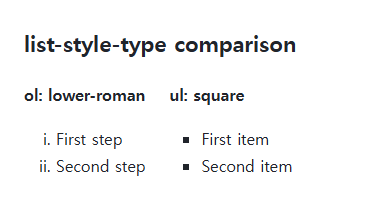
The ordered list shows i and ii; the unordered list uses squares. HTML start values remain part of the ordered list’s numbering behavior.
Marker generation and the shorthand
The property affects markers on list-item boxes. A working list-style-image can take visual precedence. A later list-style shorthand resets type, position, and image together, so inspect the final rules.
Removing markers while keeping meaning
none hides the marker rather than changing the HTML element. Some browser and assistive-technology combinations handle markerless lists differently, so check meaningful navigation structures. Typing manual numbers into text separates the numbering from the list semantics.
Change one setting at a time
Use the complete example file above. Change only the specified selector or value rather than several comparison conditions at once.
- Change only ol.target’s list-style-type among decimal, lower-roman, and none. The item order stays the same; restore lower-roman.
- Add start="3" to that ol start tag to begin with iii and iv, then remove it. Distinguish visual numbering style from a changed starting number.
For combining marker placement with paragraph and list layout, see CSS Paragraph and List Styling.
For styling the marker itself, see MDN ::marker.
For display modes and normal flow, see CSS display: Block, Inline, inline-block, and Hiding. Related properties to compare alongside these conditions are list-style-position.
When the result is missing or unexpected
- Inspect display, list-style-image, and clipping if the marker is absent.
- Choose ul or ol by meaning before choosing a marker shape.

CSS / Reference / background-repeat: Tiling, Space, and Round
Control horizontal and vertical background tiling and compare repeat, no-repeat, space, and round with the same tile and positioning area.
CSS / Reference / background-image: Images, Gradients, Relative Paths, and Layers
Paint gradients or image layers, resolve paths from the correct stylesheet location, and keep meaningful pictures in accessible HTML rather than background decoration.

CSS / Reference / white-space: Preserve Spaces, Line Breaks, and Wrapping
Choose whitespace behavior by preservation and wrapping needs. Compare traditional values and break-spaces, and handle long words with separate wrapping properties.

CSS / Reference / font-variant: Small Capitals and Font Features
Use small capitals without changing the source string and choose specific variant longhands. Compare real font support with synthesized presentation.
CSS / Reference / text-indent: First-Line Indents and Hanging Paragraphs
Create first-line and hanging indents, distinguish them from paragraph padding, and check inheritance, writing direction, and narrow-screen clipping.

CSS / Reference / empty-cells: Show or Hide Empty Table Cells
Control empty-cell borders and backgrounds in a separated table while preserving its structure. Compare show, hide, whitespace, and the collapsed-border exception.
CSS / Reference / caption-side: Place a Table Caption Above or Below
Place captions visually while keeping them first in the table’s source structure. Match caption text to the data and check alignment, width, and writing direction.
CSS / Reference / background-origin: Positioning References Versus Painting Boundaries
Choose a background image’s positioning box and distinguish it from background-clip. Compare how padding, borders, percentage sizes, and fixed attachment affect the reference.
CSS / Reference / opacity: Group Transparency, Background Alpha, and Interaction
Fade an element and its children or make only its background translucent. Check stacking, contrast, keyboard focus, and the difference between transparency and hiding.

CSS / Reference / border-style: Border Patterns, Side Order, and Hidden Conflicts
Choose border patterns for each side and inspect shorthand resets. Compare none with hidden in collapsed tables and account for zero computed border widths.