
CSS / Reference / caption-side: Place a Table Caption Above or Below
caption-side places a table caption above or below the table. It affects placement rather than cell order or the caption’s text alignment.
Syntax and value choices
| Property | Initial value | Inherited | Main application conditions |
|---|---|---|---|
caption-side |
top | Yes | Table-caption boxes |
Initial values are not necessarily the values assigned to HTML elements by the browser’s stylesheet. Inspect the actual result in developer tools’ Computed panel.
table { caption-side: bottom; }
caption { text-align: start; padding-block: 0.5em; }
| Value or category | Behavior and choice |
|---|---|
top |
Place the caption on the block-start side for the usual horizontal writing mode. |
bottom |
Place it on the corresponding block-end side. |
inherit |
Inherit the caption-placement setting. |
text-align |
Align the caption’s text with a separate property. |
For supported values and conditions, see MDN caption-side.
Run the example and compare results
Save this complete code as css-reference-10634-example.html in UTF-8 and open it in a browser. Keep its demonstration styles in that file rather than pasting them into a site-wide stylesheet.
<!doctype html>
<html lang="en">
<head>
<meta charset="utf-8">
<meta name="viewport" content="width=device-width, initial-scale=1">
<title>caption-side comparison example</title>
<style>
body { margin: 0; color: #20242b; background: #fff; font: 16px/1.7 "Malgun Gothic", sans-serif; }
#demo { padding: 24px; max-width: 820px; margin: auto; }
h1 { font-size: 22px; margin: 0 0 20px; }
.samples { display: flex; flex-wrap: wrap; gap: 24px; }
.label { margin: 0 0 8px; font-weight: 700; }
table { border-collapse: collapse; }
td, th { border: 1px solid #006c9c; padding: 10px; }
caption { padding: 8px; font-weight: bold; }
.target { caption-side: bottom; }
.reference { caption-side: top; }
</style>
</head>
<body>
<main id="demo">
<h1>caption-side comparison</h1>
<section class="samples"><table class="target"><caption>Monthly sales quantities</caption><tbody><tr><th scope="col">Month</th><th scope="col">Quantity</th></tr><tr><th scope="row">January</th><td>12</td></tr><tr><th scope="row">February</th><td>18</td></tr></tbody></table><table class="reference"><caption>Monthly sales quantities</caption><tbody><tr><th scope="col">Month</th><th scope="col">Quantity</th></tr><tr><th scope="row">January</th><td>12</td></tr><tr><th scope="row">February</th><td>18</td></tr></tbody></table></section>
</main>
</body>
</html>
The same monthly-data caption appears below the first table and above the second. Its source position stays first within each table.
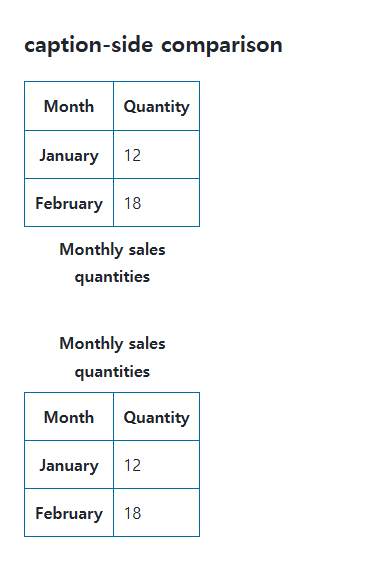
Preserve the table’s semantic structure
Place caption as the first element child of table, then choose visual placement with CSS. Replacing it with an unrelated paragraph weakens the direct table-title relationship. Make the caption accurately describe the data it introduces.
Caption size and writing direction
Long captions wrap according to available table and layout width. Check vertical writing separately from the usual top/bottom appearance. Use appropriate padding or spacing to separate the caption from the table.
Change one setting at a time
Use the complete example file above. Change only the specified selector or value rather than several comparison conditions at once.
- Keep caption as table’s first element child and change only caption-side between top and bottom. The title should describe the monthly quantities.
- Try a long caption and compare wrapping, then change only text-align between start and center. Restore it after distinguishing placement from alignment inside the caption.
Check the relevant conditions in HTML caption placement rules.
For table-wide sizing and cell layout, see CSS Tables: Borders, Sizing, and table-layout.
When the result is missing or unexpected
- Use an actual caption element rather than a styled paragraph.
- Inspect a rule on caption that overrides an inherited table setting.

CSS / Reference / font-weight: Numeric Weights, Relative Weights, and Font Matching
Request numeric or relative font weights and inspect the supplied faces. Compare static and variable-font behavior without assuming every number produces a unique weight.
CSS / Reference / list-style-type: Change List Markers and Numbering
Style list markers while keeping ordered and unordered semantics. Compare numbering styles, starting values, marker removal, and shorthand resets.

CSS / Reference / border-style: Border Patterns, Side Order, and Hidden Conflicts
Choose border patterns for each side and inspect shorthand resets. Compare none with hidden in collapsed tables and account for zero computed border widths.

CSS / Reference / overflow: Visible Overflow, Scrolling, Hidden, and Clip
Choose clipping and scrolling behavior with appropriate size constraints. Compare hidden with clip and inspect axis interactions and flex minimum sizes.
CSS / Reference / font-size: Understand px, em, rem, and Text Enlargement
Choose text-size units by their reference and test nested em scaling. Check the actual root size, browser enlargement, and layout constraints.

CSS / Reference / background-position: Percentages, Centers, and Edge Offsets
Position backgrounds using centers, percentages, or edge offsets. Calculate percentages from the remaining space and account for oversized cover images and multiple layers.
CSS / Reference / font-style: Italic, Oblique, and Available Font Faces
Request italic or oblique forms while accounting for real faces and synthesis. Separate visual styling from emphasis semantics and inspect font-loading failures.
CSS / Reference / background-image: Images, Gradients, Relative Paths, and Layers
Paint gradients or image layers, resolve paths from the correct stylesheet location, and keep meaningful pictures in accessible HTML rather than background decoration.
CSS / Reference / white-space: Preserve Spaces, Line Breaks, and Wrapping
Choose whitespace behavior by preservation and wrapping needs. Compare traditional values and break-spaces, and handle long words with separate wrapping properties.
CSS / Reference / quotes: Choose Nested Quotation Marks
Choose generated quotation pairs for nested text and distinguish them from literal punctuation. Compare automatic marks, none, and quotation-depth operations.