CSS / Reference / background-position
background-position은 배경 이미지의 위치를 정합니다. center는 이미지와 기준 영역의 중앙을 맞추며, 백분율은 기준 영역 크기에서 이미지 크기를 뺀 남는 공간을 기준으로 계산합니다.
문법과 주요 값
| 속성 | 초기값 | 상속 | 주요 적용 조건 |
|---|---|---|---|
background-position |
0% 0% | 아니요 | 모든 요소; 실제 그림·텍스트·상자의 존재 조건은 본문에서 확인 |
초기값은 브라우저 기본 스타일시트가 HTML 요소에 적용한 값과 같다는 뜻이 아닙니다. 실제 값은 개발자 도구의 Computed에서 확인하세요.
.hero { background-position: center; }
.icon { background-position: right 12px bottom 8px; }
| 값 또는 구분 | 동작과 선택 기준 |
|---|---|
left top |
왼쪽 위 맞춤 |
center / 50% 50% |
두 영역의 중앙 맞춤 |
right bottom |
오른쪽 아래 맞춤 |
right 12px bottom 8px |
오른쪽·아래 가장자리에서 지정 거리만큼 이동 |
값과 적용 조건은 MDN background-position에서 확인할 수 있습니다.
실행 예제와 결과 비교
아래 전체 코드를 UTF-8 형식의 background-position-example.html 파일로 저장한 뒤 브라우저로 여세요. 예제용 CSS는 이 파일 안에만 넣고 사이트 전체 스타일시트에 그대로 붙여 넣지 않습니다.
<!doctype html>
<html lang="ko">
<head>
<meta charset="utf-8">
<meta name="viewport" content="width=device-width, initial-scale=1">
<title>background-position 비교 예제</title>
<style>
body { margin: 0; color: #20242b; background: #fff; font: 16px/1.7 "Malgun Gothic", sans-serif; }
#demo { padding: 24px; max-width: 820px; margin: auto; }
h1 { font-size: 22px; margin: 0 0 20px; }
.samples { display: flex; flex-wrap: wrap; gap: 24px; }
.label { margin: 0 0 8px; font-weight: 700; }
.target, .reference { width: 240px; height: 150px; border: 12px dashed #718096; padding: 20px; background-color: #eaf2f8; background-image: url("data:image/svg+xml,%3Csvg xmlns='http://www.w3.org/2000/svg' width='160' height='80'%3E%3Crect width='160' height='80' fill='%23006c9c'/%3E%3Ccircle cx='40' cy='40' r='24' fill='%23ffd166'/%3E%3C/svg%3E"); background-repeat: no-repeat; }
.target, .reference { background-size: 80px 40px; }
.target { background-position: 50% 50%; }
.reference { background-position: right 12px bottom 8px; }

/* 좁은 화면에서 실습 외곽을 맞춥니다. */
.target, .reference { max-width: calc(100vw - 48px - 64px); }
</style>
</head>
<body>
<main id="demo">
<h1>background-position 적용 비교</h1>
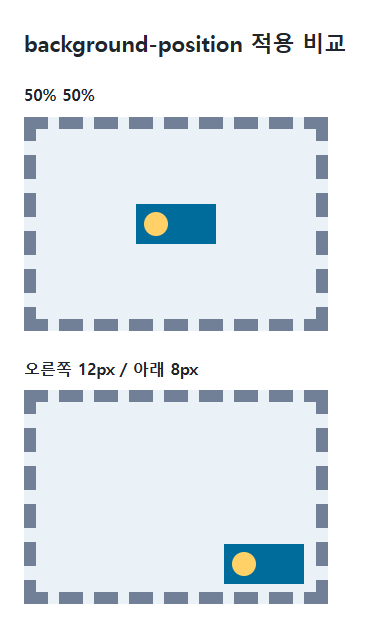
<section class="samples"><div class="a"><p class="label">50% 50%</p><div class="target"></div></div><div class="b"><p class="label">오른쪽 12px / 아래 8px</p><div class="reference"></div></div></section>
</main>
</body>
</html>
첫 도형은 기준 영역 중앙에 놓이고 두 번째 도형은 오른쪽과 아래 가장자리에서 지정한 거리만큼 떨어집니다. 이미지 자체의 중앙이 맞춰지는 점을 확인하세요.
백분율은 단순한 좌표가 아닙니다
가로 위치의 백분율은 (기준 영역 너비 - 배경 이미지 너비)에 적용됩니다. 따라서 이미지와 영역 너비가 같으면 0%, 50%, 100%가 위치를 바꾸지 않을 수 있습니다. cover로 이미지가 더 커진 경우에는 남는 공간이 음수가 되어 잘리는 부분이 바뀝니다.
한 값과 여러 배경
한 값만 쓰면 다른 축이 center로 처리되는 문법이 있으므로 위치가 중요하면 두 축을 명시하세요. right bottom 같은 키워드나 가장자리 오프셋 문법을 사용하면 의도를 읽기 쉽습니다. 여러 배경에는 레이어 순서에 맞춰 쉼표로 위치를 지정합니다.
백분율 위치의 실제 이동 거리
다음 전체 문서를 css-reference-10595-practice.html로 UTF-8 저장한 뒤 브라우저에서 엽니다. 다른 예제 파일에 중첩해서 붙이지 않고 별도 파일로 시험합니다.
<!doctype html>
<html lang="ko">
<head>
  <meta charset="utf-8">
  <meta name="viewport" content="width=device-width, initial-scale=1">
  <title>백분율 위치의 실제 이동 거리</title>
  <style>
    body { margin: 16px; color: #20242b; font: 16px/1.7 sans-serif; }
    main { max-width: 52rem; margin: auto; }
    h1 { font-size: 1.35rem; }
    .samples { display: flex; flex-wrap: wrap; gap: 24px; }
    .samples > * { max-width: 100%; min-width: 0; }
    :focus-visible { outline: 3px solid #005fcc; outline-offset: 3px; }
.tile { width:240px;max-width:100%;height:100px;padding:0;border:2px solid #718096;background-origin:content-box;background-image:url("data:image/svg+xml,%3Csvg xmlns='http://www.w3.org/2000/svg' width='80' height='40'%3E%3Crect width='80' height='40' fill='%23006c9c'/%3E%3Ccircle cx='20' cy='20' r='12' fill='%23ffd166'/%3E%3C/svg%3E");background-size:80px 40px;background-repeat:no-repeat;background-color:#e6f2ff; }
  </style>
</head>
<body>
<main>
  <h1>백분율 위치의 실제 이동 거리</h1>
<p>0%</p><div class="tile" style="background-position:0% 0"></div><p>50%</p><div class="tile" style="background-position:50% 0"></div><p>100%</p><div class="tile" style="background-position:100% 0"></div>
</main>
</body>
</html>
이 별도 예제의 내용 너비가 240px일 때 가로 이동량은 (240−80)×비율이므로 0·80·160px입니다. 첫 예제의 padding-box와 기준이 다릅니다. 240px만 200px로 바꾸면 0·60·120px인지 확인하고 복구합니다. 좁은 화면에서 max-width가 적용되면 실제 내용 너비로 계산합니다.
| 문법 | 가로 축 | 세로 축 |
|---|---|---|
right 12px bottom 8px |
오른쪽 가장자리에서 12px | 아래 가장자리에서 8px |
left 12px top 8px |
왼쪽에서 12px | 위에서 8px |
12px 8px |
왼쪽 기준 길이 | 위 기준 길이 |
여러 배경 속성을 한 화면에서 조합하려면 배경색과 배경 이미지 설정하기를 참고하세요. 본문의 조건과 함께 비교할 관련 속성은 background-size, background-origin입니다.
적용되지 않거나 예상과 다를 때
- 위치 변화가 없으면 background-size 때문에 이미지가 영역과 같은 크기인지 확인합니다.
- 반복 이미지가 위치 차이를 가리면 먼저 no-repeat로 비교합니다.
CSS / Reference / border-width
테두리 두께의 1~4개 값 대응과 실제 외곽 크기를 확인합니다. none·hidden의 계산값과 hover 시 배치 변화, outline 대안을 설명합니다.
CSS / Reference / aspect-ratio
선호 가로세로 비율과 이미지의 고유 비율을 구분합니다. auto 조합, 확정 크기, cover·contain의 잘림과 빈 공간을 실행 예제로 비교합니다.
부모와 루트 글자 크기를 기준으로 em·rem을 계산합니다. 중첩된 상대 크기의 차이와 확대 시 잘림을 확인하는 방법을 제공합니다.
문단 첫 줄 들여쓰기와 내어쓰기를 만들고 전체 문단 여백과의 차이를 비교합니다. 음수 값, 상속과 좁은 화면에서 필요한 시작 여백을 확인합니다.
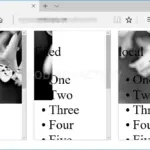
CSS / Reference / background-attachment
요소 내부와 페이지 스크롤을 나누어 local·scroll·fixed의 기준을 비교합니다. 별도 실행 예제와 모바일에서 확인해야 할 조건을 제공합니다.
문단 안의 인라인 내용을 정렬하고 블록 자체의 배치와 구분합니다. start·end의 쓰기 방향과 양끝·마지막 줄 정렬을 비교합니다.
CSS / Reference / list-style-position
목록 마커를 항목 안·밖에 배치하고 여러 줄 시작점을 비교합니다. 첫 블록 자식과 시작 여백, 잘리는 마커를 확인하는 기준을 설명합니다.
CSS / Reference / align-content
Flex 줄 묶음과 Grid 트랙의 공간 배분을 비교합니다. nowrap·wrap, auto 트랙 stretch와 일반 블록의 적용 조건을 별도 실습으로 확인합니다.
CSS / Reference / background-repeat
repeat·no-repeat·space·round를 같은 타일로 비교합니다. 반복 방향, 타일 간격과 크기 조정, 한 축에 한 타일만 들어가는 조건을 살펴봅니다.
CSS / Reference / list-style-type
목록의 의미를 유지하면서 마커 모양과 번호 표시를 변경합니다. start 속성, 이미지 마커와 단축 속성의 영향까지 예제로 확인합니다.