How to Justify Short Table Headings with CSS
To justify a one-line table heading in CSS, give the heading cell text-align: justify and text-align-last: justify. If the heading is a single word such as “Name”, add text-justify: inter-character to spread its letters and check the result in your target browsers.
Why justify alone leaves a single line at the start
text-align: justify distributes spare line width among opportunities for spacing. By default, the last line of justified text aligns at the start. A heading that fits on one line is already on its last line.
text-align-last: justify applies justification to the last line of a block and to a line just before a forced break such as <br>. The line needs spare width and a place to distribute it. Scope the rule to the cells or headings where you want that effect.
CSS Text specification for last-line alignment
Try distributed row headings in a table
Save the complete example as justify-labels.html and open it in a browser. Both tables have the same data. The second adds last-line justification and enables character spacing in one row. The tables stack when the screen gets narrow.
<!doctype html>
<html lang="en">
<head>
  <meta charset="utf-8">
  <meta name="viewport" content="width=device-width, initial-scale=1">
  <title>CSS justification for table headings</title>
  <style>
    body { margin: 1rem; font: 1rem/1.5 system-ui, sans-serif; }

    .tables {
      display: grid;
      grid-template-columns: repeat(auto-fit, minmax(min(100%, 17rem), 1fr));
      gap: 1rem;
      max-inline-size: 43rem;
    }

    table {
      inline-size: 100%;
      table-layout: fixed;
      border-collapse: collapse;
    }

    caption { margin-block-end: 0.5rem; text-align: start; }
    th, td {
      padding: 0.5rem 0.75rem;
      border: 1px solid #b9c9c3;
      overflow-wrap: anywhere;
    }

    th {
      inline-size: 55%;
      text-align: justify;
      background-color: #ecf5f0;
    }

    .spread th { text-align-last: justify; }
    .spread .by-character { text-justify: inter-character; }

    .pair {
      display: flex;
      flex-wrap: wrap;
      justify-content: space-between;
      gap: 0.25rem 0.75rem;
      max-inline-size: 17rem;
      margin-block-start: 1rem;
      padding: 0.5rem 0.75rem;
      background-color: #ecf5f0;
    }
  </style>
</head>
<body>
  <div class="tables">
    <table class="basic">
      <caption>Table with justify alone</caption>
      <tbody>
        <tr>
          <th scope="row">Name</th>
          <td>Alex</td>
        </tr>
        <tr>
          <th scope="row">Assigned team</th>
          <td>Operations</td>
        </tr>
      </tbody>
    </table>
    <table class="spread">
      <caption>Table with the last line justified</caption>
      <tbody>
        <tr>
          <th scope="row" class="by-character">Name</th>
          <td>Alex</td>
        </tr>
        <tr>
          <th scope="row">Assigned team</th>
          <td>Operations</td>
        </tr>
      </tbody>
    </table>
  </div>
  <div class="pair">
    <span>Status</span>
    <span>Complete</span>
  </div>
</body>
</html>
In the first table, both one-line headings begin at the start. In the second, the space in “Assigned team” expands. A browser that supports character justification also spreads the letters in “Name” toward the inside edges of the cell.
Distribute characters in a short word
Word-based justification has no space to stretch in a single word like “Name”. text-justify: inter-character distributes space between letters. The example applies it only to .by-character and lets the browser use its language-aware default on the other label.
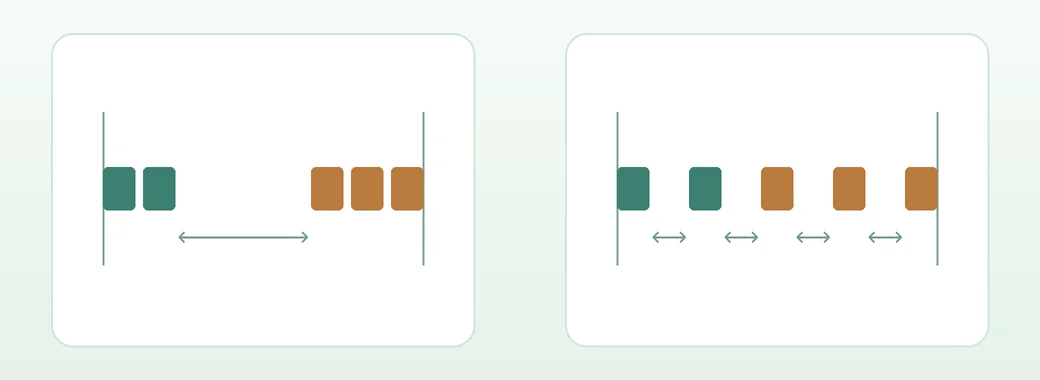
The result can depend on the browser, language, and punctuation. Set the actual language, such as lang="en", and check that the default alignment still reads well when the property is unavailable. Keep normal spelling and spacing in the HTML.
CSS Text specification for justification methods
Position two separate items with Flexbox
For distinct items such as “Status” and “Complete” at opposite edges, use display: flex and justify-content: space-between on their parent. The spare space goes between the elements and each label keeps its normal spacing.
gap keeps a minimum space between the items. In the demo, flex-wrap: wrap lets the second item move to the next line when needed. Inside a table, add a flex container within the cell to keep the table structure.
Flexbox specification for justify-content
Replace the old line-break technique and check the result
Some older examples inserted a 100%-wide inline-block with ::before or ::after to make an extra line. When moving to last-line justification, remove these alignment-only pseudo-elements and any line-height: 0 used to hide the space they created. Keep a readable line height when a heading wraps.
If spacing does not expand, inspect the cell’s computed text-align-last, its available width, and whether the language and text offer a spacing opportunity.
If a long heading or a small screen produces awkward gaps, try restoring text-align: start and text-align-last: auto. Keep <th scope="row"> so assistive technologies can associate each heading with its value.