
CSS / Reference / text-align: Text, Inline Content, and Block Alignment
text-align aligns text and inline content within a block. It does not center the block’s own box; start and end follow writing direction, unlike physical left and right.
Syntax and value choices
| Property | Initial value | Inherited | Main application conditions |
|---|---|---|---|
text-align |
start , or a nameless value that acts as left if direction is ltr , right if direction is rtl if start is not supported by the browser. | Yes | Inline content inside block containers |
Initial values are not necessarily the values assigned to HTML elements by the browser’s stylesheet. Inspect the actual result in developer tools’ Computed panel.
.copy { text-align: start; }
.title { text-align: center; }
| Value or category | Behavior and choice |
|---|---|
start / end |
Align to the writing direction’s start or end. |
left / right |
Align to a physical horizontal side. |
center |
Center inline content. |
justify |
Distribute eligible spacing; the last line usually follows separate rules. |
For supported values and conditions, see MDN text-align.
Run the example and compare results
Save this complete code as css-reference-10692-example.html in UTF-8 and open it in a browser. Keep its demonstration styles in that file rather than pasting them into a site-wide stylesheet.
<!doctype html>
<html lang="en">
<head>
<meta charset="utf-8">
<meta name="viewport" content="width=device-width, initial-scale=1">
<title>text-align comparison example</title>
<style>
body { margin: 0; color: #20242b; background: #fff; font: 16px/1.7 "Malgun Gothic", sans-serif; }
#demo { padding: 24px; max-width: 820px; margin: auto; }
h1 { font-size: 22px; margin: 0 0 20px; }
.samples { display: flex; flex-wrap: wrap; gap: 24px; }
.label { margin: 0 0 8px; font-weight: 700; }
.target, .reference { width: 260px; padding: 12px; border: 1px solid #718096; }
.target { text-align: center; }
.reference { text-align: justify; }
</style>
</head>
<body>
<main id="demo">
<h1>text-align comparison</h1>
<section class="samples"><div class="a"><p class="label">center</p><div class="target">Compare alignment within this paragraph. Inspect the gaps in full lines and in a short final line.</div></div><div class="b"><p class="label">justify</p><div class="reference">Compare alignment within this paragraph. Inspect the gaps in full lines and in a short final line.</div></div></section>
</main>
</body>
</html>
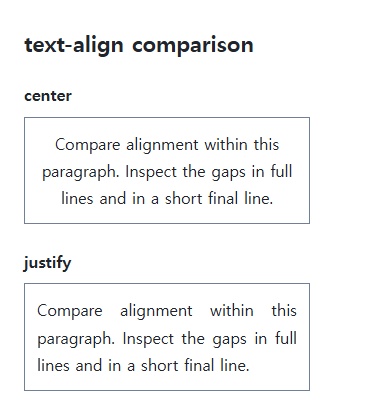
Center places each line centrally. Justify adjusts spacing to align line edges, while a short final line normally behaves differently.
The box versus its inline content
Parent text-align can affect inline and inline-block children but does not automatically center an ordinary block’s width and margins. Use margin-inline: auto or the appropriate layout-container alignment for the block itself.
Justification and readability
A narrow line with long English words can produce large gaps. Inspect language-sensitive wrapping, hyphenation, and width. text-align-last separately controls the final line; choose readable default alignment rather than applying justify everywhere.
Change one setting at a time
Use the complete example file above. Change only the specified selector or value rather than several comparison conditions at once.
- Change only text-align among start, end, center, and justify on the same paragraph. Inspect the first and last lines, then test text-align-last separately and restore it.
- Use suitable directional content to compare start/end with left/right under dir="rtl", then restore the original direction. Test centering the block separately with margin-inline:auto.
Add dir="rtl" to the first file’s .target start tag and replace its content with the Arabic sentence below. Change only text-align among start, end, left, and right. Start follows the right edge and end the left; left/right remain physical. Restore the original direction and content afterward.
<div class="target" dir="rtl" lang="ar">هذا نص عربي لمقارنة محاذاة الفقرة واتجاه الكتابة.</div>
Block centering is a separate condition. Temporarily remove the first file’s Flex layout on .samples, apply margin-inline:auto to .target, inspect its containing content area, then restore both changes.
For coordinated font sizing, line heights, and typeface choices, see CSS Fonts, Font Sizes, and Line Height. Related properties to compare alongside these conditions are word-break, text-indent.
When the result is missing or unexpected
- Identify whether the alignment target is the box or its inline content.
- Inspect available width and language before masking justification gaps with global break-all.
CSS / Reference / list-style-position: Inside and Outside Markers on Wrapped Items
Choose marker placement using wrapped text, list spacing, and actual child structure. Preserve list meaning and diagnose clipped outside markers.

CSS / Reference / empty-cells: Show or Hide Empty Table Cells
Control empty-cell borders and backgrounds in a separated table while preserving its structure. Compare show, hide, whitespace, and the collapsed-border exception.

CSS / Reference / font-variant: Small Capitals and Font Features
Use small capitals without changing the source string and choose specific variant longhands. Compare real font support with synthesized presentation.
CSS / Reference / opacity: Group Transparency, Background Alpha, and Interaction
Fade an element and its children or make only its background translucent. Check stacking, contrast, keyboard focus, and the difference between transparency and hiding.

CSS / Reference / backface-visibility: Front and Back Faces Under 3D Rotation
Choose whether a 3D-transformed back face is painted. Compare front and reverse states and account for accessible interaction when building a multi-face interface.
CSS / Reference / font-style: Italic, Oblique, and Available Font Faces
Request italic or oblique forms while accounting for real faces and synthesis. Separate visual styling from emphasis semantics and inspect font-loading failures.

CSS / Reference / accent-color: Native Control Accents and Accessible States
Request native-control accent colors without replacing their behavior. Compare selected and disabled states, accessible names, and browser-dependent contrast treatments.

CSS / Reference / white-space: Preserve Spaces, Line Breaks, and Wrapping
Choose whitespace behavior by preservation and wrapping needs. Compare traditional values and break-spaces, and handle long words with separate wrapping properties.
CSS / Reference / list-style-type: Change List Markers and Numbering
Style list markers while keeping ordered and unordered semantics. Compare numbering styles, starting values, marker removal, and shorthand resets.
CSS / Reference / content: Generate Pseudo-Element Text and Decoration
Generate strings, attribute labels, counters, and decorative pseudo-elements. Compare none with an empty string and retain important information in real HTML.