
CSS / Reference / text-indent: First-Line Indents and Hanging Paragraphs
text-indent offsets the start of a block’s first formatted line. A positive value indents that line and a negative value outdents it; padding moves the content area for all lines.
Syntax and value choices
| Property | Initial value | Inherited | Main application conditions |
|---|---|---|---|
text-indent |
0 | Yes | First formatted lines in block containers |
Initial values are not necessarily the values assigned to HTML elements by the browser’s stylesheet. Inspect the actual result in developer tools’ Computed panel.
.intro { text-indent: 2em; }
.hanging { padding-inline-start: 2em; text-indent: -2em; }
| Value or category | Behavior and choice |
|---|---|
0 |
No additional first-line indent. |
2em |
Offset the first line by twice the current font size. |
-2em |
Outdent the first line. |
10% |
Resolve against the containing block’s width. |
For supported values and conditions, see MDN text-indent.
Run the example and compare results
Save this complete code as css-reference-10459-example.html in UTF-8 and open it in a browser. Keep its demonstration styles in that file rather than pasting them into a site-wide stylesheet.
<!doctype html>
<html lang="en">
<head>
<meta charset="utf-8">
<meta name="viewport" content="width=device-width, initial-scale=1">
<title>text-indent comparison example</title>
<style>
body { margin: 0; color: #20242b; background: #fff; font: 16px/1.7 "Malgun Gothic", sans-serif; }
#demo { padding: 24px; max-width: 820px; margin: auto; }
h1 { font-size: 22px; margin: 0 0 20px; }
.samples { display: flex; flex-wrap: wrap; gap: 24px; }
.label { margin: 0 0 8px; font-weight: 700; }
.target, .reference { width: 260px; border: 1px solid #718096; padding: 12px; }
.target { text-indent: 2em; }
.reference { padding-inline-start: 2em; text-indent: -2em; }

/* Keep the practice box within a narrow viewport. */
.target { max-width: calc(100vw - 48px - 26px); }
.reference { max-width: calc(100vw - 48px - 2em - 14px); }
</style>
</head>
<body>
<main id="demo">
<h1>text-indent comparison</h1>
<section class="samples"><div class="a"><p class="label">Indent: 2em</p><div class="target">Compare the CSS result. This sample sentence demonstrates wrapping and the visible area.</div></div><div class="b"><p class="label">Hanging indent: -2em</p><div class="reference">Compare the CSS result. This sample sentence demonstrates wrapping and the visible area.</div></div></section>
</main>
</body>
</html>
The first sample indents only its first line. The hanging sample reserves start-side space and pulls its first line outward, so the later lines begin at a different position.
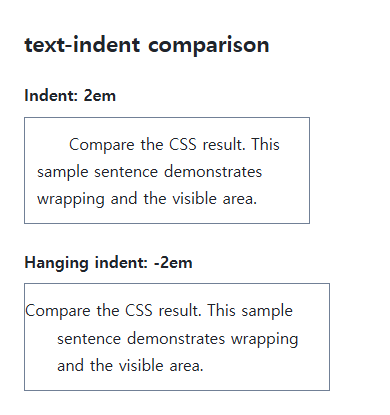
First-line placement versus the whole paragraph
Use text-indent for the first formatted line, and padding-inline-start when every line needs space. The property is inherited, so also inspect nested blocks instead of assuming the effect stays on one paragraph.
Outdenting and writing direction
Reserve enough space for a negative indent to avoid clipping or covering a neighbor. Logical padding is useful for content that must work in both left-to-right and right-to-left writing. Inspect the parent’s overflow if the outdented text disappears.
Change one setting at a time
Use the complete example file above. Change only the specified selector or value rather than several comparison conditions at once.
- In the original file, change only .target’s text-indent through 0, 2em, and -2em. Compare the first and later lines without changing its padding.
- For a real hanging paragraph, reserve start-side space as .reference does, then restore the original values. Inspect the text and box at 320px.
For a padding-only comparison, change only .reference’s text-indent to 0 in the original file. Keep its existing start padding: all lines then share the same start position. Restore -2em afterward.
For coordinated font sizing, line heights, and typeface choices, see CSS Fonts, Font Sizes, and Line Height. Related properties to compare alongside these conditions are text-align.
When the result is missing or unexpected
- Apply it to the block holding the text rather than an isolated inline span.
- Check start-side space and ancestor clipping when an outdent is cut off.

CSS / Reference / background-repeat: Tiling, Space, and Round
Control horizontal and vertical background tiling and compare repeat, no-repeat, space, and round with the same tile and positioning area.

CSS / Reference / opacity: Group Transparency, Background Alpha, and Interaction
Fade an element and its children or make only its background translucent. Check stacking, contrast, keyboard focus, and the difference between transparency and hiding.
CSS / Reference / background-size: Cover, Contain, and Background Sizing
Compare background cover and contain using a known image ratio. Account for positioning areas, percentages, cropping, repeated tiles, and the element’s own size.

CSS / Reference / border-width: Side Widths, Shorthand Order, and Box Size
Set border widths using valid lengths and shorthand ordering. Inspect none, box-sizing, and hover changes without treating keyword widths as fixed pixels.
CSS / Reference / font-family: Font Lists, Glyph Fallback, and Loading
Build a font stack with appropriate generic fallbacks and inspect the fonts actually used. Distinguish naming a family from loading files and covering characters.
CSS / Reference / font-variant: Small Capitals and Font Features
Use small capitals without changing the source string and choose specific variant longhands. Compare real font support with synthesized presentation.
CSS / Reference / list-style-type: Change List Markers and Numbering
Style list markers while keeping ordered and unordered semantics. Compare numbering styles, starting values, marker removal, and shorthand resets.

CSS / Reference / calc(): Calculate CSS Values and Understand Their Types
Combine percentages and lengths with calc(), inspect the actual parent width, and distinguish invalid expressions from newer typed arithmetic and special numeric results.
CSS / Reference / text-indent: First-Line Indents and Hanging Paragraphs
Create first-line and hanging indents, distinguish them from paragraph padding, and check inheritance, writing direction, and narrow-screen clipping.
CSS / Reference / background-image: Images, Gradients, Relative Paths, and Layers
Paint gradients or image layers, resolve paths from the correct stylesheet location, and keep meaningful pictures in accessible HTML rather than background decoration.