
CSS / Reference / content: Generate Pseudo-Element Text and Decoration
content supplies generated text, counters, or images, commonly for ::before and ::after. It does not rewrite the source Document Object Model (DOM), so essential instructions and functioning controls must not exist only as generated CSS content.
Syntax and value choices
| Property | Initial value | Inherited | Main application conditions |
|---|---|---|---|
content |
normal (computes to none on ::before/::after) | No | Generated content, commonly ::before and ::after |
Initial values are not necessarily the values assigned to HTML elements by the browser’s stylesheet. Inspect the actual result in developer tools’ Computed panel.
.tag::before { content: "Note: "; }
.item::after { content: " (" attr(data-label) ")"; }
| Value or category | Behavior and choice |
|---|---|
"A string" |
Draw text in the pseudo-element. |
attr(data-label) |
Read an attribute as a generated string. |
counter(...) |
Display a CSS counter. |
open-quote / close-quote |
Generate quotation marks. |
none / normal |
Affect whether the pseudo-element generates content. |
For supported values and conditions, see MDN content.
Run the example and compare results
Save this complete code as css-reference-10527-example.html in UTF-8 and open it in a browser. Keep its demonstration styles in that file rather than pasting them into a site-wide stylesheet.
<!doctype html>
<html lang="en">
<head>
<meta charset="utf-8">
<meta name="viewport" content="width=device-width, initial-scale=1">
<title>content comparison example</title>
<style>
body { margin: 0; color: #20242b; background: #fff; font: 16px/1.7 "Malgun Gothic", sans-serif; }
#demo { padding: 24px; max-width: 820px; margin: auto; }
h1 { font-size: 22px; margin: 0 0 20px; }
.samples { display: flex; flex-wrap: wrap; gap: 24px; }
.label { margin: 0 0 8px; font-weight: 700; }
.target::before { content: "Note: "; color: #006c9c; font-weight: bold; }
.target::after { content: " (" attr(data-label) ")"; }
.reference::before { content: ""; display: inline-block; width: 12px; height: 12px; border-radius: 50%; background: #006c9c; margin-inline-end: 6px; }
</style>
</head>
<body>
<main id="demo">
<h1>content comparison</h1>
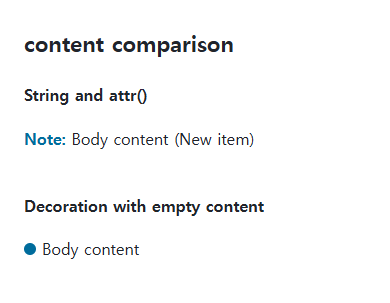
<section class="samples"><div><p class="label">String and attr()</p><p class="target" data-label="New item">Body content</p></div><div><p class="label">Decoration with empty content</p><p class="reference">Body content</p></div></section>
</main>
</body>
</html>
The first sample generates a prefix and an attribute-based suffix. The second uses an empty string to generate a small decorative box.
Why a pseudo-element is missing
Setting a size or background does not create an ordinary before/after box if content remains none or normal. content: "" creates a box without text, which can hold decoration. Do not assume the same technique works on replaced elements such as img.
Images, counters, and accessible information
An image supplied with content: url(...) is not sized like a CSS background. For a decorative icon, an empty box with background-image and explicit dimensions may be easier to manage. Keep meaningful numbering in real lists, and do not assume every assistive technology announces generated content identically.
Change one setting at a time
Use the complete example file above. Change only the specified selector or value rather than several comparison conditions at once.
- Change only .reference::before content among "", none, and normal. Compare the blue dot without changing size or background, then restore the empty string.
- Change data-label from New item to Revised item, compare removing the attribute, then restore it. Keep essential headings and control names in real HTML.
For pseudo-element selectors and generated boxes, see Pseudo-Elements: ::before and ::after.
For coordinated font sizing, line heights, and typeface choices, see CSS Fonts, Font Sizes, and Line Height. Related properties to compare alongside these conditions are quotes.
When the result is missing or unexpected
- Check that the originating element actually has the attribute used by attr().
- Make sure essential information is understandable when the decorative CSS is absent.

CSS / Reference / font-family: Font Lists, Glyph Fallback, and Loading
Build a font stack with appropriate generic fallbacks and inspect the fonts actually used. Distinguish naming a family from loading files and covering characters.

CSS / Reference / list-style-type: Change List Markers and Numbering
Style list markers while keeping ordered and unordered semantics. Compare numbering styles, starting values, marker removal, and shorthand resets.
CSS / Reference / font-style: Italic, Oblique, and Available Font Faces
Request italic or oblique forms while accounting for real faces and synthesis. Separate visual styling from emphasis semantics and inspect font-loading failures.

CSS / Reference / empty-cells: Show or Hide Empty Table Cells
Control empty-cell borders and backgrounds in a separated table while preserving its structure. Compare show, hide, whitespace, and the collapsed-border exception.
CSS / Reference / font-weight: Numeric Weights, Relative Weights, and Font Matching
Request numeric or relative font weights and inspect the supplied faces. Compare static and variable-font behavior without assuming every number produces a unique weight.

CSS / Reference / background-size: Cover, Contain, and Background Sizing
Compare background cover and contain using a known image ratio. Account for positioning areas, percentages, cropping, repeated tiles, and the element’s own size.
CSS / Reference / quotes: Choose Nested Quotation Marks
Choose generated quotation pairs for nested text and distinguish them from literal punctuation. Compare automatic marks, none, and quotation-depth operations.
CSS / Reference / text-indent: First-Line Indents and Hanging Paragraphs
Create first-line and hanging indents, distinguish them from paragraph padding, and check inheritance, writing direction, and narrow-screen clipping.
CSS / Reference / font-variant: Small Capitals and Font Features
Use small capitals without changing the source string and choose specific variant longhands. Compare real font support with synthesized presentation.

CSS / Reference / calc(): Calculate CSS Values and Understand Their Types
Combine percentages and lengths with calc(), inspect the actual parent width, and distinguish invalid expressions from newer typed arithmetic and special numeric results.