
CSS / Reference / quotes: Choose Nested Quotation Marks
quotes chooses the opening and closing characters generated by open-quote and close-quote. It can provide pairs for nested quotations but does not replace quote characters already typed in the HTML.
Syntax and value choices
| Property | Initial value | Inherited | Main application conditions |
|---|---|---|---|
quotes |
Depends on the user agent; distinguish language-sensitive auto | Yes | All elements; visible effects depend on the text, image, or box conditions below |
Initial values are not necessarily the values assigned to HTML elements by the browser’s stylesheet. Inspect the actual result in developer tools’ Computed panel.
q { quotes: "«" "»" "‹" "›"; }
q::before { content: open-quote; }
q::after { content: close-quote; }
| Value or category | Behavior and choice |
|---|---|
auto |
Let the browser choose suitable quotation marks for the language. |
none |
Do not display generated quotation marks. |
"«" "»" |
Supply one opening/closing pair. |
Four or more strings |
Supply successive pairs for deeper quotation levels. |
For supported values and conditions, see MDN quotes.
Run the example and compare results
Save this complete code as css-reference-10523-example.html in UTF-8 and open it in a browser. Keep its demonstration styles in that file rather than pasting them into a site-wide stylesheet.
<!doctype html>
<html lang="en">
<head>
<meta charset="utf-8">
<meta name="viewport" content="width=device-width, initial-scale=1">
<title>quotes comparison example</title>
<style>
body { margin: 0; color: #20242b; background: #fff; font: 16px/1.7 "Malgun Gothic", sans-serif; }
#demo { padding: 24px; max-width: 820px; margin: auto; }
h1 { font-size: 22px; margin: 0 0 20px; }
.samples { display: flex; flex-wrap: wrap; gap: 24px; }
.label { margin: 0 0 8px; font-weight: 700; }
.target { quotes: "«" "»" "‹" "›"; }
.reference { quotes: none; }
q::before { content: open-quote; }
q::after { content: close-quote; }
</style>
</head>
<body>
<main id="demo">
<h1>quotes comparison</h1>
<section class="samples"><div class="target"><p class="label">Quotes by nesting depth</p><q>Outer quotation <q>Inner quotation</q></q></div><div class="reference"><p class="label">none</p><q>Quotation</q></div></section>
</main>
</body>
</html>
The outer and inner quotations use different pairs. The none example remains a quotation but has no generated marks.
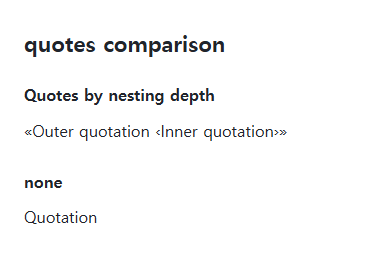
Pairs and nesting depth
Write each opening character before its closing character. Deeper quotations can reuse the last available pair. Generated quotation depth is also affected when open-quote is used outside q, so balance opening and closing operations.
Literal characters versus generated marks
quotes: none does not remove quotation characters from the source. The content values no-open-quote and no-close-quote change quotation depth without drawing a mark. Set the document language correctly when relying on automatic marks.
Change one setting at a time
Use the complete example file above. Change only the specified selector or value rather than several comparison conditions at once.
- Add a third nested q inside the existing outer quotation. Check that the deepest level reuses the final ‹ › pair.
- Set quotes to none and compare literal punctuation. no-open-quote/no-close-quote belong to content and change depth without painting; keep operations balanced and restore the example.
Temporarily append these rules at the end of the original file’s style element. The outer marks disappear, but the inner q retains the second ‹ › pair. Keep both depth operations balanced, then remove the rules.
.target > q::before { content: no-open-quote; }
.target > q::after { content: no-close-quote; }
For coordinated font sizing, line heights, and typeface choices, see CSS Fonts, Font Sizes, and Line Height. Related properties to compare alongside these conditions are content.
When the result is missing or unexpected
- Look for both literal and generated marks if punctuation appears twice.
- Check the pseudo-element content when changing quotes has no visible effect.

CSS / Reference / letter-spacing, word-spacing: Compare Character and Word Spacing
Adjust character and word gaps independently using the same text and a normal baseline. Account for inheritance, language, wrapping, and excessive negative spacing.
CSS / Reference / font-variant: Small Capitals and Font Features
Use small capitals without changing the source string and choose specific variant longhands. Compare real font support with synthesized presentation.

CSS / Reference / empty-cells: Show or Hide Empty Table Cells
Control empty-cell borders and backgrounds in a separated table while preserving its structure. Compare show, hide, whitespace, and the collapsed-border exception.
CSS / Reference / font-family: Font Lists, Glyph Fallback, and Loading
Build a font stack with appropriate generic fallbacks and inspect the fonts actually used. Distinguish naming a family from loading files and covering characters.

CSS / Reference / background-attachment: Viewport, Box, and Internal Scroll Attachment
Compare local and scroll backgrounds inside a scrolling box and distinguish them from viewport-fixed backgrounds. Test target-browser behavior and a usable fallback.
CSS / Reference / background-repeat: Tiling, Space, and Round
Control horizontal and vertical background tiling and compare repeat, no-repeat, space, and round with the same tile and positioning area.

CSS / Reference / calc(): Calculate CSS Values and Understand Their Types
Combine percentages and lengths with calc(), inspect the actual parent width, and distinguish invalid expressions from newer typed arithmetic and special numeric results.
CSS / Reference / font-weight: Numeric Weights, Relative Weights, and Font Matching
Request numeric or relative font weights and inspect the supplied faces. Compare static and variable-font behavior without assuming every number produces a unique weight.
CSS / Reference / quotes: Choose Nested Quotation Marks
Choose generated quotation pairs for nested text and distinguish them from literal punctuation. Compare automatic marks, none, and quotation-depth operations.
CSS / Reference / list-style-type: Change List Markers and Numbering
Style list markers while keeping ordered and unordered semantics. Compare numbering styles, starting values, marker removal, and shorthand resets.