
CSS / Reference / background-color: Background Alpha, Inheritance, and Contrast
background-color sets an element’s background color. The painting area is also controlled by background-clip; margin is outside the painted box.
Syntax and value choices
| Property | Initial value | Inherited | Main application conditions |
|---|---|---|---|
background-color |
transparent | No | All elements; visible effects depend on the text, image, or box conditions below |
Initial values are not necessarily the values assigned to HTML elements by the browser’s stylesheet. Inspect the actual result in developer tools’ Computed panel.
.card { background-color: #e6f2ff; }
.overlay { background-color: rgb(0 0 0 / 40%); }
| Value or category | Behavior and choice |
|---|---|
transparent |
Allow the background behind the element to show through. |
#e6f2ff |
Specify a hexadecimal color. |
rgb(0 0 0 / 40%) |
Make the background color partially transparent. |
inherit |
Explicitly use the parent’s computed background color. |
For supported values and conditions, see MDN background-color.
Run the example and compare results
Save this complete code as css-reference-10588-example.html in UTF-8 and open it in a browser. Keep its demonstration styles in that file rather than pasting them into a site-wide stylesheet.
<!doctype html>
<html lang="en">
<head>
<meta charset="utf-8">
<meta name="viewport" content="width=device-width, initial-scale=1">
<title>background-color comparison example</title>
<style>
body { margin: 0; color: #20242b; background: #fff; font: 16px/1.7 "Malgun Gothic", sans-serif; }
#demo { padding: 24px; max-width: 820px; margin: auto; }
h1 { font-size: 22px; margin: 0 0 20px; }
.samples { display: flex; flex-wrap: wrap; gap: 24px; }
.label { margin: 0 0 8px; font-weight: 700; }
.samples { background: #ffd166; padding: 20px; }
.target, .reference { width: 220px; padding: 18px; border: 6px dashed #333; margin: 10px; }
.target { background-color: rgb(0 108 156 / 40%); }
.reference { background-color: transparent; }

/* Keep the practice box within a narrow viewport. */
.target, .reference { max-width: calc(100vw - 48px - 108px); }
</style>
</head>
<body>
<main id="demo">
<h1>background-color comparison</h1>
<section class="samples"><div class="a"><p class="label">Background alpha: 40%</p><div class="target">Compare the CSS result. This sample sentence demonstrates wrapping and the visible area.</div></div><div class="b"><p class="label">transparent</p><div class="reference">Compare the CSS result. This sample sentence demonstrates wrapping and the visible area.</div></div></section>
</main>
</body>
</html>
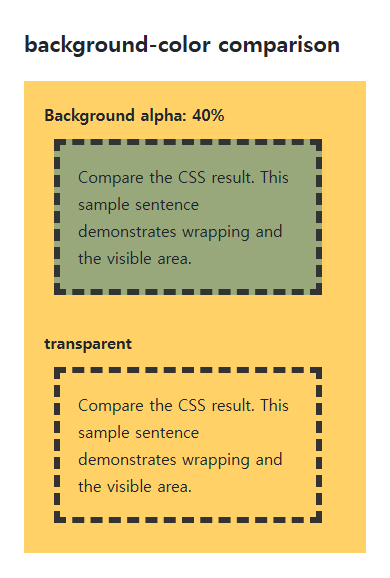
The partly transparent color composites with the yellow background while the text stays opaque. The margin exposes the parent’s background.
Transparency is not inheritance
A transparent child revealing its parent’s background is different from inheriting its color. background-color is not normally inherited; inherit explicitly assigns the parent’s computed color to a new background.
Images and readable contrast
Background color is painted below background-image layers. Choose a fallback color that remains readable if an image fails, and inspect text against both bright and dark image areas. A later background shorthand can reset the color.
Change one setting at a time
Use the complete example file above. Change only the specified selector or value rather than several comparison conditions at once.
- Change only .target’s background alpha from 40% to 100%, comparing compositing without changing text opacity, then restore it.
- Measure contrast between the final background and foreground. Distinguish the usual 4.5:1 text threshold from 3:1 for large text and applicable exceptions, accounting for alpha compositing.
When adding a real background image, retain a readable opaque background-color. Temporarily disable background-image and inspect the same foreground over that fallback, then restore it. WCAG large text generally means at least 18pt (24 CSS px), or bold 14pt (about 18.67 CSS px); logos and inactive controls have separate exceptions.
Check the relevant conditions in WCAG text contrast criteria.
For combining background properties in one practical design, see CSS Background Colors and Images: cover and contain. Related properties to compare alongside these conditions are opacity, background-clip.
When the result is missing or unexpected
- Check whether an image layer or another element covers the color.
- Compare background alpha with opacity if text also becomes faded.

CSS / Reference / background-size: Cover, Contain, and Background Sizing
Compare background cover and contain using a known image ratio. Account for positioning areas, percentages, cropping, repeated tiles, and the element’s own size.
CSS / Reference / background-attachment: Viewport, Box, and Internal Scroll Attachment
Compare local and scroll backgrounds inside a scrolling box and distinguish them from viewport-fixed backgrounds. Test target-browser behavior and a usable fallback.

CSS / Reference / text-indent: First-Line Indents and Hanging Paragraphs
Create first-line and hanging indents, distinguish them from paragraph padding, and check inheritance, writing direction, and narrow-screen clipping.
CSS / Reference / background-position: Percentages, Centers, and Edge Offsets
Position backgrounds using centers, percentages, or edge offsets. Calculate percentages from the remaining space and account for oversized cover images and multiple layers.
CSS / Reference / content: Generate Pseudo-Element Text and Decoration
Generate strings, attribute labels, counters, and decorative pseudo-elements. Compare none with an empty string and retain important information in real HTML.

CSS / Reference / clip: Understand Legacy Clip and Migrate to Clip-Path
Read legacy rect coordinates and compare them with clip-path inset distances. Keep layout sizing and clipping separate when migrating existing CSS.

CSS / Reference / overflow: Visible Overflow, Scrolling, Hidden, and Clip
Choose clipping and scrolling behavior with appropriate size constraints. Compare hidden with clip and inspect axis interactions and flex minimum sizes.
CSS / Reference / background-origin: Positioning References Versus Painting Boundaries
Choose a background image’s positioning box and distinguish it from background-clip. Compare how padding, borders, percentage sizes, and fixed attachment affect the reference.
CSS / Reference / font-weight: Numeric Weights, Relative Weights, and Font Matching
Request numeric or relative font weights and inspect the supplied faces. Compare static and variable-font behavior without assuming every number produces a unique weight.

CSS / Reference / border-spacing: Separate Cell Gaps and Collapsed Borders
Set horizontal and vertical gaps in separate-border tables. Distinguish cell padding, zero spacing, collapsed borders, and browser default styles.