
CSS / Reference / background-color: Background Alpha, Inheritance, and Contrast
background-color sets an element’s background color. The painting area is also controlled by background-clip; margin is outside the painted box.
Syntax and value choices
| Property | Initial value | Inherited | Main application conditions |
|---|---|---|---|
background-color |
transparent | No | All elements; visible effects depend on the text, image, or box conditions below |
Initial values are not necessarily the values assigned to HTML elements by the browser’s stylesheet. Inspect the actual result in developer tools’ Computed panel.
.card { background-color: #e6f2ff; }
.overlay { background-color: rgb(0 0 0 / 40%); }
| Value or category | Behavior and choice |
|---|---|
transparent |
Allow the background behind the element to show through. |
#e6f2ff |
Specify a hexadecimal color. |
rgb(0 0 0 / 40%) |
Make the background color partially transparent. |
inherit |
Explicitly use the parent’s computed background color. |
For supported values and conditions, see MDN background-color.
Run the example and compare results
Save this complete code as css-reference-10588-example.html in UTF-8 and open it in a browser. Keep its demonstration styles in that file rather than pasting them into a site-wide stylesheet.
<!doctype html>
<html lang="en">
<head>
<meta charset="utf-8">
<meta name="viewport" content="width=device-width, initial-scale=1">
<title>background-color comparison example</title>
<style>
body { margin: 0; color: #20242b; background: #fff; font: 16px/1.7 "Malgun Gothic", sans-serif; }
#demo { padding: 24px; max-width: 820px; margin: auto; }
h1 { font-size: 22px; margin: 0 0 20px; }
.samples { display: flex; flex-wrap: wrap; gap: 24px; }
.label { margin: 0 0 8px; font-weight: 700; }
.samples { background: #ffd166; padding: 20px; }
.target, .reference { width: 220px; padding: 18px; border: 6px dashed #333; margin: 10px; }
.target { background-color: rgb(0 108 156 / 40%); }
.reference { background-color: transparent; }

/* Keep the practice box within a narrow viewport. */
.target, .reference { max-width: calc(100vw - 48px - 108px); }
</style>
</head>
<body>
<main id="demo">
<h1>background-color comparison</h1>
<section class="samples"><div class="a"><p class="label">Background alpha: 40%</p><div class="target">Compare the CSS result. This sample sentence demonstrates wrapping and the visible area.</div></div><div class="b"><p class="label">transparent</p><div class="reference">Compare the CSS result. This sample sentence demonstrates wrapping and the visible area.</div></div></section>
</main>
</body>
</html>
The partly transparent color composites with the yellow background while the text stays opaque. The margin exposes the parent’s background.
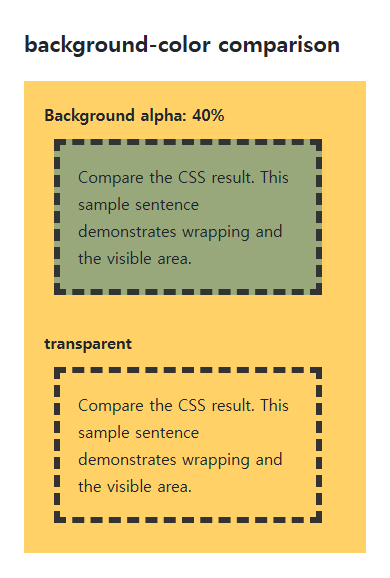
Transparency is not inheritance
A transparent child revealing its parent’s background is different from inheriting its color. background-color is not normally inherited; inherit explicitly assigns the parent’s computed color to a new background.
Images and readable contrast
Background color is painted below background-image layers. Choose a fallback color that remains readable if an image fails, and inspect text against both bright and dark image areas. A later background shorthand can reset the color.
Change one setting at a time
Use the complete example file above. Change only the specified selector or value rather than several comparison conditions at once.
- Change only .target’s background alpha from 40% to 100%, comparing compositing without changing text opacity, then restore it.
- Measure contrast between the final background and foreground. Distinguish the usual 4.5:1 text threshold from 3:1 for large text and applicable exceptions, accounting for alpha compositing.
When adding a real background image, retain a readable opaque background-color. Temporarily disable background-image and inspect the same foreground over that fallback, then restore it. WCAG large text generally means at least 18pt (24 CSS px), or bold 14pt (about 18.67 CSS px); logos and inactive controls have separate exceptions.
Check the relevant conditions in WCAG text contrast criteria.
For combining background properties in one practical design, see CSS Background Colors and Images: cover and contain. Related properties to compare alongside these conditions are opacity, background-clip.
When the result is missing or unexpected
- Check whether an image layer or another element covers the color.
- Compare background alpha with opacity if text also becomes faded.

CSS / Reference / list-style-type: Change List Markers and Numbering
Style list markers while keeping ordered and unordered semantics. Compare numbering styles, starting values, marker removal, and shorthand resets.

CSS / Reference / font-style: Italic, Oblique, and Available Font Faces
Request italic or oblique forms while accounting for real faces and synthesis. Separate visual styling from emphasis semantics and inspect font-loading failures.

CSS / Reference / background-attachment: Viewport, Box, and Internal Scroll Attachment
Compare local and scroll backgrounds inside a scrolling box and distinguish them from viewport-fixed backgrounds. Test target-browser behavior and a usable fallback.
CSS / Reference / text-indent: First-Line Indents and Hanging Paragraphs
Create first-line and hanging indents, distinguish them from paragraph padding, and check inheritance, writing direction, and narrow-screen clipping.
CSS / Reference / letter-spacing, word-spacing: Compare Character and Word Spacing
Adjust character and word gaps independently using the same text and a normal baseline. Account for inheritance, language, wrapping, and excessive negative spacing.
CSS / Reference / font-size: Understand px, em, rem, and Text Enlargement
Choose text-size units by their reference and test nested em scaling. Check the actual root size, browser enlargement, and layout constraints.
CSS / Reference / content: Generate Pseudo-Element Text and Decoration
Generate strings, attribute labels, counters, and decorative pseudo-elements. Compare none with an empty string and retain important information in real HTML.

CSS / Reference / calc(): Calculate CSS Values and Understand Their Types
Combine percentages and lengths with calc(), inspect the actual parent width, and distinguish invalid expressions from newer typed arithmetic and special numeric results.
CSS / Reference / background-clip: Background Painting Areas and Text Clipping
Choose border, padding, or content painting areas independently of image positioning. Compare visible boundaries and plan readable fallbacks for text-clipped backgrounds.
CSS / Reference / background-repeat: Tiling, Space, and Round
Control horizontal and vertical background tiling and compare repeat, no-repeat, space, and round with the same tile and positioning area.