
CSS / Reference / clip: Understand Legacy Clip and Migrate to Clip-Path
clip is a deprecated property for rectangular clipping of absolutely positioned elements. Use it to understand legacy code; prefer clip-path for new implementations.
Syntax and value choices
| Property | Initial value | Inherited | Main application conditions |
|---|---|---|---|
clip |
auto | No | Absolutely positioned elements; deprecated |
Initial values are not necessarily the values assigned to HTML elements by the browser’s stylesheet. Inspect the actual result in developer tools’ Computed panel.
.legacy { position: absolute; clip: rect(20px, 180px, 100px, 20px); }
.modern { clip-path: inset(20px); }
| Value or category | Behavior and choice |
|---|---|
auto |
Do not apply a clip rectangle. |
rect(top, right, bottom, left) |
Specify boundary coordinates, not distances from every side. |
absolute / fixed |
The positioning conditions for this legacy property. |
clip-path: inset(...) |
A modern alternative using distances inward from the sides. |
For supported values and conditions, see MDN clip, MDN clip-path.
Run the example and compare results
Save this complete code as css-reference-10636-example.html in UTF-8 and open it in a browser. Keep its demonstration styles in that file rather than pasting them into a site-wide stylesheet.
<!doctype html>
<html lang="en">
<head>
<meta charset="utf-8">
<meta name="viewport" content="width=device-width, initial-scale=1">
<title>clip comparison example</title>
<style>
body { margin: 0; color: #20242b; background: #fff; font: 16px/1.7 "Malgun Gothic", sans-serif; }
#demo { padding: 24px; max-width: 820px; margin: auto; }
h1 { font-size: 22px; margin: 0 0 20px; }
.samples { display: flex; flex-wrap: wrap; gap: 24px; }
.label { margin: 0 0 8px; font-weight: 700; }
.frame { width: 200px; height: 120px; position: relative; background: #eee; }
.target, .reference { width: 200px; height: 120px; background: linear-gradient(135deg, #006c9c, #ffd166); }
.target { position: absolute; clip: rect(20px, 180px, 100px, 20px); }
.reference { clip-path: inset(20px); }
</style>
</head>
<body>
<main id="demo">
<h1>clip comparison</h1>
<section class="samples"><div><p class="label">Legacy clip</p><div class="frame"><div class="target"></div></div></div><div><p class="label">clip-path: inset(20px)</p><div class="frame"><div class="reference"></div></div></div></section>
</main>
</body>
</html>
Both samples show a 200×120px shape with 20px excluded at each edge. The clip coordinates and inset distances describe that region in different ways.
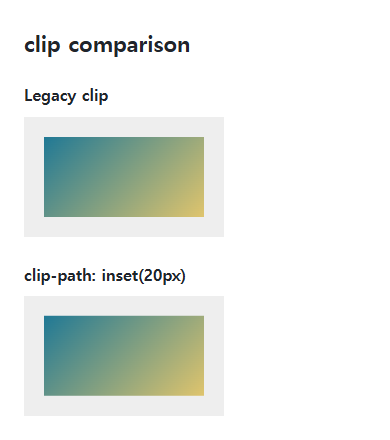
Boundary coordinates versus inset distances
A clip right coordinate of 180px is measured from the left; bottom 100px is measured from the top. Inset(20px) removes 20px at each side. Copying the same coordinates to a differently sized element need not preserve the same visible region.
Clipping is not resizing
Clipping normally does not reduce an element’s layout size. Clip-path also works for appropriate in-flow and nonrectangular cases. Overflow addresses a different boundary problem; inspect focus indicators and clipped descendants during migration.
Change one setting at a time
Use the complete example file above. Change only the specified selector or value rather than several comparison conditions at once.
- The 200×120px example uses rect boundaries 20,180,100,20px. For a 300×180px element, a 20px inset corresponds to boundaries 20,280,160,20px.
- Compare recomputed legacy coordinates with inset distances when resizing, then restore the original dimensions. Prefer clip-path in new code and retain legacy syntax only for migration.
| Edge | Rect coordinate at 200×120 | Rect coordinate at 300×180 | Inset distance |
|---|---|---|---|
| Top | 20px | 20px | 20px |
| Right | 180px | 280px | 20px |
| Bottom | 100px | 160px | 20px |
| Left | 20px | 20px | 20px |
For distance-based clipping in new implementations, see the inset examples in MDN clip-path.
For display modes and normal flow, see CSS display: Block, Inline, inline-block, and Hiding. Related properties to compare alongside these conditions are overflow.
When the result is missing or unexpected
- Check absolute or fixed positioning if legacy clip seems ineffective.
- Check coordinate order and the difference between an edge coordinate and a margin distance.

CSS / Reference / font-variant: Small Capitals and Font Features
Use small capitals without changing the source string and choose specific variant longhands. Compare real font support with synthesized presentation.

CSS / Reference / box-shadow: Offsets, Blur, Spread, and Inset Shadows
Build box shadows from offsets, blur, and spread, then inspect clipping and layering. Distinguish box geometry from glyph or transparent-image shadows.

CSS / Reference / background-position: Percentages, Centers, and Edge Offsets
Position backgrounds using centers, percentages, or edge offsets. Calculate percentages from the remaining space and account for oversized cover images and multiple layers.
CSS / Reference / quotes: Choose Nested Quotation Marks
Choose generated quotation pairs for nested text and distinguish them from literal punctuation. Compare automatic marks, none, and quotation-depth operations.

CSS / Reference / box-sizing: Content and Border Boxes, Including Small-Size Limits
Calculate content-box and border-box sizes, including margins and the minimum content-size limit. Apply resets deliberately and check external components.
CSS / Reference / text-indent: First-Line Indents and Hanging Paragraphs
Create first-line and hanging indents, distinguish them from paragraph padding, and check inheritance, writing direction, and narrow-screen clipping.
CSS / Reference / font-family: Font Lists, Glyph Fallback, and Loading
Build a font stack with appropriate generic fallbacks and inspect the fonts actually used. Distinguish naming a family from loading files and covering characters.
CSS / Reference / list-style-position: Inside and Outside Markers on Wrapped Items
Choose marker placement using wrapped text, list spacing, and actual child structure. Preserve list meaning and diagnose clipped outside markers.
CSS / Reference / background-repeat: Tiling, Space, and Round
Control horizontal and vertical background tiling and compare repeat, no-repeat, space, and round with the same tile and positioning area.

CSS / Reference / border-spacing: Separate Cell Gaps and Collapsed Borders
Set horizontal and vertical gaps in separate-border tables. Distinguish cell padding, zero spacing, collapsed borders, and browser default styles.