
CSS / Reference / text-decoration: Decoration Propagation, Underlines, and Link Meaning
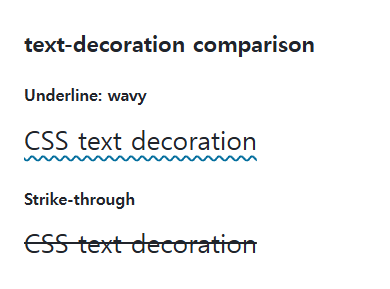
text-decoration is a shorthand for text decoration lines, styles, colors, and thickness. It can combine underlines or strike-through lines with different visual treatments.
Syntax and value choices
| Property | Initial value | Inherited | Main application conditions |
|---|---|---|---|
text-decoration |
none / solid / currentColor / auto | No | All elements; visible effects depend on the text, image, or box conditions below |
Initial values are not necessarily the values assigned to HTML elements by the browser’s stylesheet. Inspect the actual result in developer tools’ Computed panel.
a { text-decoration: underline solid #006c9c 2px; text-underline-offset: 0.2em; }
.deleted { text-decoration: line-through; }
| Value or category | Behavior and choice |
|---|---|
underline / overline |
Paint a line below / above the text. |
line-through |
Paint a line through the glyph area. |
solid / dotted / wavy |
Choose a line style. |
Color and thickness |
Specify the decoration’s color and width. |
none |
Do not originate a new decoration at this element. |
For supported values and conditions, see MDN text-decoration.
Run the example and compare results
Save this complete code as css-reference-10648-example.html in UTF-8 and open it in a browser. Keep its demonstration styles in that file rather than pasting them into a site-wide stylesheet.
<!doctype html>
<html lang="en">
<head>
<meta charset="utf-8">
<meta name="viewport" content="width=device-width, initial-scale=1">
<title>text-decoration comparison example</title>
<style>
body { margin: 0; color: #20242b; background: #fff; font: 16px/1.7 "Malgun Gothic", sans-serif; }
#demo { padding: 24px; max-width: 820px; margin: auto; }
h1 { font-size: 22px; margin: 0 0 20px; }
.samples { display: flex; flex-wrap: wrap; gap: 24px; }
.label { margin: 0 0 8px; font-weight: 700; }
.target, .reference { font-size: 26px; }
.target { text-decoration: underline wavy #006c9c 2px; text-underline-offset: 0.2em; }
.reference { text-decoration: line-through; }
</style>
</head>
<body>
<main id="demo">
<h1>text-decoration comparison</h1>
<section class="samples"><div class="a"><p class="label">Underline: wavy</p><div class="target">CSS text decoration</div></div><div class="b"><p class="label">Strike-through</p><div class="reference">CSS text decoration</div></div></section>
</main>
</body>
</html>
The first sample has a wavy underline; the second has a strike-through. An underline offset controls text-decoration placement, which differs from a border-bottom on a box.
A child cannot simply erase a parent’s line
Decoration propagation is different from ordinary property inheritance. A span with text-decoration: none can remain underlined by its parent. Apply the decoration to the correct content boundary instead of attempting to cancel its paint inside a child.
Links and meaningful deletions
Keep links distinguishable from surrounding prose and preserve keyboard focus indicators. Use del for meaningful deletion rather than inferring that meaning from CSS alone. Ink skipping can affect the final underline shape.
When an ancestor’s decoration reaches descendants
Save this complete document as css-reference-10648-practice.html in UTF-8 and open it in a browser. Test it as a separate file rather than nesting it inside another example.
<!doctype html>
<html lang="en">
<head>
  <meta charset="utf-8">
  <meta name="viewport" content="width=device-width, initial-scale=1">
  <title>When an ancestor’s decoration reaches descendants</title>
  <style>
    body { margin: 16px; color: #20242b; font: 16px/1.7 sans-serif; }
    main { max-width: 52rem; margin: auto; }
    h1 { font-size: 1.35rem; }
    .samples { display: flex; flex-wrap: wrap; gap: 24px; }
    .samples > * { max-width: 100%; min-width: 0; }
    :focus-visible { outline: 3px solid #005fcc; outline-offset: 3px; }
.parent {text-decoration:underline;} .child {text-decoration:none;} .only {text-decoration:underline;}
  </style>
</head>
<body>
<main>
  <h1>When an ancestor’s decoration reaches descendants</h1>
<p class="parent">Parent underline: <span class="child">Child none</span></p><p><span class="only">Only this span is underlined</span> <span>Undecorated text</span></p>
</main>
</body>
</html>
The child’s none does not cancel an underline drawn by the parent. This does not mean text-decoration is normally inherited. Apply decoration directly to the needed span as in the second paragraph. Change only the first parent’s underline to none, compare, and restore it. Real links still need recognizable styling and a visible focus state.
For real links’ default, visited, hover, and keyboard-focus presentation, see CSS Link States and Visible Keyboard Focus.
For coordinated font sizing, line heights, and typeface choices, see CSS Fonts, Font Sizes, and Line Height.
When the result is missing or unexpected
- Inspect the ancestor originating a line that remains visible.
- Adjust thickness and underline offset with the actual font.

CSS / Reference / font-style: Italic, Oblique, and Available Font Faces
Request italic or oblique forms while accounting for real faces and synthesis. Separate visual styling from emphasis semantics and inspect font-loading failures.
CSS / Reference / content: Generate Pseudo-Element Text and Decoration
Generate strings, attribute labels, counters, and decorative pseudo-elements. Compare none with an empty string and retain important information in real HTML.
CSS / Reference / font-variant: Small Capitals and Font Features
Use small capitals without changing the source string and choose specific variant longhands. Compare real font support with synthesized presentation.

CSS / Reference / background-position: Percentages, Centers, and Edge Offsets
Position backgrounds using centers, percentages, or edge offsets. Calculate percentages from the remaining space and account for oversized cover images and multiple layers.

CSS / Reference / empty-cells: Show or Hide Empty Table Cells
Control empty-cell borders and backgrounds in a separated table while preserving its structure. Compare show, hide, whitespace, and the collapsed-border exception.
CSS / Reference / list-style-position: Inside and Outside Markers on Wrapped Items
Choose marker placement using wrapped text, list spacing, and actual child structure. Preserve list meaning and diagnose clipped outside markers.
CSS / Reference / opacity: Group Transparency, Background Alpha, and Interaction
Fade an element and its children or make only its background translucent. Check stacking, contrast, keyboard focus, and the difference between transparency and hiding.

CSS / Reference / calc(): Calculate CSS Values and Understand Their Types
Combine percentages and lengths with calc(), inspect the actual parent width, and distinguish invalid expressions from newer typed arithmetic and special numeric results.
CSS / Reference / clip: Understand Legacy Clip and Migrate to Clip-Path
Read legacy rect coordinates and compare them with clip-path inset distances. Keep layout sizing and clipping separate when migrating existing CSS.
CSS / Reference / background-color: Background Alpha, Inheritance, and Contrast
Set a background or a partly transparent color without fading the text. Distinguish transparency from inheritance and provide readable image fallbacks.