
CSS / Reference / tab-size: Preserved Tabs and Tab-Stop Positions
tab-size sets tab-stop spacing for preserved tab characters. It does not change a sequence of ordinary spaces; use pre or an appropriate white-space value to preserve the tabs.
Syntax and value choices
| Property | Initial value | Inherited | Main application conditions |
|---|---|---|---|
tab-size |
8 | Yes | All elements; visible effects depend on the text, image, or box conditions below |
Initial values are not necessarily the values assigned to HTML elements by the browser’s stylesheet. Inspect the actual result in developer tools’ Computed panel.
pre { white-space: pre; tab-size: 4; }
| Value or category | Behavior and choice |
|---|---|
8 |
The initial numeric tab-stop interval. |
4 |
Use four space-advance units between tab stops. |
2 |
Use a narrower interval. |
A length |
Use a fixed-length interval. |
For supported values and conditions, see MDN tab-size.
Run the example and compare results
Save this complete code as css-reference-12098-example.html in UTF-8 and open it in a browser. Keep its demonstration styles in that file rather than pasting them into a site-wide stylesheet.
<!doctype html>
<html lang="en">
<head>
<meta charset="utf-8">
<meta name="viewport" content="width=device-width, initial-scale=1">
<title>tab-size comparison example</title>
<style>
body { margin: 0; color: #20242b; background: #fff; font: 16px/1.7 "Malgun Gothic", sans-serif; }
#demo { padding: 24px; max-width: 820px; margin: auto; }
h1 { font-size: 22px; margin: 0 0 20px; }
.samples { display: flex; flex-wrap: wrap; gap: 24px; }
.label { margin: 0 0 8px; font-weight: 700; }
.target, .reference { font: 16px/1.7 Consolas, monospace; white-space: pre; border: 1px solid #718096; padding: 12px; }
.target { tab-size: 4; }
.reference { tab-size: 8; }
</style>
</head>
<body>
<main id="demo">
<h1>tab-size comparison</h1>
<section class="samples"><div class="a"><p class="label">Tab-stop interval: 4</p><div class="target">A	B	C
AB	B	C</div></div><div class="b"><p class="label">Tab-stop interval: 8</p><div class="reference">A	B	C
AB	B	C</div></div></section>
</main>
</body>
</html>
Characters after each tab align with successive tab stops. The advance depends on the current position, not a promise that every tab always behaves like the same number of typed spaces.
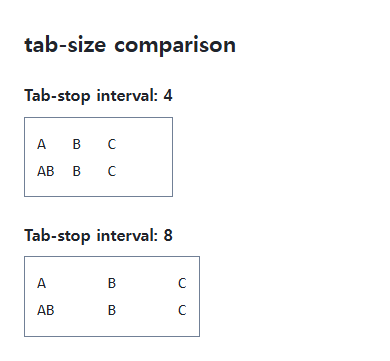
Check the actual characters
An editor may turn a Tab-key press into spaces, which tab-size cannot resize. The example contains real tab characters. A monospace font makes column positions easier to compare.
Code display and wrapping
Normal whitespace can collapse tabs. Pre preserves them but can require horizontal scrolling for long lines. Pre-wrap permits wrapping, so distinguish display wrapping from line breaks in the copied source.
Change one setting at a time
Use the complete example file above. Change only the specified selector or value rather than several comparison conditions at once.
- Enable whitespace markers in the editor to confirm real tabs. Change only tab-size between 4 and 8 on the same string, compare column positions, and restore it.
- Replace one tab with four spaces and observe that tab-size no longer resizes those spaces. Restore the real tab and save the UTF-8 file.
For coordinated font sizing, line heights, and typeface choices, see CSS Fonts, Font Sizes, and Line Height. Related properties to compare alongside these conditions are white-space.
When the result is missing or unexpected
- Use the editor’s whitespace markers to distinguish a tab from spaces.
- Inspect whether the computed white-space value preserves tabs.

CSS / Reference / box-sizing: Content and Border Boxes, Including Small-Size Limits
Calculate content-box and border-box sizes, including margins and the minimum content-size limit. Apply resets deliberately and check external components.

CSS / Reference / border-width: Side Widths, Shorthand Order, and Box Size
Set border widths using valid lengths and shorthand ordering. Inspect none, box-sizing, and hover changes without treating keyword widths as fixed pixels.

CSS / Reference / text-shadow: Glyph Shadows, Layers, and Contrast
Add text shadows without box-shadow-only syntax. Compare blur and layer order, preserve legibility, and avoid treating decoration as a contrast guarantee.

CSS / Reference / caption-side: Place a Table Caption Above or Below
Place captions visually while keeping them first in the table’s source structure. Match caption text to the data and check alignment, width, and writing direction.
CSS / Reference / color: Foreground Colors, CurrentColor, and Contrast
Set foreground colors and reuse them through currentColor. Inspect inheritance, alpha compositing, readable contrast, and non-color state cues.
CSS / Reference / border-spacing: Separate Cell Gaps and Collapsed Borders
Set horizontal and vertical gaps in separate-border tables. Distinguish cell padding, zero spacing, collapsed borders, and browser default styles.
CSS / Reference / empty-cells: Show or Hide Empty Table Cells
Control empty-cell borders and backgrounds in a separated table while preserving its structure. Compare show, hide, whitespace, and the collapsed-border exception.
CSS / Reference / text-align: Text, Inline Content, and Block Alignment
Align text by physical or logical sides and distinguish it from centering a block. Inspect justification, final lines, and direction-sensitive layouts.

CSS / Reference / calc(): Calculate CSS Values and Understand Their Types
Combine percentages and lengths with calc(), inspect the actual parent width, and distinguish invalid expressions from newer typed arithmetic and special numeric results.

CSS / Reference / background-attachment: Viewport, Box, and Internal Scroll Attachment
Compare local and scroll backgrounds inside a scrolling box and distinguish them from viewport-fixed backgrounds. Test target-browser behavior and a usable fallback.