
MariaDB Tutorial / Understand Replication, Lag, Errors, and Failover
Standard asynchronous MariaDB replication transfers a primary server’s change records to a replica and applies them there. Having a replica does not guarantee that it is current or that failover happens automatically; manage lag, errors, potential data loss, and the application’s write path together.
Follow a change from primary to replica
The primary records changes in its binary log. A replica’s receiver thread retrieves those records into a relay log, and its applier processes them into replica data. Parallel replication can involve multiple workers, but receiving a change and applying it remain distinct stages. Because replication can propagate damaging changes, retain the separate recovery checks in Back Up an InnoDB Database with mariadb-dump and Restore a Backup into a Separate Database and Verify It. The local container bootstrap builds on the file/volume distinctions in Build a Local MariaDB Lab with Docker Compose.
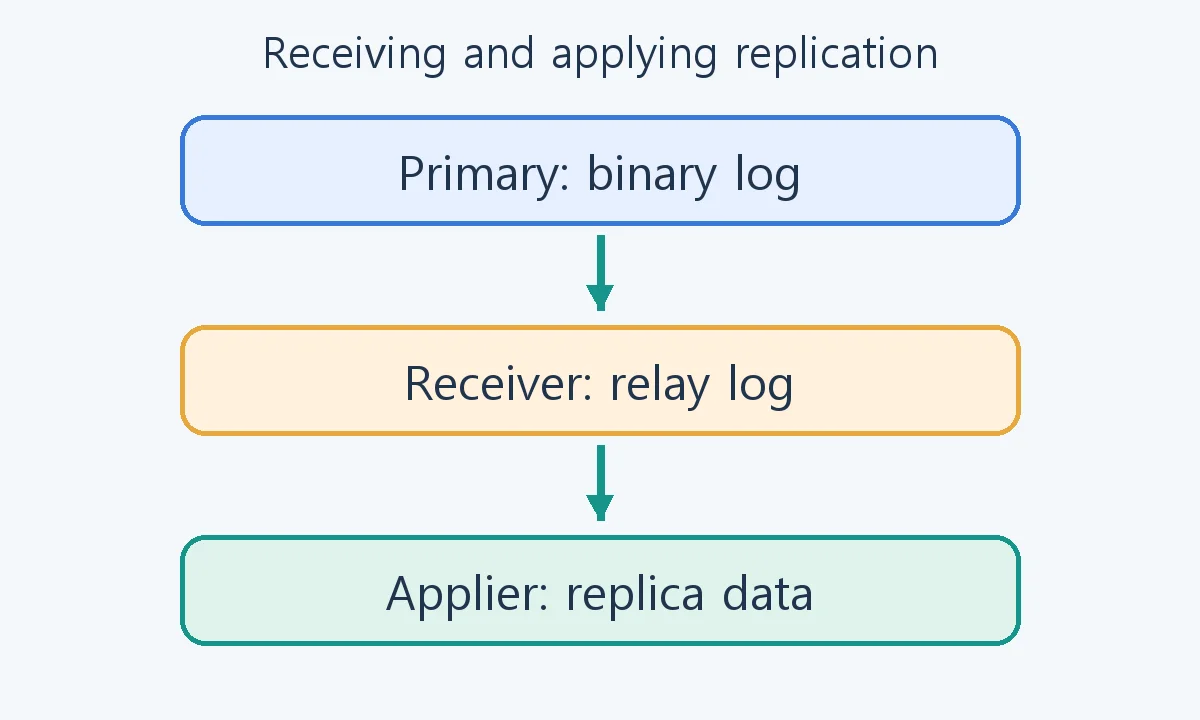
A successful COMMIT on the primary does not mean an asynchronous replica has finished applying that transaction. Reading a replica immediately after a write can therefore return an earlier value. Requests requiring read-after-write consistency need a deliberate routing policy. The replication setup guide and MariaDB GTID reference explain logging and position management.
GTID means Global Transaction ID and identifies replication positions. Its presence does not automatically validate data or make every replica ready for promotion. MariaDB and MySQL GTIDs must not be assumed to have identical syntax and behavior merely because they share a name.
Prepare two empty servers for a first lab
Skip this section if you already have a correctly configured learning replica. This separate local lab extends the Docker lesson’s file-secret approach. Use a new project with empty volumes, never production servers or a pre-existing replica.
In a new directory, create secrets/primary-root.txt and secrets/replica-root.txt containing different root passwords, one line each, and ignore secrets/ in version control. Save the following as compose.yaml. No host ports are published; the servers communicate on an internal Compose network.
name: mariadb-replication-lab
services:
  primary:
    image: mariadb:11.8
    environment:
      MARIADB_ROOT_PASSWORD_FILE: /run/secrets/primary_root
    secrets: [primary_root]
    command: ["--server-id=11", "--log-bin=primary-bin", "--binlog-format=ROW", "--gtid-strict-mode=ON"]
    volumes: [primary_data:/var/lib/mysql]
    networks: [replication]
    healthcheck:
      test: ["CMD", "healthcheck.sh", "--connect", "--innodb_initialized"]
      interval: 10s
      retries: 10
      start_period: 30s
  replica:
    image: mariadb:11.8
    environment:
      MARIADB_ROOT_PASSWORD_FILE: /run/secrets/replica_root
    secrets: [replica_root]
    command: ["--server-id=12", "--log-bin=replica-bin", "--binlog-format=ROW", "--gtid-strict-mode=ON", "--read-only=ON"]
    volumes: [replica_data:/var/lib/mysql]
    networks: [replication]
    healthcheck:
      test: ["CMD", "healthcheck.sh", "--connect", "--innodb_initialized"]
      interval: 10s
      retries: 10
      start_period: 30s
secrets:
  primary_root:
    file: ./secrets/primary-root.txt
  replica_root:
    file: ./secrets/replica-root.txt
volumes:
  primary_data:
  replica_data:
networks:
  replication:
    internal: true
docker compose config --quiet
docker compose up -d
docker compose ps
After both services become healthy, configure replication before inserting application data. This opens a local administrator client in primary; enter its root file-secret password.
docker compose exec primary mariadb -u root -p
CREATE USER 'repl_lab'@'%' IDENTIFIED BY 'Replace_With_A_Unique_Replication_Password';
GRANT REPLICATION SLAVE ON *.* TO 'repl_lab'@'%';
SHOW GRANTS FOR 'repl_lab'@'%';
EXIT;
Replace the demonstration password. The percent host pattern does not grant administrator privileges; this example grants replication only inside a dedicated network without published ports. A real remote deployment needs an appropriate origin restriction and TLS policy.
docker compose exec replica mariadb -u root -p
Enter replica’s root password, then supply the new replication password in this statement. Do not publish commands or output containing a real secret.
CHANGE MASTER TO
  MASTER_HOST='primary', MASTER_PORT=3306,
  MASTER_USER='repl_lab',
  MASTER_PASSWORD='Replace_With_A_Unique_Replication_Password',
  MASTER_USE_GTID=slave_pos;
START REPLICA;
SHOW REPLICA STATUS\G
This bootstrap assumes two new empty servers and retained primary logs. Existing data or missing logs requires a consistent initial copy and matching replication position first. Connection settings alone cannot reconcile data. Check both threads are Yes, then continue with the diagnostic and marker exercises below.
This Compose configuration has been checked statically. Docker is unavailable in the authoring environment, so image startup, networking and volumes are not claimed as executed tests. This differs from the replication behavior verified with two native temporary servers.
Official initial-copy and replication requirements
Establish topology and diagnostic privileges
The following queries diagnose an already configured primary and replica. Building that topology requires different server IDs, primary binary logging, a replication account and network path, and an initially consistent dataset. Entering connection coordinates alone does not initialize an existing replica correctly.
Remote connections also need TLS, origin restrictions, and appropriately scoped accounts. Status inspection requires version-appropriate privileges such as REPLICA MONITOR, which are distinct from privileges controlling replication threads. Applications do not need full administrator access merely to support operational monitoring.
SELECT @@server_id AS server_id, @@log_bin AS binary_logging,
       @@GLOBAL.gtid_binlog_pos AS logged_gtid;
SHOW MASTER STATUS;
Run those queries on the primary. Confirm the server identity and binary logging, then record its current position. Run the next commands on the replica. \G is a vertical-output terminator for the mariadb command-line client, not text to send unchanged through a SQL API.
SELECT @@server_id AS server_id, @@GLOBAL.read_only AS read_only,
       @@GLOBAL.gtid_slave_pos AS applied_gtid;
SHOW REPLICA STATUS\G
The transfer and pause/resume exercise in this article was checked using two temporary MariaDB 12.3.3 servers with different IDs, ROW binary logging, and GTID. That lab did not deploy remote-network TLS or execute a production failover.
| Field | Interpretation |
|---|---|
| Slave_IO_Running | Receiver state; Yes alone does not prove data has been applied |
| Slave_SQL_Running | Applier state; distinguish an intentional stop from an application error |
| Last_IO_Error and Last_SQL_Error | Evidence separating transport or authentication failure from apply failure |
| Seconds_Behind_Master | A lag indicator whose meaning depends on state and timing; neither 0 nor NULL alone proves health |
| Gtid_IO_Pos and @@GLOBAL.gtid_slave_pos | Received versus applied positions; interpret with the configured domains and topology |
Even when the command is SHOW REPLICA STATUS, output columns can retain historical Slave and Master names. Their order can also vary by version; monitoring code should read field names instead of fixed offsets. See the SHOW REPLICA STATUS reference.
Both threads running, a particular business write arriving, and an acceptable failover loss window are different checks. Record state and positions, and reconcile required business data or processing markers. A small lag number does not rule out divergence caused by filters or unintended replica writes.
Observe an applier pause in an isolated lab
Perform the following only on a separate, disposable replication lab with thread-control privileges. It is not a procedure for stopping a production replica during diagnosis. On the primary, create the probe below, then verify that its first marker has arrived on the replica.
CREATE DATABASE IF NOT EXISTS replication_lab;
CREATE TABLE replication_lab.probe (
  probe_id INT PRIMARY KEY,
  marker VARCHAR(40) NOT NULL
) ENGINE=InnoDB;
INSERT INTO replication_lab.probe VALUES (1, 'before-pause');
SELECT probe_id, marker FROM replication_lab.probe ORDER BY probe_id;
On the replica, stop only the applier. The receiver can continue collecting records, illustrating why received logs and visible data are different.
STOP REPLICA SQL_THREAD;
Insert this row on the primary. The paused replica should still lack the second row. Inspect status as well to distinguish receiver and applier state.
INSERT INTO replication_lab.probe VALUES (2, 'during-pause');
Immediately after observing the difference, resume application on the replica and query the probe. With no conflicting filters or errors, its second row should arrive. Do not copy a resume command into an environment whose replication was deliberately stopped for another operation.
START REPLICA SQL_THREAD;
SELECT probe_id, marker FROM replication_lab.probe ORDER BY probe_id;
Application takes time; one immediate SELECT is not a definitive failure. Conversely, do not wait indefinitely without inspecting state and the last error. Confirm that replication returns to its original running state. Remove the disposable probe from the primary when finished, and confirm that cleanup is reflected on the replica.
Preserve evidence before skipping or resetting anything
| Problem | Investigate first | Avoid a premature response |
|---|---|---|
| Receiver cannot connect | Address, port, DNS, firewall, TLS, account, and last IO error | Turning off authentication or encryption |
| Applier stops | Duplicate keys, missing rows, schema differences, filters, and last SQL error | Skipping an event without understanding its data effect |
| Required log no longer available | Primary log retention, replica position, and initial-copy consistency | Forcing a position without a matching consistent dataset |
| Lag keeps increasing | Write volume, replica IO and CPU, large transactions, and locks | Promoting based on one lag number |
Preserve timestamped status and errors first. If data has diverged, consider rebuilding the replica from a consistent backup. Skipping an event may restart the threads while leaving missing or inconsistent data. Replication can also propagate an erroneous DELETE, so it does not replace independent backups or restore verification.
Treat failover as control of the write path
- Establish the failure and isolate the previous primary from new writes. A network partition alone does not prove that server has stopped accepting writes.
- Inspect candidate replicas’ received and applied positions, pending work, errors, and potential loss.
- Evaluate the recovery point objective, or RPO, for acceptable loss and recovery time objective, or RTO, for acceptable restoration time.
- Follow the approved promotion and routing process to establish one write destination, then verify application reads and writes.
- Before reintroducing the recovered former primary, verify consistency and rebuild it as a replica if required.
read_only restricts ordinary-user writes; it is not an absolute barrier against every privileged write. Review the read-only replica privilege exceptions. Disabling read_only is not the complete promotion procedure. Preventing split brain, where both servers accept writes, requires fencing the previous primary and controlling connection routing together.

MariaDB Tutorial / Join, Extract, Replace, and Measure Strings
Practice concatenation, substring extraction, replacement, trimming and string length in MariaDB. Compare NULL and empty inputs and distinguish Unicode characters from UTF-8 byte counts.

MariaDB Tutorial / Improve Date Filters, Sorting, and Pagination Without Changing Results
Compare equivalent date predicates and deterministic keyset pagination in MariaDB. Preserve exact results, account for version-specific DATE/YEAR optimization and review projection and search semantics.

MariaDB Tutorial / Break Queries into Named Steps with WITH and CTEs
Build a readable multi-step query with WITH, verify paid orders and per-order totals independently, and understand CTE scope, naming and execution-plan limitations.

MariaDB Tutorial / Read Related Rows with INNER JOIN
Join customer names to orders with explicit relationship keys, interpret repeated customers correctly and compare filtered INNER JOIN results with an unrestricted Cartesian product.

MariaDB Tutorial / Change Table Structure Safely with ALTER TABLE
Practice an add-fill-constrain migration with a product SKU column, verify counts and rejected duplicates, and review metadata locks, online-change limits and recovery boundaries.

MariaDB Tutorial / Select Columns, Aliases, Calculations, and DISTINCT
Read explicit columns, label results with AS, calculate per-product stock values and understand how DISTINCT treats complete row combinations. Compare expected values and troubleshoot aliases and filters.

MariaDB Tutorial / Normalize an Order Database Without Losing Historical Facts
Analyze order-data dependencies and observe an update anomaly in a flattened copy. Separate current attributes from transaction snapshots and review keys, normal forms and deliberate denormalization.

MariaDB Tutorial / Design Single and Composite Indexes for Real Queries
Inspect existing keys, create a customer–time composite index and review leading columns, covering access and foreign-key dependencies. Preserve query results while evaluating read, write and storage costs.

MariaDB Tutorial / Install MariaDB on Ubuntu and Start the Server
Install MariaDB on Ubuntu with APT, distinguish service activity from automatic startup, and understand socket authentication. Create a restricted TCP learning account and diagnose connection or service problems.

MariaDB Tutorial / Define a Table Structure with CREATE TABLE
Define and inspect a MariaDB product-table schema using a complete CREATE TABLE example. Understand defaults, storage settings, IF NOT EXISTS, common errors, and a reset limited to the practice table.