
MariaDB Tutorial / Back Up an InnoDB Database with mariadb-dump
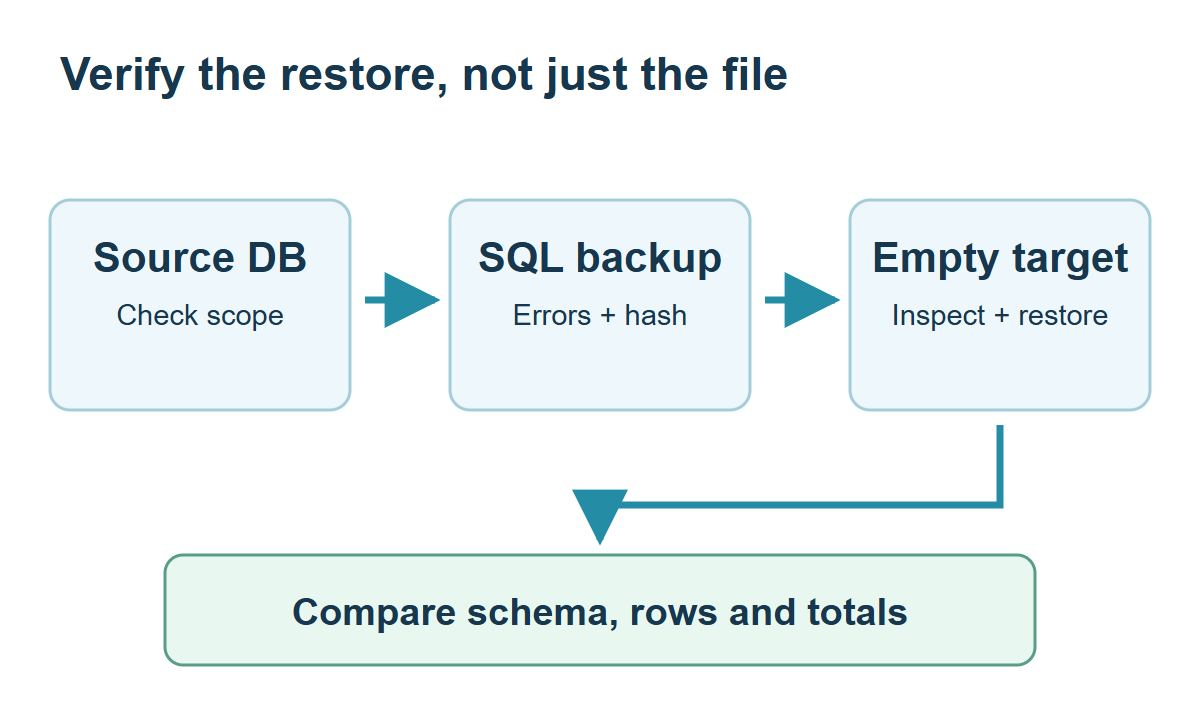
mariadb-dump creates a logical backup containing SQL to recreate definitions and rows. Choose consistent-snapshot options and an explicit output path, inspect errors and verify restoration into a separate database; the mere existence of a file is not proof of a usable backup.
Define backup scope and recovery objectives
This exercise backs up four InnoDB tables in the separate backup46_lab database. It is not a complete backup of an instance’s accounts, configuration or external files. Acceptable data-loss boundaries and recovery time influence frequency, storage location and additional log requirements. Follow file creation with the restoration checks in Restore a Backup into a Separate Database and Verify It. Container volumes in Build a Local MariaDB Lab with Docker Compose do not remove the need for a separate backup.
| Area | This exercise | Further review |
|---|---|---|
| Data | Four InnoDB tables | Other engines, volume and concurrent DDL |
| Objects | Base tables and keys | Views, definers, routines, triggers and events |
| Accounts and settings | Outside this database dump | Separate recovery procedures |
| Verification | Restore into a different empty database | Rows, constraints, business totals and access |
Check the MariaDB documentation for the syntax and conditions used here: mariadb dump.
Create an independent source database
As administrator, use SHOW DATABASES to confirm backup46_lab is unused. Stop and choose another name if it exists; do not replace or drop existing data to make the fixture run. The full schema and rows below make the example independent:
CREATE DATABASE backup46_lab CHARACTER SET utf8mb4 COLLATE utf8mb4_unicode_ci;
USE backup46_lab;
CREATE TABLE c46_customers (
 customer_id INT NOT NULL PRIMARY KEY,
 customer_name VARCHAR(50) NOT NULL,
 city VARCHAR(30) NOT NULL
) ENGINE=InnoDB DEFAULT CHARSET=utf8mb4 COLLATE=utf8mb4_unicode_ci;
CREATE TABLE c46_products (
 product_id INT NOT NULL PRIMARY KEY,
 product_name VARCHAR(100) NOT NULL,
 category VARCHAR(30) NOT NULL,
 price DECIMAL(10,2) NOT NULL CHECK (price >= 0),
 stock INT NOT NULL CHECK (stock >= 0)
) ENGINE=InnoDB DEFAULT CHARSET=utf8mb4 COLLATE=utf8mb4_unicode_ci;
CREATE TABLE c46_orders (
 order_id INT NOT NULL PRIMARY KEY,
 customer_id INT NOT NULL,
 ordered_at DATETIME NOT NULL,
 status VARCHAR(20) NOT NULL,
 shipping_fee DECIMAL(10,2) NOT NULL DEFAULT 1000,
 CONSTRAINT fk_c46_order_customer FOREIGN KEY (customer_id)
  REFERENCES c46_customers(customer_id) ON DELETE RESTRICT
) ENGINE=InnoDB DEFAULT CHARSET=utf8mb4 COLLATE=utf8mb4_unicode_ci;
CREATE TABLE c46_items (
 order_id INT NOT NULL,
 product_id INT NOT NULL,
 quantity INT NOT NULL CHECK (quantity > 0),
 unit_price DECIMAL(10,2) NOT NULL CHECK (unit_price >= 0),
 PRIMARY KEY (order_id, product_id),
 CONSTRAINT fk_c46_item_order FOREIGN KEY (order_id)
  REFERENCES c46_orders(order_id) ON DELETE RESTRICT,
 CONSTRAINT fk_c46_item_product FOREIGN KEY (product_id)
  REFERENCES c46_products(product_id) ON DELETE RESTRICT
) ENGINE=InnoDB DEFAULT CHARSET=utf8mb4 COLLATE=utf8mb4_unicode_ci;
INSERT INTO c46_customers VALUES
 (1,'김민수','서울'),(2,'이서연','부산'),
 (3,'박지우','서울'),(4,'최하늘','대전');
INSERT INTO c46_products VALUES
 (1,'노트','문구',3500,20),(2,'볼펜','문구',1500,50),
 (3,'머그컵','생활',8000,12),(4,'스탠드','생활',25000,5);
INSERT INTO c46_orders
 (order_id,customer_id,ordered_at,status,shipping_fee) VALUES
 (101,1,'2026-01-10 10:00:00','paid',1000),
 (102,1,'2026-01-20 11:00:00','paid',1000),
 (103,2,'2026-02-05 12:00:00','paid',1000),
 (104,3,'2026-02-10 13:00:00','canceled',1000);
INSERT INTO c46_items VALUES
 (101,1,2,3500),(101,2,3,1500),(102,3,1,8000),
 (103,1,1,3500),(103,3,2,8000),(104,2,1,1500);
The SQL retains Korean sample names and city strings, while the explanations use stable customer and product IDs. Products 1–4 are a notebook, pen, mug and lamp. Customers 1 and 3 have the Seoul city value; customers 2 and 4 have Busan and Daejeon values. Preserve the supplied UTF-8 literals when reproducing the results.
The existing shopcourse grant does not grant access to this new database. An administrator must grant the learning account the required scope. ALL below is confined to this disposable exercise database; an operational backup account needs privileges tailored to its objects and options.
GRANT ALL PRIVILEGES ON backup46_lab.* TO 'course_user'@'127.0.0.1';
Check client versions, a new file and the exit status
Use mariadb-dump from its installed bin directory or PATH and create C:/mariadb-lab first. Run these commands in the operating-system terminal, not at the SQL prompt. --result-file avoids differences in PowerShell output-redirection encoding:
mariadb-dump --version
mariadb --version
New-Item -ItemType Directory -Path 'C:/mariadb-lab' -Force | Out-Null
$backup46Path='C:/mariadb-lab/backup46-first.sql'
if (Test-Path -LiteralPath $backup46Path) { throw 'Choose a new backup filename.' }
mariadb-dump --protocol=tcp --host=127.0.0.1 --port=3306 --user=course_user --password --default-character-set=utf8mb4 --single-transaction --quick --skip-lock-tables --result-file=C:/mariadb-lab/backup46-first.sql backup46_lab
if ($LASTEXITCODE -ne 0) { throw 'Backup failed: inspect the error and verify the file.' }
Get-Item -LiteralPath $backup46Path | Select-Object Name,Length
Get-FileHash -LiteralPath $backup46Path -Algorithm SHA256
Enter the password at its prompt rather than append it to the command. A failed exit status may leave an empty or partial file. A nonzero size or successfully calculated SHA-256 hash establishes neither completeness nor recoverability.
Ubuntu shell alternative: choose this or the Windows PowerShell version. The subshell confines the restrictive umask and noclobber settings to this backup operation.
mkdir -p "$HOME/mariadb-lab"
(
  umask 077
  set -C
  backup_file="$HOME/mariadb-lab/backup46-first.sql"
  if mariadb-dump --protocol=tcp --host=127.0.0.1 --port=3306 \
      --user=course_user --password --default-character-set=utf8mb4 \
      --single-transaction --quick --skip-lock-tables backup46_lab > "$backup_file"; then
    test -s "$backup_file" || exit 1
    sha256sum "$backup_file"
  else
    printf '%s\n' 'Backup failed; preserve the partial file for diagnosis.' >&2
    exit 1
  fi
)
An existing destination causes failure rather than overwrite. Do not restore a partial file after a failed command; diagnose it and retry with a new filename. Size and SHA-256 provide evidence, not proof of recoverability.
For a TLS connection error, inspect server/client versions, certificate names, the trusted CA and any required client certificate using the official TLS connection requirements. Apply the appropriate option file or certificate options to backup and restoration clients too; do not routinely disable verification to bypass an error.
Understand the consistent-snapshot conditions
--single-transaction supports a consistent read for transactional tables such as InnoDB. Coordinate concurrent ALTER, CREATE, DROP, RENAME and TRUNCATE operations because they can interfere with the snapshot’s assumptions. Nontransactional engines are not thereby given the same consistency guarantee.
--quick reads rows incrementally. --skip-lock-tables makes the intended table-lock option choice explicit here; it does not mean backup has no load, locking or network impact. The command omits --databases to support the separate-name restoration exercise.
Inventory non-table objects and protect backup contents
This fixture has no routines, events, triggers or views. For a real database, inventory those objects and inspect the current tool’s options, permissions, DEFINER attributes and restored execution context. Review --routines and --events where needed and inspect actual trigger output rather than assume every dependency was captured from an option’s name.
The dump contains definitions and business data. Apply access control, encryption, retention and copies in a separate failure domain according to policy. A file on the same disk alone does not protect against that disk’s loss, and dumps do not belong in a public repository or web directory.
Preserve the source until restoration is verified
Keep the source and backup until the separate-database restore checks establish matching structure, rows, keys and business totals. The baseline is four customers, four products, four orders, six items and paid goods of 39000. Record that amount with this query. Do not automatically delete the original database after producing its dump.
SELECT SUM(i.quantity*i.unit_price) AS paid_goods
FROM backup46_lab.c46_orders o
JOIN backup46_lab.c46_items i ON i.order_id=o.order_id
WHERE o.status='paid';
MariaDB Tutorial / Query Hierarchies and Prevent Cycles with Recursive CTEs
Traverse a complete category tree with WITH RECURSIVE, depth, and path tracking. Change the traversal bound, introduce a controlled cycle, and distinguish a finite result from a complete and valid hierarchy.

MariaDB Tutorial / Compare ROW_NUMBER, RANK, and DENSE_RANK
Compare ROW_NUMBER, RANK and DENSE_RANK on customer totals, then run regional rankings and an outer top-N filter. Check how a row limit differs from retaining tied ranks.

MariaDB Tutorial / Design Table Relationships with Keys and Foreign Keys
Build and inspect customer, product, order and item tables with foreign keys. Verify one-to-many links, reject missing parents and choose deliberate deletion and historical-price policies.
MariaDB Tutorial / Use Stored Procedures, Functions, and Triggers
Compare procedures, functions, and triggers with complete stock, amount, and audit examples. Verify commit, rollback, invalid inputs, and the difference between caller and definer privileges.

MariaDB Tutorial / Compare NULL Correctly with IS NULL and COALESCE
Distinguish NULL from empty strings and zero, filter missing notes with IS NULL, choose COALESCE fallbacks and avoid NULL-related NOT IN surprises using reproducible product queries.

MariaDB Tutorial / Choose Numeric Types: Integers, DECIMAL, FLOAT, and DOUBLE
Choose MariaDB numeric types by range, signedness, decimal scale, and acceptable approximation. Run a comparison of DECIMAL, FLOAT, and DOUBLE, then check rounding, overflow errors, and session-mode restoration.

MariaDB Tutorial / Use Subqueries, EXISTS, and NOT EXISTS
Choose scalar and existence subqueries according to the result needed. Compare paid-order customers and absent-order customers, inspect correlation keys and avoid NULL-related exclusion assumptions.

MariaDB Tutorial / Normalize an Order Database Without Losing Historical Facts
Analyze order-data dependencies and observe an update anomaly in a flattened copy. Separate current attributes from transaction snapshots and review keys, normal forms and deliberate denormalization.

MariaDB Tutorial / Insert One Row or Multiple Rows with INSERT
Practice single-row and multi-row INSERT statements, inspect stored values and defaults, and test duplicate keys, mismatched value counts and required inputs without changing existing product tables.

MariaDB Tutorial / Improve Date Filters, Sorting, and Pagination Without Changing Results
Compare equivalent date predicates and deterministic keyset pagination in MariaDB. Preserve exact results, account for version-specific DATE/YEAR optimization and review projection and search semantics.