
MariaDB Tutorial / What MariaDB Is: Databases, SQL, and Its Relationship to MySQL
MariaDB is a relational database management system that stores data in tables and lets you read and change it with SQL. The server manages the data, while a client sends commands and displays results; those roles remain separate even when both programs run on your computer.
A database, a DBMS, and MariaDB
A database is an organized collection of related data. A database management system (DBMS) is the software that controls storage, queries, access permissions, concurrent work, and recovery mechanisms. MariaDB Server is one such system, and a single server can manage multiple databases.
Relational databases organize data into tables of rows and columns. Identifiers express relationships between tables: a customer table can hold a customer’s name, while an order stores the customer’s identifier. This avoids copying the name into every order. Reliable relationships still require a deliberate design and appropriate primary-key and foreign-key constraints; merely splitting data into tables does not prevent every error.
The MariaDB Foundation introduction explains the project’s background and its work supporting the open-source server.
Databases, tables, rows, and columns
Our practice database is named shopcourse. We start with one table, products, and later expand the model with customers, orders, and order items. Use lowercase database and table names consistently to avoid unnecessary confusion over naming behavior on different operating systems.
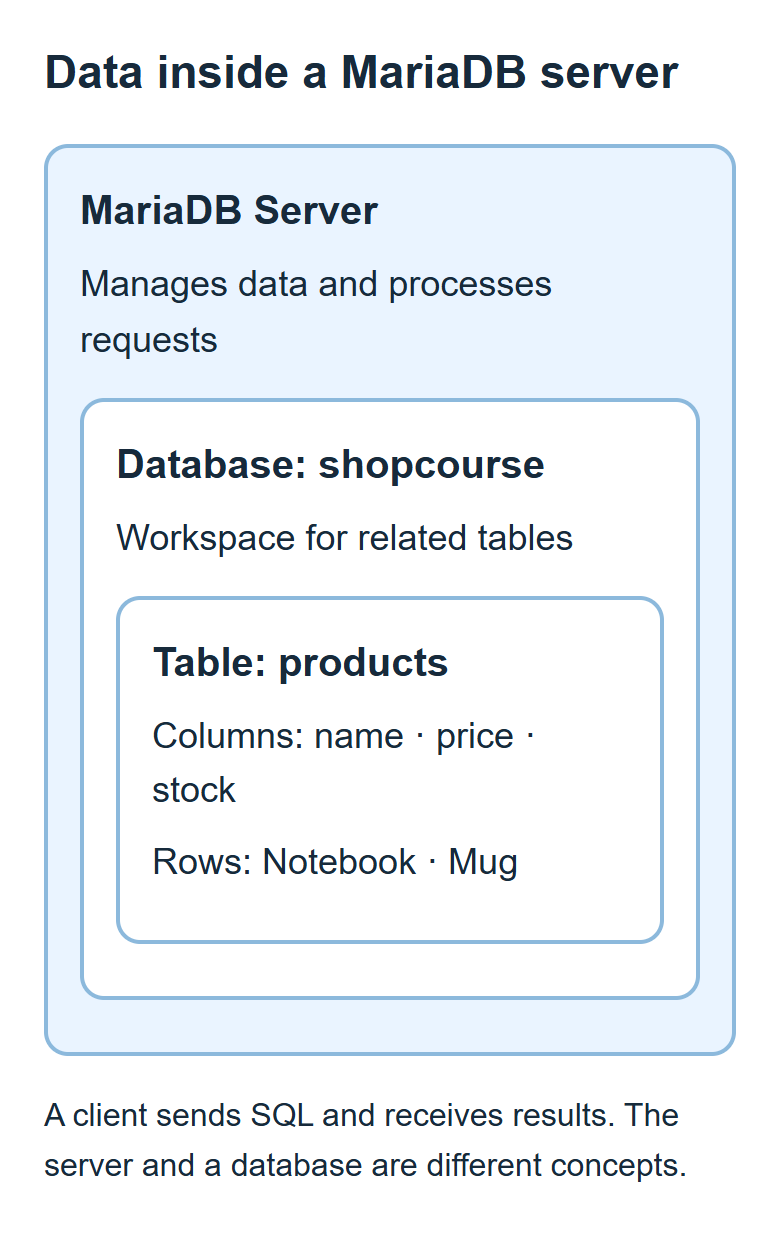
| Concept | Meaning in the product example |
|---|---|
| Database | shopcourse: the workspace containing the tutorial’s tables |
| Table | products: product records sharing one defined structure |
| Column | product_name, price, or stock: a particular kind of value |
| Row | One product record containing its name, price, and stock |
| Primary key | product_id: an identifier that distinguishes product rows |
Columns have data types and constraints. A price column needs a suitable numeric type, while a product name needs a string type. Two products may share a name and still be separate rows if they have different primary keys. A product name alone is therefore a poor assumption for identifying a particular record.
What the server and client do
The server process manages the stored data and handles requests. The mariadb command-line client connects to that server, sends SQL, and prints the response. A graphical database tool is also a client. Installing only a client does not create a local database server.
| Situation | Server | Client |
|---|---|---|
| Local practice | MariaDB service or process on your computer | mariadb on the same computer |
| Remote connection | MariaDB running on another computer | Client on your computer |
| Server stopped | Cannot process new requests | Can start, but its connection may fail |
Your operating-system account, your MariaDB account, and your database name are separate concepts. A Windows login name does not automatically become a database user. Some Ubuntu administrator connections use operating-system identity through socket authentication; the Ubuntu installation and authentication guide explains that distinction.
What SQL asks the server to do
SQL stands for Structured Query Language. It describes database structures and operations: SELECT reads data, INSERT adds rows, UPDATE changes values, and DELETE removes rows. CREATE TABLE defines a table. These statements have different effects and scopes, so treat a query and a data-changing operation differently.
After connecting, run this statement inside the client. It needs no database or table: the server can evaluate an expression and return a string directly. The semicolon ends the statement, and AS supplies a result-column label.
SELECT 1 + 1 AS result, 'Learning MariaDB' AS message;
| result | message |
|---|---|
| 2 | Learning MariaDB |
These values are a query result, not a product saved in a table. Persisting a product requires a table and an operation such as INSERT. The MariaDB basics guide provides further context for the common commands.
How MariaDB relates to MySQL
MariaDB began from MySQL but is developed as a separate product. Many basic SQL statements and connection conventions are similar, so existing knowledge can help. That does not make every feature, authentication method, setting, or data-file format interchangeable across all versions.
Check the actual server version and the relevant feature documentation before applying a MySQL procedure to MariaDB. Replacing a database product or moving its data files is a migration task with its own requirements. Do not swap data directories as an installation shortcut. This course uses MariaDB Server and the MariaDB client as its reference environment.
The environment and first practice goal
Follow the Windows installation guide or the Ubuntu installation guide before joining the common SQL exercises. Windows command examples use an installation path for the MariaDB 12.3 series. Ubuntu examples use the default APT packages on Ubuntu 24.04 LTS. Distribution packages and vendor downloads may provide different versions; matching their version numbers is not a prerequisite for these introductory statements.
Inside a connection, SELECT VERSION(); reports the server version. Outside the connection, mariadb --version reports the client version. These answer different questions. Consult the official download page when choosing a supported stable release and record the versions you actually use.
The first goal is to save three products and retrieve them with a clear condition. You can learn these SQL and data-modeling fundamentals without connecting a web application or configuring replication and multiple servers.

MariaDB Tutorial / Create a Product Table, Insert Data, and Query It
Build a complete product table, insert three records, and verify its definition and query results. Practice price and stock filters, understand rerun behavior, and reset only confirmed disposable tutorial data.

MariaDB Tutorial / Install MariaDB on Windows and Start the Server
Set up a local MariaDB server on Windows, verify its service and TCP connection, and create a database-scoped learning account. Follow practical checks for installation, port, path, and authentication problems.

MariaDB Tutorial / What MariaDB Is: Databases, SQL, and Its Relationship to MySQL
Understand the roles of the MariaDB server and client, the structure of relational data, and the purpose of SQL. Learn how MariaDB relates to MySQL and prepare for a small product-database exercise.

MariaDB Tutorial / Create a Database with CREATE DATABASE, USE, and utf8mb4
Create a practice database with explicit utf8mb4 settings and verify its definition. Understand connection-local database selection, collation comparisons, and why IF NOT EXISTS preserves existing defaults.

MariaDB Tutorial / Connect with the Command-Line Client and Run SQL Files
Connect to MariaDB with explicit TCP and UTF-8 settings, check account and query results, and execute a complete SQL file with SOURCE. Learn how to diagnose path, encoding, and partial-execution errors.

MariaDB Tutorial / Install MariaDB on Ubuntu and Start the Server
Install MariaDB on Ubuntu with APT, distinguish service activity from automatic startup, and understand socket authentication. Create a restricted TCP learning account and diagnose connection or service problems.