
CSS / Reference / border-style: Border Patterns, Side Order, and Hidden Conflicts
border-style specifies the border patterns on the four sides of a box. The initial style is none, so a width and color alone need not produce a visible border.
Syntax and value choices
| Property | Initial value | Inherited | Main application conditions |
|---|---|---|---|
border-style |
none (all four sides) | No | All elements; visible effects depend on the text, image, or box conditions below |
Initial values are not necessarily the values assigned to HTML elements by the browser’s stylesheet. Inspect the actual result in developer tools’ Computed panel.
.card { border: 2px solid #006c9c; }
.box { border-style: solid dashed dotted double; }
| Value or category | Behavior and choice |
|---|---|
solid / dashed / dotted |
Solid, dashed, or dotted borders. |
double |
Two lines, most clearly distinguished with enough width. |
none / hidden |
No ordinary box border; collapsed-table conflict rules differ. |
One to four values |
Set all sides or side groups using the standard shorthand order. |
For supported values and conditions, see MDN border-style.
Run the example and compare results
Save this complete code as css-reference-10622-example.html in UTF-8 and open it in a browser. Keep its demonstration styles in that file rather than pasting them into a site-wide stylesheet.
<!doctype html>
<html lang="en">
<head>
<meta charset="utf-8">
<meta name="viewport" content="width=device-width, initial-scale=1">
<title>border-style comparison example</title>
<style>
body { margin: 0; color: #20242b; background: #fff; font: 16px/1.7 "Malgun Gothic", sans-serif; }
#demo { padding: 24px; max-width: 820px; margin: auto; }
h1 { font-size: 22px; margin: 0 0 20px; }
.samples { display: flex; flex-wrap: wrap; gap: 24px; }
.label { margin: 0 0 8px; font-weight: 700; }
.target, .reference { width: 220px; height: 100px; padding: 12px; border-width: 6px; border-color: #006c9c; }
.target { border-style: solid dashed dotted double; }
.reference { border-style: none; }
</style>
</head>
<body>
<main id="demo">
<h1>border-style comparison</h1>
<section class="samples"><div class="a"><p class="label">A different style on each side</p><div class="target">Border comparison</div></div><div class="b"><p class="label">none</p><div class="reference">Border comparison</div></div></section>
</main>
</body>
</html>
Inspect top, right, bottom, and left on the first box. The none box paints no border, even when a border width was specified.
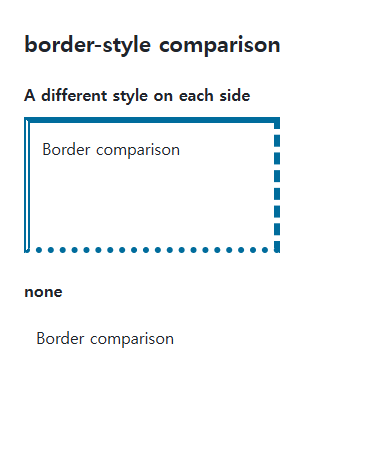
Side ordering
Four values start at the top and proceed clockwise. Two values mean top/bottom and left/right; three mean top, left/right, and bottom. Match each side’s style with its width and color.
Shorthand resets and table conflicts
A later border shorthand can reset earlier side styles. none and hidden look similar on an ordinary box but have different precedence in collapsed-table border conflicts. A none style can also make the computed width zero.
Save this complete document as css-reference-10622-practice.html in UTF-8 and open it in a browser. Test it as a separate file rather than nesting it inside another example.
<!doctype html>
<html lang="en">
<head>
  <meta charset="utf-8">
  <meta name="viewport" content="width=device-width, initial-scale=1">
  <title>Compare none and hidden in collapsed tables</title>
  <style>
    body { margin: 16px; color: #20242b; font: 16px/1.7 sans-serif; }
    main { max-width: 52rem; margin: auto; }
    h1 { font-size: 1.35rem; }
    .samples { display: flex; flex-wrap: wrap; gap: 24px; }
    .samples > * { max-width: 100%; min-width: 0; }
    :focus-visible { outline: 3px solid #005fcc; outline-offset: 3px; }
table { border-collapse:collapse;margin-bottom:20px; } td { padding:12px; } .left { border-right:6px solid #006c9c; } .none { border-left:6px none #006c9c; } .hidden { border-left:6px hidden #006c9c; }
  </style>
</head>
<body>
<main>
  <h1>Compare none and hidden in collapsed tables</h1>
<p>none</p><table><tr><td class="left">Left</td><td class="none">Right</td></tr></table><p>hidden</p><table><tr><td class="left">Left</td><td class="hidden">Right</td></tr></table>
</main>
</body>
</html>
The neighbor’s solid border wins beside none; hidden suppresses other styles on that shared collapsed border. Change only .hidden to none, compare both tables, then restore hidden. Distinguish ordinary invisible borders from collapsed-table conflict precedence.
For using borders and shadows together on components, see CSS Borders, Rounded Corners, and Shadows. Related properties to compare alongside these conditions are border-width.
When the result is missing or unexpected
- Check for none when width and color are correct but no border appears.
- Use sufficient width and inspect zoom if a double border looks solid.

CSS / Reference / border-width: Side Widths, Shorthand Order, and Box Size
Set border widths using valid lengths and shorthand ordering. Inspect none, box-sizing, and hover changes without treating keyword widths as fixed pixels.

CSS / Reference / background-size: Cover, Contain, and Background Sizing
Compare background cover and contain using a known image ratio. Account for positioning areas, percentages, cropping, repeated tiles, and the element’s own size.

CSS / Reference / text-indent: First-Line Indents and Hanging Paragraphs
Create first-line and hanging indents, distinguish them from paragraph padding, and check inheritance, writing direction, and narrow-screen clipping.
CSS / Reference / font-weight: Numeric Weights, Relative Weights, and Font Matching
Request numeric or relative font weights and inspect the supplied faces. Compare static and variable-font behavior without assuming every number produces a unique weight.
CSS / Reference / opacity: Group Transparency, Background Alpha, and Interaction
Fade an element and its children or make only its background translucent. Check stacking, contrast, keyboard focus, and the difference between transparency and hiding.

CSS / Reference / align-content: Flex Lines, Grid Tracks, and Available Space
Distribute available space in flex, grid, and supported block layouts. Compare wrap with nowrap, fixed with auto tracks, and content-group alignment with item alignment.

CSS / Reference / list-style-position: Inside and Outside Markers on Wrapped Items
Choose marker placement using wrapped text, list spacing, and actual child structure. Preserve list meaning and diagnose clipped outside markers.

CSS / Reference / box-sizing: Content and Border Boxes, Including Small-Size Limits
Calculate content-box and border-box sizes, including margins and the minimum content-size limit. Apply resets deliberately and check external components.

CSS / Reference / word-break: Language-Sensitive Breaks Versus Emergency Wrapping
Choose word-breaking behavior for actual scripts and long strings. Compare normal, keep-all, and break-all, and distinguish deprecated break-word from overflow-wrap.
CSS / Reference / color: Foreground Colors, CurrentColor, and Contrast
Set foreground colors and reuse them through currentColor. Inspect inheritance, alpha compositing, readable contrast, and non-color state cues.