
CSS / Reference / empty-cells: Show or Hide Empty Table Cells
empty-cells controls whether an empty table cell paints its border and background in the separated-border model. hide keeps the cell and its space; it does not apply to a table using border-collapse: collapse.
Syntax and value choices
| Property | Initial value | Inherited | Main application conditions |
|---|---|---|---|
empty-cells |
show | Yes | Table cells in the separated-border model |
Initial values are not necessarily the values assigned to HTML elements by the browser’s stylesheet. Inspect the actual result in developer tools’ Computed panel.
table { border-collapse: separate; empty-cells: hide; }
| Value or category | Behavior and choice |
|---|---|
show |
Paint the empty cell’s background and border. |
hide |
Suppress that painting while preserving the cell’s space. |
separate |
The border model in which this property takes effect. |
collapse |
The property does not control empty-cell painting in this model. |
For supported values and conditions, see MDN empty-cells.
Run the example and compare results
Save this complete code as css-reference-10370-example.html in UTF-8 and open it in a browser. Keep its demonstration styles in that file rather than pasting them into a site-wide stylesheet.
<!doctype html>
<html lang="en">
<head>
<meta charset="utf-8">
<meta name="viewport" content="width=device-width, initial-scale=1">
<title>empty-cells comparison example</title>
<style>
body { margin: 0; color: #20242b; background: #fff; font: 16px/1.7 "Malgun Gothic", sans-serif; }
#demo { padding: 24px; max-width: 820px; margin: auto; }
h1 { font-size: 22px; margin: 0 0 20px; }
.samples { display: flex; flex-wrap: wrap; gap: 24px; }
.label { margin: 0 0 8px; font-weight: 700; }
table { border-collapse: separate; border-spacing: 8px; }
td { padding: 12px; border: 2px solid #006c9c; background: #bfe3ff; }
.target { empty-cells: hide; }
.reference { empty-cells: show; }
</style>
</head>
<body>
<main id="demo">
<h1>empty-cells comparison</h1>
<section class="samples"><div><p class="label">hide</p><table class="target"><tbody><tr><td>Content</td><td></td></tr><tr><td>Second</td><td>Value</td></tr></tbody></table></div><div><p class="label">show</p><table class="reference"><tbody><tr><td>Content</td><td></td></tr><tr><td>Second</td><td>Value</td></tr></tbody></table></div></section>
</main>
</body>
</html>
The first table hides the second empty cell’s background and border. Both tables retain the same rows, columns, and cell space.
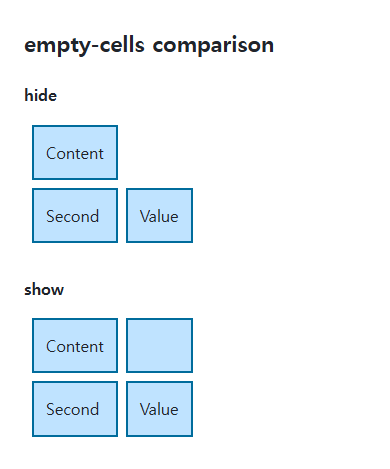
What counts as empty?
Visible text, images, and generated content can change whether a cell is considered empty. A nonbreaking space such as is different from genuinely empty content. Do not insert decorative spaces simply to manufacture a table layout.
Painting is different from deleting data
This property does not remove a row or filter a data value. If readers need to understand missing information, an explicit “Not applicable” value may be clearer than an unexplained blank. Cell spacing and the table’s outer border use separate properties.
Change one setting at a time
Use the complete example file above. Change only the specified selector or value rather than several comparison conditions at once.
- Put ordinary whitespace, a nonbreaking space ( ), and visible text into one empty cell in turn, comparing its paint.
- Switch the same table to collapse, compare hide/show, then restore separate and the empty cell. Distinguish cell space from its painting.
For table-wide sizing and cell layout, see CSS Tables: Borders, Sizing, and table-layout. Related properties to compare alongside these conditions are border-spacing.
When the result is missing or unexpected
- Check that Computed shows border-collapse: separate.
- Inspect whitespace, generated content, and children in a cell that remains visible.

CSS / Reference / content: Generate Pseudo-Element Text and Decoration
Generate strings, attribute labels, counters, and decorative pseudo-elements. Compare none with an empty string and retain important information in real HTML.

CSS / Reference / background-origin: Positioning References Versus Painting Boundaries
Choose a background image’s positioning box and distinguish it from background-clip. Compare how padding, borders, percentage sizes, and fixed attachment affect the reference.
CSS / Reference / background-clip: Background Painting Areas and Text Clipping
Choose border, padding, or content painting areas independently of image positioning. Compare visible boundaries and plan readable fallbacks for text-clipped backgrounds.

CSS / Reference / border-spacing: Separate Cell Gaps and Collapsed Borders
Set horizontal and vertical gaps in separate-border tables. Distinguish cell padding, zero spacing, collapsed borders, and browser default styles.

CSS / Reference / overflow: Visible Overflow, Scrolling, Hidden, and Clip
Choose clipping and scrolling behavior with appropriate size constraints. Compare hidden with clip and inspect axis interactions and flex minimum sizes.
CSS / Reference / quotes: Choose Nested Quotation Marks
Choose generated quotation pairs for nested text and distinguish them from literal punctuation. Compare automatic marks, none, and quotation-depth operations.
CSS / Reference / font-weight: Numeric Weights, Relative Weights, and Font Matching
Request numeric or relative font weights and inspect the supplied faces. Compare static and variable-font behavior without assuming every number produces a unique weight.
CSS / Reference / font-variant: Small Capitals and Font Features
Use small capitals without changing the source string and choose specific variant longhands. Compare real font support with synthesized presentation.

CSS / Reference / list-style-type: Change List Markers and Numbering
Style list markers while keeping ordered and unordered semantics. Compare numbering styles, starting values, marker removal, and shorthand resets.
CSS / Reference / background-repeat: Tiling, Space, and Round
Control horizontal and vertical background tiling and compare repeat, no-repeat, space, and round with the same tile and positioning area.