
MariaDB Tutorial / Design Table Relationships with Keys and Foreign Keys
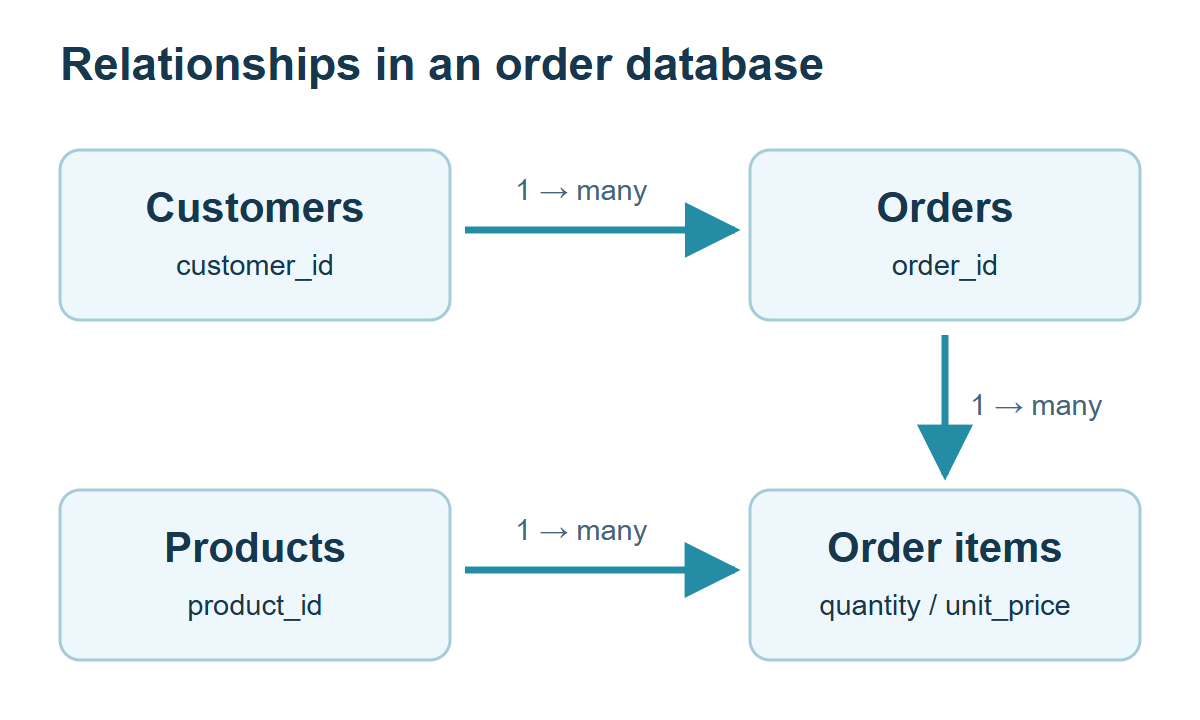
Design relationships by defining what each row represents and connecting primary and foreign keys. One customer can have many orders; the many-to-many relationship between orders and products can be represented by order items containing quantities and the unit prices recorded at purchase.
Define row meaning and relationship direction
Putting a customer name and a product list into a single order string makes quantity calculations and customer updates depend on parsing and repeated text. Separate customers, products, orders and items according to the facts and update rules that need to be preserved, rather than split tables merely for its own sake. Read Related Rows with INNER JOIN reads the defined relationships through queries; Normalize an Order Database Without Losing Historical Facts explains why independently maintained facts should be separated.
| Table | One row represents | Identification or relationship |
|---|---|---|
| customers | One customer | customer_id primary key |
| products | One product type | product_id primary key |
| orders | One order | customer_id references its customer |
| items | One product in an order | Composite order_id + product_id primary key |
An item stores its purchase-time unit_price, allowing an old order amount to remain reproducible after a product’s current price changes. If one order can contain multiple separate option variants of a product, review whether it needs a line identifier or an option key rather than this simplified composite key.
Check the MariaDB documentation for the syntax and conditions used here: foreign keys.
Create the complete foreign-key fixture
Connect to the learning server as course_user and select shopcourse. The command-line and UTF-8 SQL-file guide explains how to save the code as a UTF-8 file and execute it with SOURCE C:/mariadb-lab/lesson.sql;, replacing the path with the actual file. Run SQL inside the MariaDB client, rather than at the operating-system prompt.
Check SELECT VERSION(), DATABASE(); and SHOW TABLES; before creating c25_customers, c25_products, c25_orders, c25_items. These names belong only to this exercise. If they exist, inspect their definitions and rows first; remove them only when you have established that they are disposable exercise objects. Do not replace existing application tables.
Create and populate customers and products before orders and items that reference them. The primary and composite key guide explains the identification choices.
USE shopcourse;
CREATE TABLE c25_customers (
 customer_id INT NOT NULL PRIMARY KEY,
 customer_name VARCHAR(50) NOT NULL,
 city VARCHAR(30) NOT NULL
) ENGINE=InnoDB DEFAULT CHARSET=utf8mb4 COLLATE=utf8mb4_unicode_ci;
CREATE TABLE c25_products (
 product_id INT NOT NULL PRIMARY KEY,
 product_name VARCHAR(100) NOT NULL,
 category VARCHAR(30) NOT NULL,
 price DECIMAL(10,2) NOT NULL CHECK (price >= 0),
 stock INT NOT NULL CHECK (stock >= 0)
) ENGINE=InnoDB DEFAULT CHARSET=utf8mb4 COLLATE=utf8mb4_unicode_ci;
CREATE TABLE c25_orders (
 order_id INT NOT NULL PRIMARY KEY,
 customer_id INT NOT NULL,
 ordered_at DATETIME NOT NULL,
 status VARCHAR(20) NOT NULL,
 shipping_fee DECIMAL(10,2) NOT NULL DEFAULT 1000,
 CONSTRAINT fk_c25_order_customer FOREIGN KEY (customer_id)
  REFERENCES c25_customers(customer_id) ON DELETE RESTRICT
) ENGINE=InnoDB DEFAULT CHARSET=utf8mb4 COLLATE=utf8mb4_unicode_ci;
CREATE TABLE c25_items (
 order_id INT NOT NULL,
 product_id INT NOT NULL,
 quantity INT NOT NULL CHECK (quantity > 0),
 unit_price DECIMAL(10,2) NOT NULL CHECK (unit_price >= 0),
 PRIMARY KEY (order_id, product_id),
 CONSTRAINT fk_c25_item_order FOREIGN KEY (order_id)
  REFERENCES c25_orders(order_id) ON DELETE RESTRICT,
 CONSTRAINT fk_c25_item_product FOREIGN KEY (product_id)
  REFERENCES c25_products(product_id) ON DELETE RESTRICT
) ENGINE=InnoDB DEFAULT CHARSET=utf8mb4 COLLATE=utf8mb4_unicode_ci;
INSERT INTO c25_customers VALUES
 (1,'김민수','서울'),(2,'이서연','부산'),
 (3,'박지우','서울'),(4,'최하늘','대전');
INSERT INTO c25_products VALUES
 (1,'노트','문구',3500,20),(2,'볼펜','문구',1500,50),
 (3,'머그컵','생활',8000,12),(4,'스탠드','생활',25000,5);
INSERT INTO c25_orders
 (order_id,customer_id,ordered_at,status,shipping_fee) VALUES
 (101,1,'2026-01-10 10:00:00','paid',1000),
 (102,1,'2026-01-20 11:00:00','paid',1000),
 (103,2,'2026-02-05 12:00:00','paid',1000),
 (104,3,'2026-02-10 13:00:00','canceled',1000);
INSERT INTO c25_items VALUES
 (101,1,2,3500),(101,2,3,1500),(102,3,1,8000),
 (103,1,1,3500),(103,3,2,8000),(104,2,1,1500);
The SQL retains Korean sample names and city strings, while the explanations use stable customer and product IDs. Products 1–4 are a notebook, pen, mug and lamp. Customers 1 and 3 have the Seoul city value; customers 2 and 4 have Busan and Daejeon values. Preserve the supplied UTF-8 literals when reproducing the results.
Verify one-to-many and many-to-many links
SHOW CREATE TABLE c25_items;
SELECT c.customer_id,c.customer_name,o.order_id
FROM c25_customers AS c JOIN c25_orders AS o
 ON o.customer_id=c.customer_id ORDER BY c.customer_id,o.order_id;
SELECT COUNT(*) AS customers FROM c25_customers;
SELECT COUNT(*) AS orders_count FROM c25_orders;
SELECT COUNT(*) AS detail_rows FROM c25_items;
There are four customers, four orders and six item rows. Customer 1 owns orders 101 and 102; order 101 contains products 1 and 2. Product 1 occurs in orders 101 and 103. Each order–product link is itself a row containing the quantity and historical unit price.
Use identifiers rather than names for relationships. Different customers can share a name and names can change. Separating a stable identifier from a business uniqueness condition avoids rebuilding order links whenever a display name changes.
Test nonexistent parents and restricted deletion
Run the following deliberate failures separately after the valid setup. The first references nonexistent customer 999. The second attempts to delete customer 1 while referenced orders remain.
INSERT INTO c25_orders(order_id,customer_id,ordered_at,status)
VALUES(999,999,'2026-03-01 10:00:00','paid');

DELETE FROM c25_customers WHERE customer_id=1;
Expect foreign-key rejection in each case, then verify customer 1 remains and the order count is four. Do not disable foreign_key_checks simply to pass the input. A nullable child reference can represent no parent in a different design; this fixture declares the order customer NOT NULL to disallow that state.
Choose a deletion policy rather than defaulting to CASCADE
CASCADE can propagate a parent deletion to children, so convenience alone is insufficient justification. Customer departure may require preserving, anonymizing or deleting different records, and items can support accounting or return histories. This exercise uses RESTRICT to avoid automatically deleting related orders.
Check compatible key types and signedness, indexes and the storage engine. SHOW CREATE TABLE plus deliberately invalid input verifies more than the mere presence of reference-like text in a schema script. Referential integrity does not enforce every business rule, such as sufficient stock.
Review optional relationships and remove children first
Ask whether a customer can exist without an order, whether a product can exist before its first sale and whether an order requires a customer. Examine actual links and rejected inputs while the fixture is small. The normalization and order-design discussion develops the distinction between current attributes and transaction facts.
Before repeating the exercise, inspect the selected database, actual table definitions and stored rows, and back up anything that must be kept. Drop only this article’s disposable practice objects, with child tables before their referenced parents. DROP TABLE removes both definitions and rows and cannot be undone by an ordinary ROLLBACK; keep cleanup separate from transaction experiments.
DROP TABLE shopcourse.c25_items;
DROP TABLE shopcourse.c25_orders;
DROP TABLE shopcourse.c25_products;
DROP TABLE shopcourse.c25_customers;

MariaDB Tutorial / Break Queries into Named Steps with WITH and CTEs
Build a readable multi-step query with WITH, verify paid orders and per-order totals independently, and understand CTE scope, naming and execution-plan limitations.

MariaDB Tutorial / Identify Rows with PRIMARY KEY, AUTO_INCREMENT, and UNIQUE
Use primary keys, generated identifiers, and unique constraints for different purposes. Practice nullable unique email values, composite keys, duplicate failures, and the identifier gap left by a rolled-back insert.
MariaDB Tutorial / Query Hierarchies and Prevent Cycles with Recursive CTEs
Traverse a complete category tree with WITH RECURSIVE, depth, and path tracking. Change the traversal bound, introduce a controlled cycle, and distinguish a finite result from a complete and valid hierarchy.

MariaDB Tutorial / Install MariaDB on Ubuntu and Start the Server
Install MariaDB on Ubuntu with APT, distinguish service activity from automatic startup, and understand socket authentication. Create a restricted TCP learning account and diagnose connection or service problems.

MariaDB Tutorial / Connect Python to MariaDB and Use Parameterized Queries
Use a complete PyMySQL program to connect, insert, select, commit, and roll back. Keep apostrophes, Unicode, and injection-shaped inputs as values, and restrict dynamic sorting through an identifier allowlist.

MariaDB Tutorial / Connect with the Command-Line Client and Run SQL Files
Connect to MariaDB with explicit TCP and UTF-8 settings, check account and query results, and execute a complete SQL file with SOURCE. Learn how to diagnose path, encoding, and partial-execution errors.

MariaDB Tutorial / Avoid Duplicate Totals When Joining Multiple Tables
Trace row multiplication across customer, order, item and product joins. Reconcile correct goods and shipping totals, understand DISTINCT pitfalls and preaggregate details at the order grain.

MariaDB Tutorial / Import and Export CSV with Correct Paths, Types, and Encoding
Stage and validate a UTF-8 CSV before converting IDs and prices, then export through a server-side path. Review quoting, warnings, normalized duplicates, numeric bounds and field-level round-trip checks.

MariaDB Tutorial / Schedule Database Tasks and Verify Event Results
Create a disabled one-time event, reschedule it into the future, and verify both execution metadata and its result row. Understand recurring-task overlap, retries, privileges, time zones, and cleanup.

MariaDB Tutorial / Design Table Relationships with Keys and Foreign Keys
Build and inspect customer, product, order and item tables with foreign keys. Verify one-to-many links, reject missing parents and choose deliberate deletion and historical-price policies.