
CSS / Reference / backface-visibility: Front and Back Faces Under 3D Rotation
backface-visibility controls whether a transformed element’s back face is painted when it faces the viewer. Use a 3D rotation such as rotateY for the comparison; a plain 2D rotation does not demonstrate the same condition.
Syntax and value choices
| Property | Initial value | Inherited | Main application conditions |
|---|---|---|---|
backface-visibility |
visible | No | 3D reverse sides of transformable elements |
Initial values are not necessarily the values assigned to HTML elements by the browser’s stylesheet. Inspect the actual result in developer tools’ Computed panel.
.face { backface-visibility: hidden; transform: rotateY(180deg); }
| Value or category | Behavior and choice |
|---|---|
visible |
Paint the back-facing surface. |
hidden |
Do not paint the back-facing surface. |
rotateY(180deg) |
Turn a surface to show its reverse. |
preserve-3d |
A separate setting relevant when arranging multiple surfaces. |
For supported values and conditions, see MDN backface-visibility.
Run the example and compare results
Save this complete code as css-reference-10971-example.html in UTF-8 and open it in a browser. Keep its demonstration styles in that file rather than pasting them into a site-wide stylesheet.
<!doctype html>
<html lang="en">
<head>
<meta charset="utf-8">
<meta name="viewport" content="width=device-width, initial-scale=1">
<title>backface-visibility comparison example</title>
<style>
body { margin: 0; color: #20242b; background: #fff; font: 16px/1.7 "Malgun Gothic", sans-serif; }
#demo { padding: 24px; max-width: 820px; margin: auto; }
h1 { font-size: 22px; margin: 0 0 20px; }
.samples { display: flex; flex-wrap: wrap; gap: 24px; }
.label { margin: 0 0 8px; font-weight: 700; }
.frame { width: 220px; height: 120px; perspective: 600px; border: 1px dashed #718096; }
.target, .reference { width: 220px; height: 120px; background: #bfe3ff; transform: rotateY(180deg); text-align: center; line-height: 120px; }
.target { backface-visibility: hidden; }
.reference { backface-visibility: visible; }
</style>
</head>
<body>
<main id="demo">
<h1>backface-visibility comparison</h1>
<section class="samples"><div><p class="label">hidden / 180-degree rotation</p><div class="frame"><div class="target">Front FACE</div></div></div><div><p class="label">visible / 180-degree rotation</p><div class="frame"><div class="reference">Front FACE</div></div></div></section>
</main>
</body>
</html>
The hidden sample is not painted at 180 degrees; the visible sample shows mirrored text. Restoring the rotation to 0deg displays both front faces.
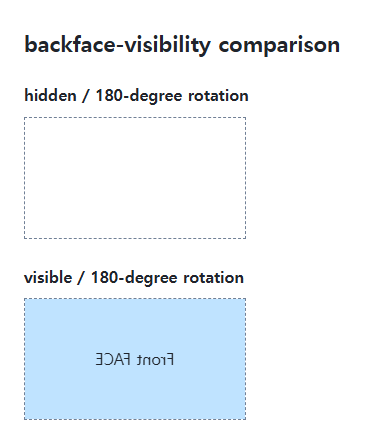
Individual faces in a two-sided card
A card can use separate front and back surfaces, each with hidden backface visibility. Position and rotate the reverse surface deliberately and inspect the parent’s 3D context. The visibility property alone does not construct a complete card.
Hidden painting and interaction
Do not assume a visually hidden face is automatically removed from accessible navigation. A real interactive card needs deliberate state, focus, and active-control management. Also account for reduced-motion preferences when adding a transition.
Change one setting at a time
Use the complete example file above. Change only the specified selector or value rather than several comparison conditions at once.
- Change only rotateY(180deg) to 0deg to show the fronts. Compare near 90deg and 180deg, then restore the original rotation.
- A real two-sided card also needs face positioning, parent rotation, active controls, tab behavior, and reduced-motion handling. This property alone does not implement the interface.
For combining rotation with state transitions, see CSS Transforms and Transitions.
When the result is missing or unexpected
- Compare rotateY or rotateX rather than an ordinary 2D rotation.
- Inspect both parent and face angles if the intended front is missing.

CSS / Reference / background-repeat: Tiling, Space, and Round
Control horizontal and vertical background tiling and compare repeat, no-repeat, space, and round with the same tile and positioning area.

CSS / Reference / empty-cells: Show or Hide Empty Table Cells
Control empty-cell borders and backgrounds in a separated table while preserving its structure. Compare show, hide, whitespace, and the collapsed-border exception.

CSS / Reference / box-sizing: Content and Border Boxes, Including Small-Size Limits
Calculate content-box and border-box sizes, including margins and the minimum content-size limit. Apply resets deliberately and check external components.

CSS / Reference / font-variant: Small Capitals and Font Features
Use small capitals without changing the source string and choose specific variant longhands. Compare real font support with synthesized presentation.
CSS / Reference / line-height: Unitless Ratios, Inherited Lengths, and Line Boxes
Choose scalable line-height values and compare ratio inheritance with fixed lengths. Separate line boxes from paragraph margins and test larger child text.
CSS / Reference / background-attachment: Viewport, Box, and Internal Scroll Attachment
Compare local and scroll backgrounds inside a scrolling box and distinguish them from viewport-fixed backgrounds. Test target-browser behavior and a usable fallback.
CSS / Reference / text-align: Text, Inline Content, and Block Alignment
Align text by physical or logical sides and distinguish it from centering a block. Inspect justification, final lines, and direction-sensitive layouts.

CSS / Reference / word-wrap: Legacy Alias and Min-Content Wrapping
Use overflow-wrap to manage long strings and understand the word-wrap alias. Compare anywhere with break-word in intrinsic sizing and flex or grid layouts.

CSS / Reference / aspect-ratio: Preferred Ratios, Natural Images, and Constraints
Use preferred aspect ratios with automatic sizing and inspect competing constraints. Distinguish a replaced image’s natural ratio from its CSS box and object-fit behavior.
CSS / Reference / word-break: Language-Sensitive Breaks Versus Emergency Wrapping
Choose word-breaking behavior for actual scripts and long strings. Compare normal, keep-all, and break-all, and distinguish deprecated break-word from overflow-wrap.