
CSS / Reference / font-family: Font Lists, Glyph Fallback, and Loading
font-family lists font candidates in priority order. Selection also depends on glyph coverage, so one sentence can use different fonts for different characters.
Syntax and value choices
| Property | Initial value | Inherited | Main application conditions |
|---|---|---|---|
font-family |
Depends on the user agent | Yes | All elements; visible effects depend on the text, image, or box conditions below |
Initial values are not necessarily the values assigned to HTML elements by the browser’s stylesheet. Inspect the actual result in developer tools’ Computed panel.
body { font-family: "Malgun Gothic", "Apple SD Gothic Neo", sans-serif; }
code { font-family: Consolas, monospace; }
| Value or category | Behavior and choice |
|---|---|
"A font name" |
Quote a multiword family name to identify it clearly. |
sans-serif |
An unquoted generic sans-serif family. |
serif |
An unquoted generic serif family. |
monospace |
An unquoted generic fixed-width family. |
For supported values and conditions, see MDN font-family.
Run the example and compare results
Save this complete code as css-reference-10551-example.html in UTF-8 and open it in a browser. Keep its demonstration styles in that file rather than pasting them into a site-wide stylesheet.
<!doctype html>
<html lang="en">
<head>
<meta charset="utf-8">
<meta name="viewport" content="width=device-width, initial-scale=1">
<title>font-family comparison example</title>
<style>
body { margin: 0; color: #20242b; background: #fff; font: 16px/1.7 "Malgun Gothic", sans-serif; }
#demo { padding: 24px; max-width: 820px; margin: auto; }
h1 { font-size: 22px; margin: 0 0 20px; }
.samples { display: flex; flex-wrap: wrap; gap: 24px; }
.label { margin: 0 0 8px; font-weight: 700; }
.target { font-family: Georgia, serif; font-size: 24px; }
.reference { font-family: Consolas, monospace; font-size: 24px; }
</style>
</head>
<body>
<main id="demo">
<h1>font-family comparison</h1>
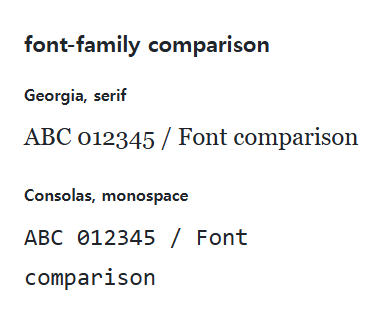
<section class="samples"><div class="a"><p class="label">Georgia, serif</p><div class="target">ABC 012345 / Font comparison</div></div><div class="b"><p class="label">Consolas, monospace</p><div class="reference">ABC 012345 / Font comparison</div></div></section>
</main>
</body>
</html>
The samples request different font families. Installed fonts and script coverage affect the actual glyphs; do not treat one operating system’s screenshot as a universal result.
Finish with a generic family
Separate candidates with commas and write generic names without quotation marks. "sans-serif" can be interpreted as a specific named family instead of the generic. A final generic gives the browser a fallback when named candidates are absent.
Naming a font does not deliver its file
A family name alone does not download a font. Supply licensed files through an appropriate mechanism such as @font-face. Use the developer tools’ rendered-font information to distinguish missing faces from missing glyphs.
Change one setting at a time
Use the complete example file above. Change only the specified selector or value rather than several comparison conditions at once.
- Inspect the actual glyphs in Elements → Computed → Rendered Fonts, selecting script passages separately where relevant. Record the candidate list and rendered font independently.
- Temporarily use a nonexistent practice family first, observe fallback, and restore the original stack. Another OS can choose a different actual face.
For coordinated font sizing, line heights, and typeface choices, see CSS Fonts, Font Sizes, and Line Height. Related properties to compare alongside these conditions are font-weight.
When the result is missing or unexpected
- Check spelling, commas, quotation marks, and the intended generic fallback.
- Inspect network requests and matching @font-face family names.

CSS / Reference / background-repeat: Tiling, Space, and Round
Control horizontal and vertical background tiling and compare repeat, no-repeat, space, and round with the same tile and positioning area.
CSS / Reference / background-size: Cover, Contain, and Background Sizing
Compare background cover and contain using a known image ratio. Account for positioning areas, percentages, cropping, repeated tiles, and the element’s own size.

CSS / Reference / quotes: Choose Nested Quotation Marks
Choose generated quotation pairs for nested text and distinguish them from literal punctuation. Compare automatic marks, none, and quotation-depth operations.
CSS / Reference / content: Generate Pseudo-Element Text and Decoration
Generate strings, attribute labels, counters, and decorative pseudo-elements. Compare none with an empty string and retain important information in real HTML.
CSS / Reference / font-variant: Small Capitals and Font Features
Use small capitals without changing the source string and choose specific variant longhands. Compare real font support with synthesized presentation.
CSS / Reference / font-size: Understand px, em, rem, and Text Enlargement
Choose text-size units by their reference and test nested em scaling. Check the actual root size, browser enlargement, and layout constraints.

CSS / Reference / empty-cells: Show or Hide Empty Table Cells
Control empty-cell borders and backgrounds in a separated table while preserving its structure. Compare show, hide, whitespace, and the collapsed-border exception.
CSS / Reference / text-indent: First-Line Indents and Hanging Paragraphs
Create first-line and hanging indents, distinguish them from paragraph padding, and check inheritance, writing direction, and narrow-screen clipping.
CSS / Reference / font-family: Font Lists, Glyph Fallback, and Loading
Build a font stack with appropriate generic fallbacks and inspect the fonts actually used. Distinguish naming a family from loading files and covering characters.

CSS / Reference / calc(): Calculate CSS Values and Understand Their Types
Combine percentages and lengths with calc(), inspect the actual parent width, and distinguish invalid expressions from newer typed arithmetic and special numeric results.