
CSS / Reference / font-weight: Numeric Weights, Relative Weights, and Font Matching
font-weight requests text weight. normal corresponds to 400 and bold to 700; numeric values from 1 to 1000 are allowed, but the font need not provide every requested weight.
Syntax and value choices
| Property | Initial value | Inherited | Main application conditions |
|---|---|---|---|
font-weight |
normal | Yes | All elements; visible effects depend on the text, image, or box conditions below |
Initial values are not necessarily the values assigned to HTML elements by the browser’s stylesheet. Inspect the actual result in developer tools’ Computed panel.
body { font-weight: 400; }
strong { font-weight: 700; }
.title { font-weight: 650; }
| Value or category | Behavior and choice |
|---|---|
normal / 400 |
Normal requested weight. |
bold / 700 |
Bold requested weight. |
1–1000 |
Numeric weight; available faces or axes vary by font. |
bolder / lighter |
Select a relative weight using the inherited value. |
For supported values and conditions, see MDN font-weight.
Run the example and compare results
Save this complete code as css-reference-10553-example.html in UTF-8 and open it in a browser. Keep its demonstration styles in that file rather than pasting them into a site-wide stylesheet.
<!doctype html>
<html lang="en">
<head>
<meta charset="utf-8">
<meta name="viewport" content="width=device-width, initial-scale=1">
<title>font-weight comparison example</title>
<style>
body { margin: 0; color: #20242b; background: #fff; font: 16px/1.7 "Malgun Gothic", sans-serif; }
#demo { padding: 24px; max-width: 820px; margin: auto; }
h1 { font-size: 22px; margin: 0 0 20px; }
.samples { display: flex; flex-wrap: wrap; gap: 24px; }
.label { margin: 0 0 8px; font-weight: 700; }
.target { font-weight: 400; font-size: 26px; }
.reference { font-weight: 700; font-size: 26px; }
</style>
</head>
<body>
<main id="demo">
<h1>font-weight comparison</h1>
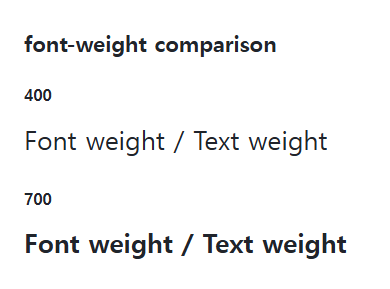
<section class="samples"><div class="a"><p class="label">400</p><div class="target">Font weight / Text weight</div></div><div class="b"><p class="label">700</p><div class="reference">Font weight / Text weight</div></div></section>
</main>
</body>
</html>
Compare the 400 and 700 requests. A missing weight can lead to font matching or synthesized bold rather than a distinct supplied face.
Static and variable fonts
A static family usually offers discrete weight files. A variable font may provide values across its supported weight-axis range. Match @font-face weight descriptors to the actual files; not every variable font has the same range.
Relative weights and meaningful emphasis
bolder is not a fixed number added to the parent. Use a numeric weight when a design requires an explicit request. The semantic meaning of strong is separate from a visual bold face, so CSS alone does not replace meaningful emphasis.
Change one setting at a time
Use the complete example file above. Change only the specified selector or value rather than several comparison conditions at once.
- Change only font-weight among 400, 650, and 700, inspecting Computed and Rendered Fonts. Three requests need not create three different faces.
- A parent request of 400 with a bolder child demonstrates a 700 request. Distinguish the relative request from the selected face, then restore the numeric rules.
| Parent request | bolder | lighter |
|---|---|---|
| 100 | 400 | 100 |
| 400 | 700 | 100 |
| 700 | 900 | 400 |
| 900 | 900 | 700 |
The table shows relative requests for representative inherited weights, not the selected face or synthesis outcome. In the original example set .samples to font-weight:400, change only .target to bolder/lighter, inspect 700/100 in Computed, then remove the temporary rules.
For coordinated font sizing, line heights, and typeface choices, see CSS Fonts, Font Sizes, and Line Height. Related properties to compare alongside these conditions are font-family.
When the result is missing or unexpected
- Inspect both the computed request and the font face actually rendered.
- If several numeric requests look identical, check the available weights and loading.

CSS / Reference / content: Generate Pseudo-Element Text and Decoration
Generate strings, attribute labels, counters, and decorative pseudo-elements. Compare none with an empty string and retain important information in real HTML.

CSS / Reference / background-repeat: Tiling, Space, and Round
Control horizontal and vertical background tiling and compare repeat, no-repeat, space, and round with the same tile and positioning area.
CSS / Reference / letter-spacing, word-spacing: Compare Character and Word Spacing
Adjust character and word gaps independently using the same text and a normal baseline. Account for inheritance, language, wrapping, and excessive negative spacing.
CSS / Reference / text-indent: First-Line Indents and Hanging Paragraphs
Create first-line and hanging indents, distinguish them from paragraph padding, and check inheritance, writing direction, and narrow-screen clipping.
CSS / Reference / font-variant: Small Capitals and Font Features
Use small capitals without changing the source string and choose specific variant longhands. Compare real font support with synthesized presentation.
CSS / Reference / font-family: Font Lists, Glyph Fallback, and Loading
Build a font stack with appropriate generic fallbacks and inspect the fonts actually used. Distinguish naming a family from loading files and covering characters.
CSS / Reference / quotes: Choose Nested Quotation Marks
Choose generated quotation pairs for nested text and distinguish them from literal punctuation. Compare automatic marks, none, and quotation-depth operations.
CSS / Reference / font-size: Understand px, em, rem, and Text Enlargement
Choose text-size units by their reference and test nested em scaling. Check the actual root size, browser enlargement, and layout constraints.
CSS / Reference / background-size: Cover, Contain, and Background Sizing
Compare background cover and contain using a known image ratio. Account for positioning areas, percentages, cropping, repeated tiles, and the element’s own size.
CSS / Reference / font-weight: Numeric Weights, Relative Weights, and Font Matching
Request numeric or relative font weights and inspect the supplied faces. Compare static and variable-font behavior without assuming every number produces a unique weight.