Claude Code / 계산기
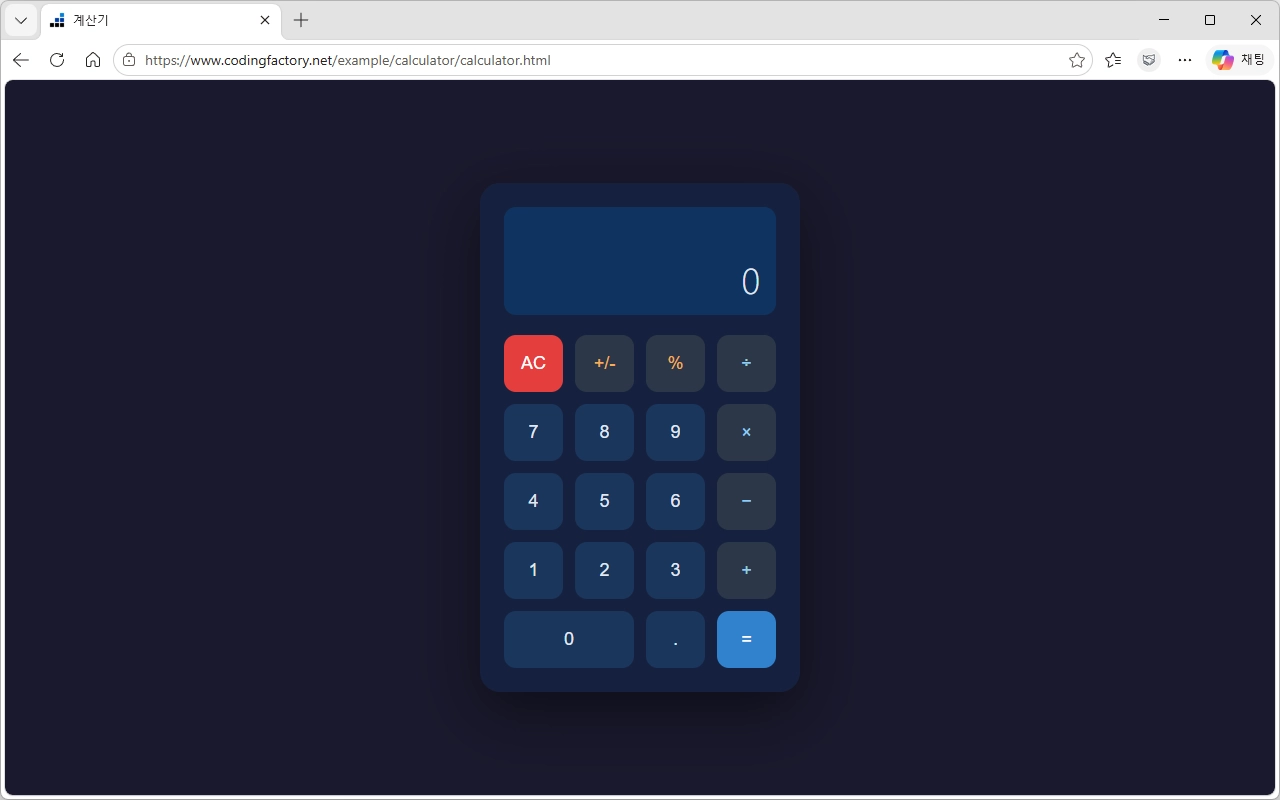
Claude Code로 만든 계산기 웹페이지입니다.
https://www.codingfactory.net/example/calculator/calculator.html
<!DOCTYPE html>
<html lang="ko">
<head>
  <meta charset="UTF-8">
  <meta name="viewport" content="width=device-width, initial-scale=1.0">
  <title>계산기</title>
  <style>
    * { box-sizing: border-box; margin: 0; padding: 0; }

    body {
      display: flex;
      justify-content: center;
      align-items: center;
      min-height: 100vh;
      background: #1a1a2e;
      font-family: 'Segoe UI', sans-serif;
    }

    .calculator {
      background: #16213e;
      border-radius: 20px;
      padding: 24px;
      box-shadow: 0 20px 60px rgba(0,0,0,0.5);
      width: 320px;
    }

    .display {
      background: #0f3460;
      border-radius: 12px;
      padding: 20px 16px 12px;
      margin-bottom: 20px;
      text-align: right;
    }

    .display .expression {
      color: #a0aec0;
      font-size: 14px;
      min-height: 20px;
      margin-bottom: 8px;
      overflow: hidden;
      text-overflow: ellipsis;
      white-space: nowrap;
    }

    .display .result {
      color: #e2e8f0;
      font-size: 36px;
      font-weight: 300;
      overflow: hidden;
      text-overflow: ellipsis;
      white-space: nowrap;
    }

    .buttons {
      display: grid;
      grid-template-columns: repeat(4, 1fr);
      gap: 12px;
    }

    button {
      border: none;
      border-radius: 12px;
      font-size: 18px;
      font-weight: 500;
      cursor: pointer;
      padding: 18px 0;
      transition: all 0.15s ease;
    }

    button:active { transform: scale(0.93); }

    .btn-number {
      background: #1a365d;
      color: #e2e8f0;
    }

    .btn-number:hover { background: #2a4a7f; }

    .btn-operator {
      background: #2d3748;
      color: #90cdf4;
    }

    .btn-operator:hover { background: #4a5568; }

    .btn-equal {
      background: #3182ce;
      color: white;
    }

    .btn-equal:hover { background: #2b6cb0; }

    .btn-clear {
      background: #e53e3e;
      color: white;
    }

    .btn-clear:hover { background: #c53030; }

    .btn-special {
      background: #2d3748;
      color: #f6ad55;
    }

    .btn-special:hover { background: #4a5568; }

    .span-two { grid-column: span 2; }
  </style>
</head>
<body>
  <div class="calculator">
    <div class="display">
      <div class="expression" id="expression"></div>
      <div class="result" id="result">0</div>
    </div>
    <div class="buttons">
      <button class="btn-clear" onclick="clearAll()">AC</button>
      <button class="btn-special" onclick="toggleSign()">+/-</button>
      <button class="btn-special" onclick="percent()">%</button>
      <button class="btn-operator" onclick="inputOperator('/')">÷</button>

      <button class="btn-number" onclick="inputNumber('7')">7</button>
      <button class="btn-number" onclick="inputNumber('8')">8</button>
      <button class="btn-number" onclick="inputNumber('9')">9</button>
      <button class="btn-operator" onclick="inputOperator('*')">×</button>

      <button class="btn-number" onclick="inputNumber('4')">4</button>
      <button class="btn-number" onclick="inputNumber('5')">5</button>
      <button class="btn-number" onclick="inputNumber('6')">6</button>
      <button class="btn-operator" onclick="inputOperator('-')">−</button>

      <button class="btn-number" onclick="inputNumber('1')">1</button>
      <button class="btn-number" onclick="inputNumber('2')">2</button>
      <button class="btn-number" onclick="inputNumber('3')">3</button>
      <button class="btn-operator" onclick="inputOperator('+')">+</button>

      <button class="btn-number span-two" onclick="inputNumber('0')">0</button>
      <button class="btn-number" onclick="inputDot()">.</button>
      <button class="btn-equal" onclick="calculate()">=</button>
    </div>
  </div>

  <script>
    let current = '0';
    let expression = '';
    let operator = null;
    let operand = null;
    let justCalculated = false;

    function updateDisplay() {
      document.getElementById('result').textContent = current;
      document.getElementById('expression').textContent = expression;
    }

    function inputNumber(n) {
      if (justCalculated) {
        current = n;
        expression = '';
        justCalculated = false;
      } else {
        current = current === '0' ? n : current + n;
      }
      updateDisplay();
    }

    function inputDot() {
      if (justCalculated) { current = '0.'; justCalculated = false; }
      else if (!current.includes('.')) current += '.';
      updateDisplay();
    }

    function inputOperator(op) {
      justCalculated = false;
      if (operator && operand !== null) {
        const result = compute(operand, parseFloat(current), operator);
        current = formatNum(result);
      }
      operand = parseFloat(current);
      operator = op;
      expression = current + ' ' + opSymbol(op);
      current = '0';
      updateDisplay();
    }

    function calculate() {
      if (operator === null || operand === null) return;
      const result = compute(operand, parseFloat(current), operator);
      expression = operand + ' ' + opSymbol(operator) + ' ' + current + ' =';
      current = formatNum(result);
      operator = null;
      operand = null;
      justCalculated = true;
      updateDisplay();
    }

    function compute(a, b, op) {
      if (op === '+') return a + b;
      if (op === '-') return a - b;
      if (op === '*') return a * b;
      if (op === '/') return b !== 0 ? a / b : 'Error';
    }

    function formatNum(n) {
      if (n === 'Error') return 'Error';
      const s = parseFloat(n.toFixed(10)).toString();
      return s;
    }

    function opSymbol(op) {
      return { '+': '+', '-': '−', '*': '×', '/': '÷' }[op];
    }

    function clearAll() {
      current = '0'; expression = '';
      operator = null; operand = null; justCalculated = false;
      updateDisplay();
    }

    function toggleSign() {
      if (current !== '0' && current !== 'Error')
        current = current.startsWith('-') ? current.slice(1) : '-' + current;
      updateDisplay();
    }

    function percent() {
      if (current !== 'Error')
        current = formatNum(parseFloat(current) / 100);
      updateDisplay();
    }

    document.addEventListener('keydown', e => {
      if (e.key >= '0' && e.key <= '9') inputNumber(e.key);
      else if (e.key === '.') inputDot();
      else if (e.key === '+') inputOperator('+');
      else if (e.key === '-') inputOperator('-');
      else if (e.key === '*') inputOperator('*');
      else if (e.key === '/') { e.preventDefault(); inputOperator('/'); }
      else if (e.key === 'Enter' || e.key === '=') calculate();
      else if (e.key === 'Escape') clearAll();
      else if (e.key === 'Backspace') {
        if (current.length > 1) current = current.slice(0, -1);
        else current = '0';
        updateDisplay();
      }
    });
  </script>
</body>
</html>

Claude Code로 만든 계산기 웹페이지입니다.

Claude Code / 개발자를 위한 AI 코딩 에이전트 개념과 활용 방법
Claude Code란 무엇인지 쉽게 정리했습니다. AI 코딩 에이전트의 개념, 주요 기능, 기존 코딩 도구와의 차이, 활용 방법과 주의사항까지 개발자가 알아야 할 핵심 내용을 확인해 보세요.

Claude Code로 만든 내 IP 확인 웹페이지입니다. 외부에서 인식하는 내 IP를 알려줍니다. HTML 버전, PHP 버전 두 가지입니다.

Claude Code로 만든 로또 번호 생성기입니다. 1개에서 10개까지 만들 수 있습니다. 초기화를 클릭하여 계속 만들 수 있습니다.