Claude Code / 로또 번호 생성기
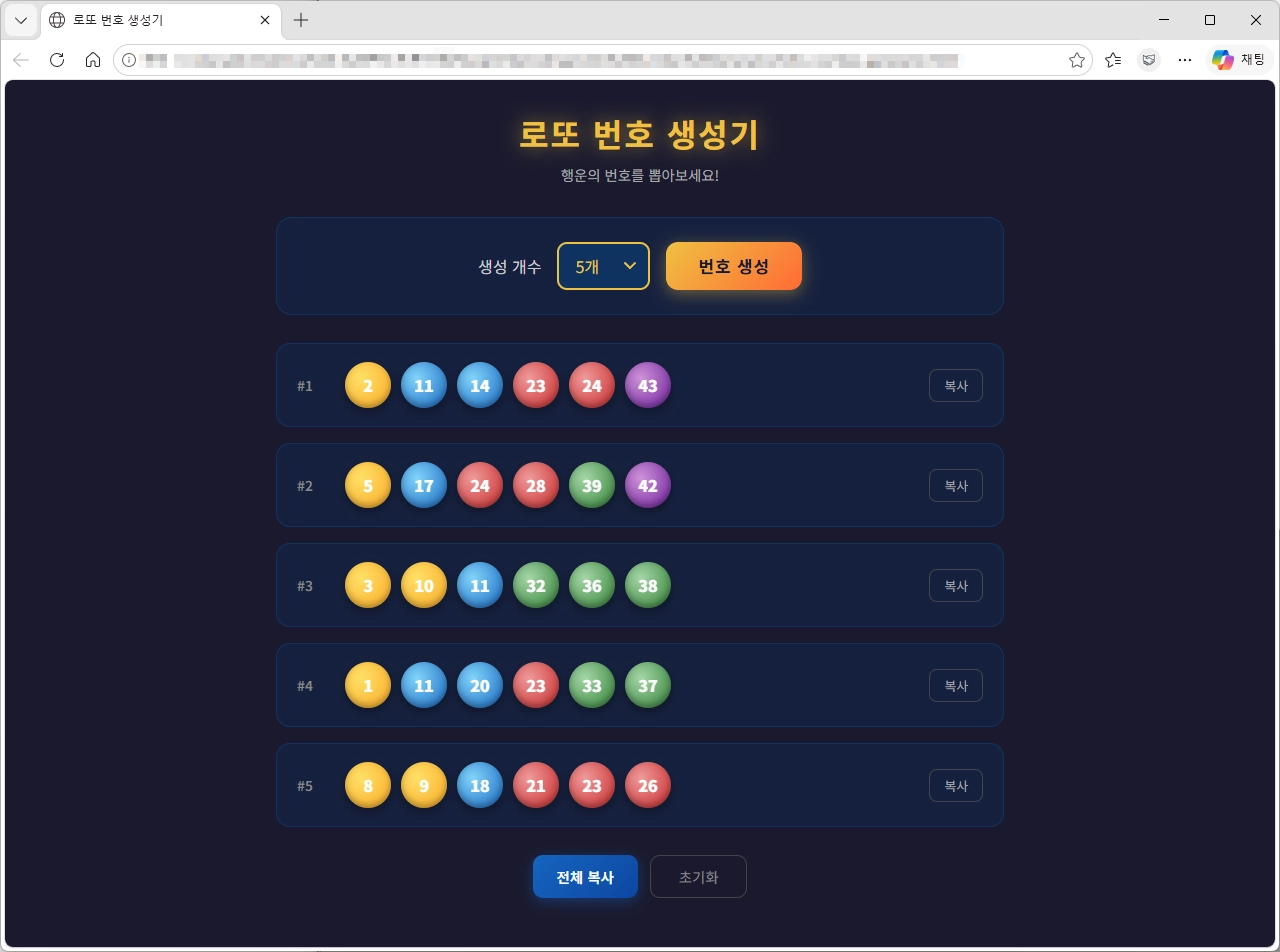
HTML
<!DOCTYPE html>
<html lang="ko">
<head>
  <meta charset="UTF-8" />
  <meta name="viewport" content="width=device-width, initial-scale=1.0" />
  <title>로또 번호 생성기</title>
  <link href="https://fonts.googleapis.com/css2?family=Noto+Sans+KR:wght@400;600;700;900&display=swap" rel="stylesheet" />
  <link rel="stylesheet" href="style.css" />
</head>
<body>
  <div class="container">
    <h1>로또 번호 생성기</h1>
    <p class="subtitle">행운의 번호를 뽑아보세요!</p>

    <div class="control-box">
      <label for="count">생성 개수</label>
      <select id="count" class="count-select">
        <option value="1">1개</option>
        <option value="2">2개</option>
        <option value="3">3개</option>
        <option value="4">4개</option>
        <option value="5" selected>5개</option>
        <option value="6">6개</option>
        <option value="7">7개</option>
        <option value="8">8개</option>
        <option value="9">9개</option>
        <option value="10">10개</option>
      </select>
      <button class="btn-generate" id="btnGenerate" onclick="generate()">번호 생성</button>
    </div>

    <div class="results" id="results"></div>
    <div class="btn-actions" id="btnActions" style="display:none;">
      <button class="btn-copy-all" id="btnCopyAll" onclick="copyAll()">전체 복사</button>
      <button class="btn-reset" onclick="reset()">초기화</button>
    </div>
  </div>

  <script src="script.js"></script>
</body>
</html>
style.css
* {
  box-sizing: border-box;
  margin: 0;
  padding: 0;
}

input, select, button, textarea {
  font-family: 'Noto Sans KR', sans-serif;
}

body {
  background: #1a1a2e;
  font-family: 'Noto Sans KR', sans-serif;
  min-height: 100vh;
  display: flex;
  justify-content: center;
  align-items: flex-start;
  padding: 30px 16px;
}

.container {
  width: 100%;
  max-width: 728px;
}

h1 {
  text-align: center;
  font-size: 2rem;
  color: #f0c040;
  margin-bottom: 8px;
  text-shadow: 0 0 20px rgba(240, 192, 64, 0.6);
  letter-spacing: 2px;
}

.subtitle {
  text-align: center;
  color: #aaa;
  font-size: 0.9rem;
  margin-bottom: 32px;
}

.control-box {
  background: #16213e;
  border-radius: 16px;
  padding: 24px;
  margin-bottom: 28px;
  border: 1px solid #0f3460;
  display: flex;
  flex-wrap: wrap;
  align-items: center;
  gap: 16px;
  justify-content: center;
}

.control-box label {
  color: #ccc;
  font-size: 1rem;
  white-space: nowrap;
}

.count-select {
  appearance: none;
  background: #0f3460;
  color: #f0c040;
  border: 2px solid #f0c040;
  border-radius: 10px;
  padding: 10px 40px 10px 16px;
  font-size: 1rem;
  cursor: pointer;
  outline: none;
  background-image: url("data:image/svg+xml,%3Csvg xmlns='http://www.w3.org/2000/svg' width='12' height='8' viewBox='0 0 12 8'%3E%3Cpath d='M1 1l5 5 5-5' stroke='%23f0c040' stroke-width='2' fill='none' stroke-linecap='round'/%3E%3C/svg%3E");
  background-repeat: no-repeat;
  background-position: right 12px center;
  transition: border-color 0.2s;
}

.count-select:hover {
  border-color: #ffd700;
}

.btn-generate {
  background: linear-gradient(135deg, #f0c040, #ff6b35);
  color: #1a1a2e;
  border: none;
  border-radius: 12px;
  padding: 12px 32px;
  font-size: 1.05rem;
  font-weight: 700;
  cursor: pointer;
  transition: transform 0.15s, box-shadow 0.15s;
  box-shadow: 0 4px 16px rgba(240, 192, 64, 0.4);
  letter-spacing: 1px;
}

.btn-generate:hover {
  transform: translateY(-2px);
  box-shadow: 0 6px 24px rgba(240, 192, 64, 0.6);
}

.btn-generate:active {
  transform: translateY(0);
}

.btn-generate:disabled {
  opacity: 0.6;
  cursor: not-allowed;
  transform: none;
}

.results {
  display: flex;
  flex-direction: column;
  gap: 16px;
}

.lotto-row {
  background: #16213e;
  border-radius: 14px;
  padding: 18px 20px;
  border: 1px solid #0f3460;
  display: flex;
  align-items: center;
  justify-content: center;
  gap: 12px;
  flex-wrap: wrap;
  opacity: 0;
  transform: translateY(20px);
  animation: rowFadeIn 0.4s forwards;
}

@keyframes rowFadeIn {
  to {
    opacity: 1;
    transform: translateY(0);
  }
}

.row-label {
  color: #888;
  font-size: 0.85rem;
  min-width: 36px;
  font-weight: 600;
}

.balls {
  display: flex;
  flex-wrap: wrap;
  gap: 10px;
  justify-content: center;
}

.btn-copy {
  margin-left: auto;
  background: transparent;
  color: #aaa;
  border: 1px solid #444;
  border-radius: 8px;
  padding: 6px 14px;
  font-size: 0.8rem;
  cursor: pointer;
  transition: color 0.2s, border-color 0.2s, background 0.2s;
  white-space: nowrap;
  flex-shrink: 0;
}

.btn-copy:hover {
  color: #f0c040;
  border-color: #f0c040;
}

.btn-copy.copied {
  color: #4caf50;
  border-color: #4caf50;
  background: rgba(76, 175, 80, 0.1);
}

.ball {
  width: 46px;
  height: 46px;
  border-radius: 50%;
  display: flex;
  align-items: center;
  justify-content: center;
  font-size: 1rem;
  font-weight: 800;
  color: #fff;
  box-shadow: inset 0 -3px 6px rgba(0,0,0,0.3), 0 4px 12px rgba(0,0,0,0.4);
  opacity: 0;
  transform: scale(0.3) rotate(-180deg);
  animation: ballPop 0.5s cubic-bezier(0.34, 1.56, 0.64, 1) forwards;
}

@keyframes ballPop {
  to {
    opacity: 1;
    transform: scale(1) rotate(0deg);
  }
}

/* 번호 구간별 색상 */
.ball.c1 { background: radial-gradient(circle at 35% 35%, #ffe066, #f9a825); } /* 1~10 노랑 */
.ball.c2 { background: radial-gradient(circle at 35% 35%, #81d4fa, #1565c0); } /* 11~20 파랑 */
.ball.c3 { background: radial-gradient(circle at 35% 35%, #ef9a9a, #c62828); } /* 21~30 빨강 */
.ball.c4 { background: radial-gradient(circle at 35% 35%, #a5d6a7, #2e7d32); } /* 31~40 초록 */
.ball.c5 { background: radial-gradient(circle at 35% 35%, #ce93d8, #6a1b9a); } /* 41~45 보라 */

.btn-actions {
  display: flex;
  justify-content: center;
  gap: 12px;
  margin-top: 28px;
  flex-wrap: wrap;
}

.btn-copy-all {
  background: linear-gradient(135deg, #1565c0, #0d47a1);
  color: #fff;
  border: none;
  border-radius: 10px;
  padding: 10px 24px;
  font-size: 0.9rem;
  font-weight: 600;
  cursor: pointer;
  transition: transform 0.15s, box-shadow 0.15s;
  box-shadow: 0 4px 14px rgba(21, 101, 192, 0.4);
}

.btn-copy-all:hover {
  transform: translateY(-2px);
  box-shadow: 0 6px 20px rgba(21, 101, 192, 0.6);
}

.btn-copy-all.copied {
  background: linear-gradient(135deg, #2e7d32, #1b5e20);
  box-shadow: 0 4px 14px rgba(46, 125, 50, 0.4);
}

.btn-reset {
  display: block;
  margin: 0;
  background: transparent;
  color: #888;
  border: 1px solid #444;
  border-radius: 10px;
  padding: 10px 28px;
  font-size: 0.9rem;
  cursor: pointer;
  transition: color 0.2s, border-color 0.2s;
}

.btn-reset:hover {
  color: #f0c040;
  border-color: #f0c040;
}

@media (max-width: 480px) {
  h1 { font-size: 1.5rem; }
  .ball { width: 40px; height: 40px; font-size: 0.9rem; }
  .btn-generate { padding: 11px 24px; font-size: 0.95rem; }
}
script.js
function getColorClass(num) {
  if (num <= 10) return 'c1';
  if (num <= 20) return 'c2';
  if (num <= 30) return 'c3';
  if (num <= 40) return 'c4';
  return 'c5';
}

function pickNumbers() {
  const pool = Array.from({ length: 45 }, (_, i) => i + 1);
  for (let i = pool.length - 1; i > 0; i--) {
    const j = Math.floor(Math.random() * (i + 1));
    [pool[i], pool[j]] = [pool[j], pool[i]];
  }
  return pool.slice(0, 6).sort((a, b) => a - b);
}

function generate() {
  const count = parseInt(document.getElementById('count').value);
  const resultsEl = document.getElementById('results');
  const btn = document.getElementById('btnGenerate');

  btn.disabled = true;
  resultsEl.innerHTML = '';

  for (let r = 0; r < count; r++) {
    const numbers = pickNumbers();
    const delay = r * 150;

    setTimeout(() => {
      const row = document.createElement('div');
      row.className = 'lotto-row';
      row.style.animationDelay = '0ms';

      const label = document.createElement('span');
      label.className = 'row-label';
      label.textContent = `#${r + 1}`;

      const balls = document.createElement('div');
      balls.className = 'balls';

      numbers.forEach((num, idx) => {
        const ball = document.createElement('div');
        ball.className = `ball ${getColorClass(num)}`;
        ball.textContent = num;
        ball.style.animationDelay = `${idx * 80}ms`;
        balls.appendChild(ball);
      });

      const copyBtn = document.createElement('button');
      copyBtn.className = 'btn-copy';
      copyBtn.textContent = '복사';
      copyBtn.addEventListener('click', () => {
        const text = numbers.join(', ');
        navigator.clipboard.writeText(text).then(() => {
          copyBtn.textContent = '✔ 복사됨';
          copyBtn.classList.add('copied');
          setTimeout(() => {
            copyBtn.textContent = '복사';
            copyBtn.classList.remove('copied');
          }, 1500);
        });
      });

      row.appendChild(label);
      row.appendChild(balls);
      row.appendChild(copyBtn);
      resultsEl.appendChild(row);

      if (r === count - 1) {
        setTimeout(() => {
          btn.disabled = false;
          document.getElementById('btnActions').style.display = 'flex';
        }, numbers.length * 80 + 200);
      }
    }, delay);
  }
}

function copyAll() {
  const rows = document.querySelectorAll('.lotto-row');
  const text = Array.from(rows).map((row, i) => {
    const nums = Array.from(row.querySelectorAll('.ball')).map(b => b.textContent).join(', ');
    return `#${i + 1}: ${nums}`;
  }).join('\n');

  const btn = document.getElementById('btnCopyAll');
  navigator.clipboard.writeText(text).then(() => {
    btn.textContent = '✔ 복사됨';
    btn.classList.add('copied');
    setTimeout(() => {
      btn.textContent = '전체 복사';
      btn.classList.remove('copied');
    }, 1500);
  });
}

function reset() {
  document.getElementById('results').innerHTML = '';
  document.getElementById('btnActions').style.display = 'none';
}

Claude Code / 개발자를 위한 AI 코딩 에이전트 개념과 활용 방법
Claude Code란 무엇인지 쉽게 정리했습니다. AI 코딩 에이전트의 개념, 주요 기능, 기존 코딩 도구와의 차이, 활용 방법과 주의사항까지 개발자가 알아야 할 핵심 내용을 확인해 보세요.

HTML https://www.codingfactory.net/example/ip/ip.html <!DOCTYPE html> <html lang="ko"> <head> <meta charset="UTF-8"> <meta name="viewport" content="width=device-width, initial-scale=1.0"> <title>내 IP 주소</title> <style> * { margin: 0; padding: 0; box-sizing: border-box; } body { min-height: 100vh; display: flex; ...
HTML <!DOCTYPE html> <html lang="ko"> <head> <meta charset="UTF-8" /> <meta name="viewport" content="width=device-width, initial-scale=1.0" /> <title>로또 번호 생성기</title> <link href="https://fonts.googleapis.com/css2?family=Noto+Sans+KR:wght@400;600;700;900&display=swap" rel="stylesheet" /> <link rel="stylesheet" href="style.css" /> </head> <body> <div class="container"> <h1>로또 번호 생성기</h1> <p class="subtitle">행운의 번호를 뽑아보세요!</p> <div class="control-box"> ...