Claude Code / 내 IP 확인
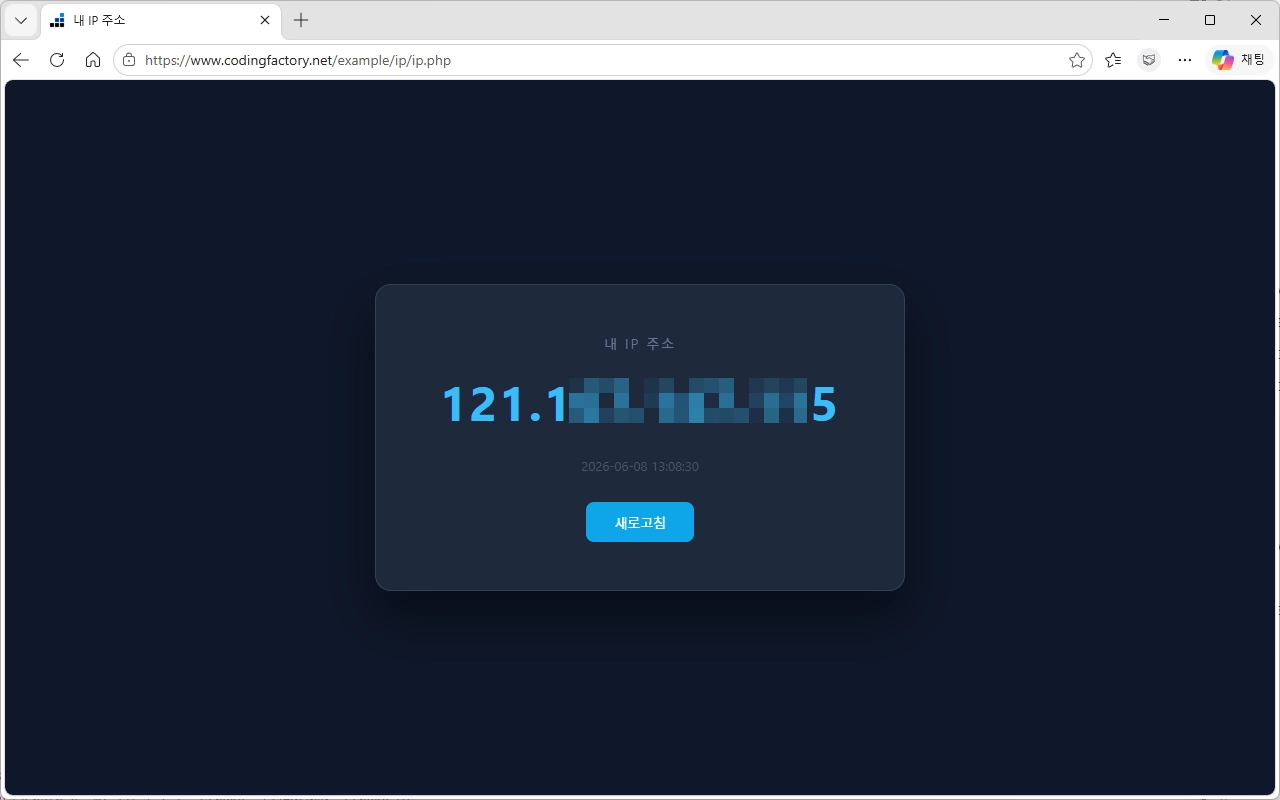
HTML
https://www.codingfactory.net/example/ip/ip.html
<!DOCTYPE html>
<html lang="ko">
<head>
  <meta charset="UTF-8">
  <meta name="viewport" content="width=device-width, initial-scale=1.0">
  <title>내 IP 주소</title>
  <style>
    * { margin: 0; padding: 0; box-sizing: border-box; }
    body {
      min-height: 100vh;
      display: flex;
      align-items: center;
      justify-content: center;
      background: #0f172a;
      font-family: 'Segoe UI', sans-serif;
      color: #e2e8f0;
    }
    .card {
      background: #1e293b;
      border: 1px solid #334155;
      border-radius: 16px;
      padding: 48px 64px;
      text-align: center;
      box-shadow: 0 25px 50px rgba(0,0,0,0.5);
    }
    .label {
      font-size: 14px;
      letter-spacing: 2px;
      text-transform: uppercase;
      color: #64748b;
      margin-bottom: 16px;
    }
    .ip {
      font-size: 48px;
      font-weight: 700;
      letter-spacing: 2px;
      color: #38bdf8;
      font-variant-numeric: tabular-nums;
      min-width: 300px;
    }
    .loading { color: #475569; font-size: 32px; }
    .error { color: #f87171; font-size: 24px; }
    .info {
      margin-top: 24px;
      font-size: 13px;
      color: #475569;
    }
    .refresh {
      margin-top: 28px;
      background: #0ea5e9;
      border: none;
      color: #fff;
      padding: 10px 28px;
      border-radius: 8px;
      font-size: 14px;
      cursor: pointer;
      transition: background 0.2s;
    }
    .refresh:hover { background: #0284c7; }
  </style>
</head>
<body>
  <div class="card">
    <div class="label">내 IP 주소</div>
    <div class="ip loading" id="ip">조회 중...</div>
    <div class="info" id="info"></div>
    <button class="refresh" onclick="loadIP()">새로고침</button>
  </div>

  <script>
    async function loadIP() {
      const ipEl = document.getElementById('ip');
      const infoEl = document.getElementById('info');
      ipEl.className = 'ip loading';
      ipEl.textContent = '조회 중...';
      infoEl.textContent = '';

      try {
        const res = await fetch('https://api.ipify.org?format=json');
        const data = await res.json();
        ipEl.className = 'ip';
        ipEl.textContent = data.ip;
        infoEl.textContent = '마지막 조회: ' + new Date().toLocaleTimeString('ko-KR');
      } catch (e) {
        ipEl.className = 'ip error';
        ipEl.textContent = '조회 실패';
        infoEl.textContent = '네트워크 연결을 확인해주세요.';
      }
    }

    loadIP();
  </script>
</body>
</html>
PHP
https://www.codingfactory.net/example/ip/ip.php
<?php
$ip = $_SERVER['HTTP_X_FORWARDED_FOR']
    ?? $_SERVER['HTTP_X_REAL_IP']
    ?? $_SERVER['REMOTE_ADDR']
    ?? '알 수 없음';

// 프록시 경유 시 첫 번째 IP만 사용
if (str_contains($ip, ',')) {
    $ip = trim(explode(',', $ip)[0]);
}
?>
<!DOCTYPE html>
<html lang="ko">
<head>
  <meta charset="UTF-8">
  <meta name="viewport" content="width=device-width, initial-scale=1.0">
  <title>내 IP 주소</title>
  <style>
    * { margin: 0; padding: 0; box-sizing: border-box; }
    body {
      min-height: 100vh;
      display: flex;
      align-items: center;
      justify-content: center;
      background: #0f172a;
      font-family: 'Segoe UI', sans-serif;
      color: #e2e8f0;
    }
    .card {
      background: #1e293b;
      border: 1px solid #334155;
      border-radius: 16px;
      padding: 48px 64px;
      text-align: center;
      box-shadow: 0 25px 50px rgba(0,0,0,0.5);
    }
    .label {
      font-size: 14px;
      letter-spacing: 2px;
      text-transform: uppercase;
      color: #64748b;
      margin-bottom: 16px;
    }
    .ip {
      font-size: 48px;
      font-weight: 700;
      letter-spacing: 2px;
      color: #38bdf8;
      font-variant-numeric: tabular-nums;
    }
    .info {
      margin-top: 24px;
      font-size: 13px;
      color: #475569;
    }
    .refresh {
      margin-top: 28px;
      background: #0ea5e9;
      border: none;
      color: #fff;
      padding: 10px 28px;
      border-radius: 8px;
      font-size: 14px;
      cursor: pointer;
      transition: background 0.2s;
      text-decoration: none;
      display: inline-block;
    }
    .refresh:hover { background: #0284c7; }
  </style>
</head>
<body>
  <div class="card">
    <div class="label">내 IP 주소</div>
    <div class="ip"><?= htmlspecialchars($ip) ?></div>
    <div class="info"><?= date('Y-m-d H:i:s') ?></div>
    <a class="refresh" href="">새로고침</a>
  </div>
</body>
</html>
HTML https://www.codingfactory.net/example/ip/ip.html <!DOCTYPE html> <html lang="ko"> <head> <meta charset="UTF-8"> <meta name="viewport" content="width=device-width, initial-scale=1.0"> <title>내 IP 주소</title> <style> * { margin: 0; padding: 0; box-sizing: border-box; } body { min-height: 100vh; display: flex; ...

Claude Code / 개발자를 위한 AI 코딩 에이전트 개념과 활용 방법
Claude Code란 무엇인지 쉽게 정리했습니다. AI 코딩 에이전트의 개념, 주요 기능, 기존 코딩 도구와의 차이, 활용 방법과 주의사항까지 개발자가 알아야 할 핵심 내용을 확인해 보세요.
HTML <!DOCTYPE html> <html lang="ko"> <head> <meta charset="UTF-8" /> <meta name="viewport" content="width=device-width, initial-scale=1.0" /> <title>로또 번호 생성기</title> <link href="https://fonts.googleapis.com/css2?family=Noto+Sans+KR:wght@400;600;700;900&display=swap" rel="stylesheet" /> <link rel="stylesheet" href="style.css" /> </head> <body> <div class="container"> <h1>로또 번호 생성기</h1> <p class="subtitle">행운의 번호를 뽑아보세요!</p> <div class="control-box"> ...