
CSS / Reference / clip: Understand Legacy Clip and Migrate to Clip-Path
clip is a deprecated property for rectangular clipping of absolutely positioned elements. Use it to understand legacy code; prefer clip-path for new implementations.
Syntax and value choices
| Property | Initial value | Inherited | Main application conditions |
|---|---|---|---|
clip |
auto | No | Absolutely positioned elements; deprecated |
Initial values are not necessarily the values assigned to HTML elements by the browser’s stylesheet. Inspect the actual result in developer tools’ Computed panel.
.legacy { position: absolute; clip: rect(20px, 180px, 100px, 20px); }
.modern { clip-path: inset(20px); }
| Value or category | Behavior and choice |
|---|---|
auto |
Do not apply a clip rectangle. |
rect(top, right, bottom, left) |
Specify boundary coordinates, not distances from every side. |
absolute / fixed |
The positioning conditions for this legacy property. |
clip-path: inset(...) |
A modern alternative using distances inward from the sides. |
For supported values and conditions, see MDN clip, MDN clip-path.
Run the example and compare results
Save this complete code as css-reference-10636-example.html in UTF-8 and open it in a browser. Keep its demonstration styles in that file rather than pasting them into a site-wide stylesheet.
<!doctype html>
<html lang="en">
<head>
<meta charset="utf-8">
<meta name="viewport" content="width=device-width, initial-scale=1">
<title>clip comparison example</title>
<style>
body { margin: 0; color: #20242b; background: #fff; font: 16px/1.7 "Malgun Gothic", sans-serif; }
#demo { padding: 24px; max-width: 820px; margin: auto; }
h1 { font-size: 22px; margin: 0 0 20px; }
.samples { display: flex; flex-wrap: wrap; gap: 24px; }
.label { margin: 0 0 8px; font-weight: 700; }
.frame { width: 200px; height: 120px; position: relative; background: #eee; }
.target, .reference { width: 200px; height: 120px; background: linear-gradient(135deg, #006c9c, #ffd166); }
.target { position: absolute; clip: rect(20px, 180px, 100px, 20px); }
.reference { clip-path: inset(20px); }
</style>
</head>
<body>
<main id="demo">
<h1>clip comparison</h1>
<section class="samples"><div><p class="label">Legacy clip</p><div class="frame"><div class="target"></div></div></div><div><p class="label">clip-path: inset(20px)</p><div class="frame"><div class="reference"></div></div></div></section>
</main>
</body>
</html>
Both samples show a 200×120px shape with 20px excluded at each edge. The clip coordinates and inset distances describe that region in different ways.
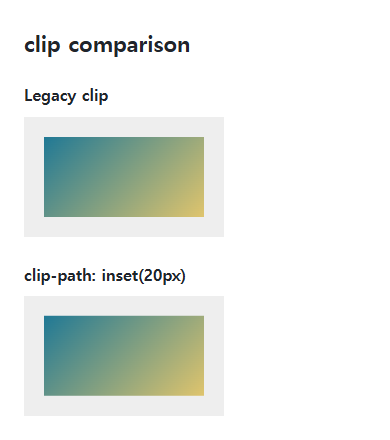
Boundary coordinates versus inset distances
A clip right coordinate of 180px is measured from the left; bottom 100px is measured from the top. Inset(20px) removes 20px at each side. Copying the same coordinates to a differently sized element need not preserve the same visible region.
Clipping is not resizing
Clipping normally does not reduce an element’s layout size. Clip-path also works for appropriate in-flow and nonrectangular cases. Overflow addresses a different boundary problem; inspect focus indicators and clipped descendants during migration.
Change one setting at a time
Use the complete example file above. Change only the specified selector or value rather than several comparison conditions at once.
- The 200×120px example uses rect boundaries 20,180,100,20px. For a 300×180px element, a 20px inset corresponds to boundaries 20,280,160,20px.
- Compare recomputed legacy coordinates with inset distances when resizing, then restore the original dimensions. Prefer clip-path in new code and retain legacy syntax only for migration.
| Edge | Rect coordinate at 200×120 | Rect coordinate at 300×180 | Inset distance |
|---|---|---|---|
| Top | 20px | 20px | 20px |
| Right | 180px | 280px | 20px |
| Bottom | 100px | 160px | 20px |
| Left | 20px | 20px | 20px |
For distance-based clipping in new implementations, see the inset examples in MDN clip-path.
For display modes and normal flow, see CSS display: Block, Inline, inline-block, and Hiding. Related properties to compare alongside these conditions are overflow.
When the result is missing or unexpected
- Check absolute or fixed positioning if legacy clip seems ineffective.
- Check coordinate order and the difference between an edge coordinate and a margin distance.

CSS / Reference / font-variant: Small Capitals and Font Features
Use small capitals without changing the source string and choose specific variant longhands. Compare real font support with synthesized presentation.

CSS / Reference / border-spacing: Separate Cell Gaps and Collapsed Borders
Set horizontal and vertical gaps in separate-border tables. Distinguish cell padding, zero spacing, collapsed borders, and browser default styles.
CSS / Reference / quotes: Choose Nested Quotation Marks
Choose generated quotation pairs for nested text and distinguish them from literal punctuation. Compare automatic marks, none, and quotation-depth operations.

CSS / Reference / border-style: Border Patterns, Side Order, and Hidden Conflicts
Choose border patterns for each side and inspect shorthand resets. Compare none with hidden in collapsed tables and account for zero computed border widths.

CSS / Reference / background-repeat: Tiling, Space, and Round
Control horizontal and vertical background tiling and compare repeat, no-repeat, space, and round with the same tile and positioning area.
CSS / Reference / font-family: Font Lists, Glyph Fallback, and Loading
Build a font stack with appropriate generic fallbacks and inspect the fonts actually used. Distinguish naming a family from loading files and covering characters.
CSS / Reference / background-attachment: Viewport, Box, and Internal Scroll Attachment
Compare local and scroll backgrounds inside a scrolling box and distinguish them from viewport-fixed backgrounds. Test target-browser behavior and a usable fallback.
CSS / Reference / font-weight: Numeric Weights, Relative Weights, and Font Matching
Request numeric or relative font weights and inspect the supplied faces. Compare static and variable-font behavior without assuming every number produces a unique weight.
CSS / Reference / list-style-position: Inside and Outside Markers on Wrapped Items
Choose marker placement using wrapped text, list spacing, and actual child structure. Preserve list meaning and diagnose clipped outside markers.
CSS / Reference / font-size: Understand px, em, rem, and Text Enlargement
Choose text-size units by their reference and test nested em scaling. Check the actual root size, browser enlargement, and layout constraints.