
CSS / Reference / white-space: Preserve Spaces, Line Breaks, and Wrapping
white-space controls preserved whitespace, source line breaks, and automatic wrapping. Use normal for ordinary text or pre-wrap when source spacing and line breaks should survive while lines may still wrap.
Syntax and value choices
| Property | Initial value | Inherited | Main application conditions |
|---|---|---|---|
white-space |
normal | Yes | All elements; visible effects depend on the text, image, or box conditions below |
Initial values are not necessarily the values assigned to HTML elements by the browser’s stylesheet. Inspect the actual result in developer tools’ Computed panel.
.copy { white-space: normal; }
.log { white-space: pre-wrap; overflow-wrap: anywhere; }
| Value or category | Behavior and choice |
|---|---|
normal |
Collapse whitespace and source breaks; allow wrapping. |
nowrap |
Collapse whitespace and prevent automatic wrapping. |
pre |
Preserve spacing and source breaks without automatic wrapping. |
pre-wrap |
Preserve spacing and source breaks while allowing wrapping. |
pre-line |
Collapse spacing but preserve source breaks and allow wrapping. |
break-spaces |
Preserve spaces with different wrapping and trailing-space behavior. |
For supported values and conditions, see MDN white-space.
Run the example and compare results
Save this complete code as css-reference-10597-example.html in UTF-8 and open it in a browser. Keep its demonstration styles in that file rather than pasting them into a site-wide stylesheet.
<!doctype html>
<html lang="en">
<head>
<meta charset="utf-8">
<meta name="viewport" content="width=device-width, initial-scale=1">
<title>white-space comparison example</title>
<style>
body { margin: 0; color: #20242b; background: #fff; font: 16px/1.7 "Malgun Gothic", sans-serif; }
#demo { padding: 24px; max-width: 820px; margin: auto; }
h1 { font-size: 22px; margin: 0 0 20px; }
.samples { display: flex; flex-wrap: wrap; gap: 24px; }
.label { margin: 0 0 8px; font-weight: 700; }
.target, .reference { width: 240px; padding: 12px; border: 1px solid #718096; }
.target { white-space: pre-wrap; }
.reference { white-space: normal; }
</style>
</head>
<body>
<main id="demo">
<h1>white-space comparison</h1>
<section class="samples"><div class="a"><p class="label">pre-wrap</p><div class="target">First    second
The third source line contains a longer sentence.</div></div><div class="b"><p class="label">normal</p><div class="reference">First    second
The third source line contains a longer sentence.</div></div></section>
</main>
</body>
</html>
Pre-wrap preserves the repeated spaces and original line break. Normal collapses them into ordinary text flow; both can wrap to the available width.
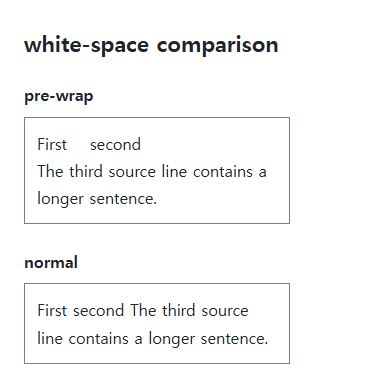
Separate whitespace from long-word handling
Wrapping permission alone does not guarantee a long URL fits. overflow-wrap and word-break handle breaks inside long strings. nowrap can prevent those wrapping rules from taking effect.
Modern shorthand and established keywords
The commonly implemented shorthand combines white-space-collapse and text-wrap-mode. Traditional keywords express useful combinations. break-spaces differs from pre-wrap for preserved and end-of-line spaces; test it when the placement of spaces is part of the content.
Compare six values on identical whitespace
Save this complete document as css-reference-10597-practice.html in UTF-8 and open it in a browser. Test it as a separate file rather than nesting it inside another example.
<!doctype html>
<html lang="en">
<head>
  <meta charset="utf-8">
  <meta name="viewport" content="width=device-width, initial-scale=1">
  <title>Compare six values on identical whitespace</title>
  <style>
    body { margin: 16px; color: #20242b; font: 16px/1.7 sans-serif; }
    main { max-width: 52rem; margin: auto; }
    h1 { font-size: 1.35rem; }
    .samples { display: flex; flex-wrap: wrap; gap: 24px; }
    .samples > * { max-width: 100%; min-width: 0; }
    :focus-visible { outline: 3px solid #005fcc; outline-offset: 3px; }
.sample { width:220px;max-width:100%;background:#e6f2ff;overflow-x:auto;border:1px solid #718096;font-family:monospace; }
  </style>
</head>
<body>
<main>
  <h1>Compare six values on identical whitespace</h1>
<p>normal</p><div class="sample" style="white-space:normal">One    two
Third	word and a much longer source line.
Four     </div><p>nowrap</p><div class="sample" style="white-space:nowrap">One    two
Third	word and a much longer source line.
Four     </div><p>pre</p><div class="sample" style="white-space:pre">One    two
Third	word and a much longer source line.
Four     </div><p>pre-wrap</p><div class="sample" style="white-space:pre-wrap">One    two
Third	word and a much longer source line.
Four     </div><p>pre-line</p><div class="sample" style="white-space:pre-line">One    two
Third	word and a much longer source line.
Four     </div><p>break-spaces</p><div class="sample" style="white-space:break-spaces">One    two
Third	word and a much longer source line.
Four     </div>
</main>
</body>
</html>
Normal and nowrap collapse source newlines; pre, pre-wrap, pre-line, and break-spaces preserve them. Pre-line collapses consecutive spaces. Long nowrap/pre lines scroll inside the sample. Compare pre-wrap with break-spaces on the same text and width to inspect trailing spaces, then restore the original value.
| Value | Runs of spaces | Source newlines | Automatic wrapping |
|---|---|---|---|
| normal | Collapse | Collapse | Allow |
| nowrap | Collapse | Collapse | No |
| pre | Preserve | Preserve | No |
| pre-wrap | Preserve | Preserve | Allow |
| pre-line | Collapse | Preserve | Allow |
| break-spaces | Preserve, including space at line ends | Preserve | Allow, including after preserved spaces |
For overflow causes and usable scroll regions, see CSS Overflow, Long Text Wrapping, and Ellipsis. Related properties to compare alongside these conditions are word-wrap, word-break.
When the result is missing or unexpected
- Check that editing preserved the actual spaces and line breaks.
- Inspect inherited or theme-level nowrap rules in Computed.

CSS / Reference / white-space: Preserve Spaces, Line Breaks, and Wrapping
Choose whitespace behavior by preservation and wrapping needs. Compare traditional values and break-spaces, and handle long words with separate wrapping properties.

CSS / Reference / list-style-type: Change List Markers and Numbering
Style list markers while keeping ordered and unordered semantics. Compare numbering styles, starting values, marker removal, and shorthand resets.

CSS / Reference / background-attachment: Viewport, Box, and Internal Scroll Attachment
Compare local and scroll backgrounds inside a scrolling box and distinguish them from viewport-fixed backgrounds. Test target-browser behavior and a usable fallback.
CSS / Reference / background-clip: Background Painting Areas and Text Clipping
Choose border, padding, or content painting areas independently of image positioning. Compare visible boundaries and plan readable fallbacks for text-clipped backgrounds.

CSS / Reference / text-indent: First-Line Indents and Hanging Paragraphs
Create first-line and hanging indents, distinguish them from paragraph padding, and check inheritance, writing direction, and narrow-screen clipping.

CSS / Reference / border-spacing: Separate Cell Gaps and Collapsed Borders
Set horizontal and vertical gaps in separate-border tables. Distinguish cell padding, zero spacing, collapsed borders, and browser default styles.
CSS / Reference / background-repeat: Tiling, Space, and Round
Control horizontal and vertical background tiling and compare repeat, no-repeat, space, and round with the same tile and positioning area.
CSS / Reference / background-position: Percentages, Centers, and Edge Offsets
Position backgrounds using centers, percentages, or edge offsets. Calculate percentages from the remaining space and account for oversized cover images and multiple layers.
CSS / Reference / font-variant: Small Capitals and Font Features
Use small capitals without changing the source string and choose specific variant longhands. Compare real font support with synthesized presentation.

CSS / Reference / calc(): Calculate CSS Values and Understand Their Types
Combine percentages and lengths with calc(), inspect the actual parent width, and distinguish invalid expressions from newer typed arithmetic and special numeric results.