CSS講座 / レスポンシブ画像と動画:aspect-ratio・object-fit
レスポンシブな画像や動画では、要素の大きさと、その中へ内容をどう収めるかを分けて指定します。aspect-ratioは箱の比率、object-fitは比率を保った内容の収まり方や切り取りを調整します。
元の寸法と画面上の大きさを分ける
元が400×300なら比率は4:3で、表示幅288pxのまま比率を保つ高さは216pxです。HTMLのwidthとheightは元の寸法・比率の情報を与え、CSSが表示サイズを制御します。属性を消す前に、CSSで何が上書きされているか確認します。
img { max-width: 100%; height: auto; }
/* Instead of forcing the small original size to grow, it is reduced to fit the parent. */
max-width: 100%は親幅を超えない上限で、小さい元画像を必ず拡大する指定ではありません。width: 100%は親を埋めるため、元より拡大する場合もあります。見た目が小さくても大きなファイルを取得することはあるので、鮮明さと転送量は別に確認します。srcset・sizesがあるなら、選ばれたファイルと画面の表示寸法を分けて見ます。
aspect-ratioで自動サイズを計算する
16 / 9は幅と高さの比率です。幅288pxなら高さ162pxになります。比率がサイズ計算へ作用するには少なくとも一方のサイズがautoである必要があり、両方を固定した場合はその寸法が優先されます。MDNのaspect-ratioを参照してください。
.thumbnail { width: 100%; height: auto; aspect-ratio: 16 / 9; object-fit: cover; }
.gallery { display: flex; flex-wrap: wrap; gap: 1rem; align-items: flex-start; }
画像自体をFlexアイテムにする場合は、交差軸のstretchも確認します。heightだけをautoへ戻しても、親の整列によって高さが伸びる場合があります。align-items: flex-startやalign-selfの条件を調べます。実習はborder-boxに統一し、比較画像には枠とpaddingを付けず寸法を読みやすくしています。
cover・containと切り取り位置を比べる
fillは領域へ合わせるため比率が変わる場合があります。coverは比率を保って空きなく埋める代わりに切り取り、containは全体を収める代わりに空きを残します。4:3を16:9へcoverで収めると上下が切れます。
中央なら上下へ分けて切り、object-position: center topなら上を残して下を多く切ります。実習は上の緑帯と下の赤帯を目印にします。中央の円だけでは、切れた範囲を見分けにくい点にも注意します。
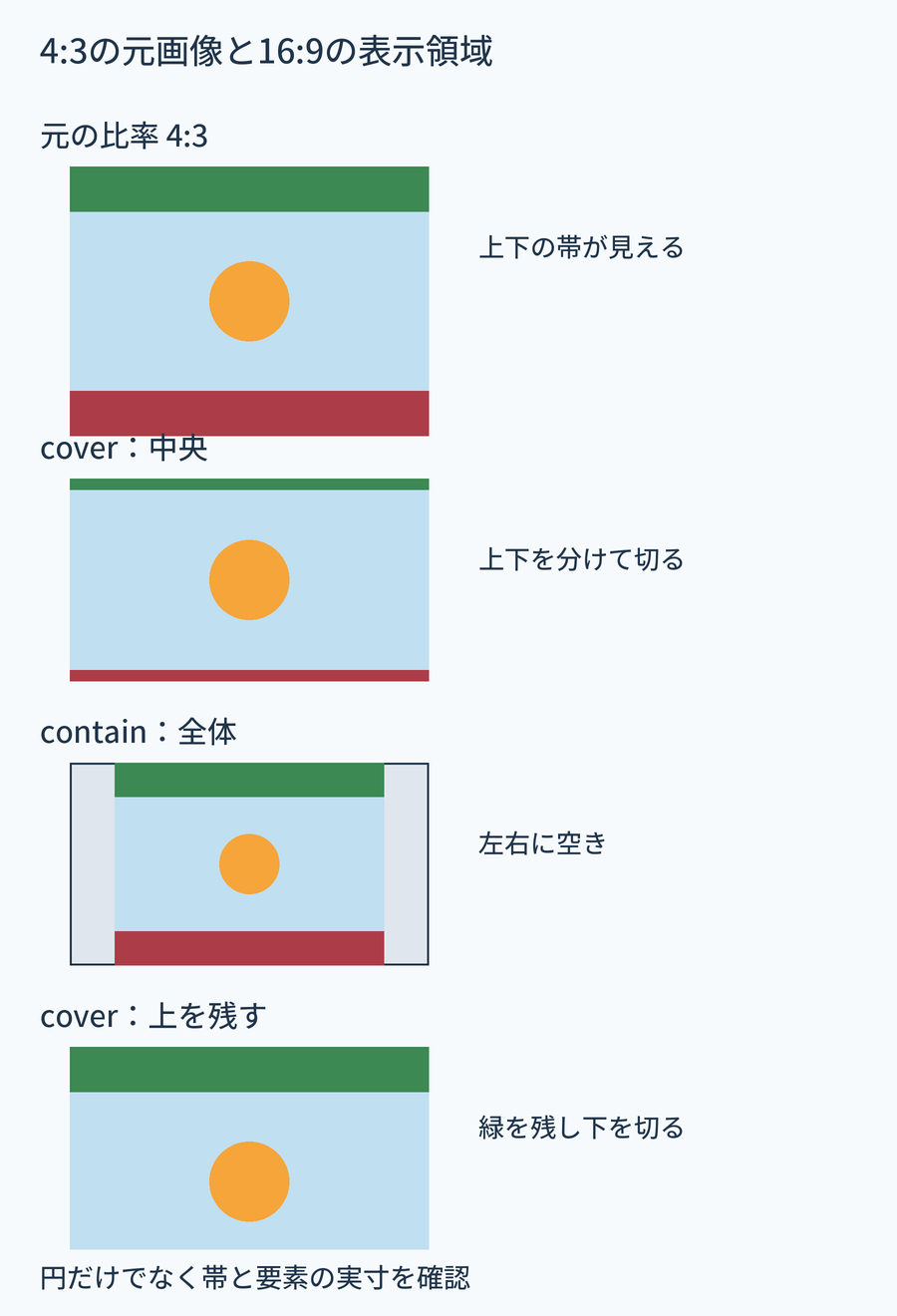
背景も似た選択がありますが、HTMLの画像とは内容や代替テキストの役割が違います。背景画像のcoverとcontainと比較してください。
同じ画像を四つの条件で表示する
次をimage-ratio.htmlとして保存します。SVGデータを含むので外部画像は不要です。HTMLの400×300は元の情報を保ち、表示はCSSで変えています。
<!doctype html>
<html lang="en">
<head>
<meta charset="utf-8">
<meta name="viewport" content="width=device-width, initial-scale=1">
<title>image-ratio.html</title>
<style>
*, *::before, *::after { box-sizing: border-box; }
body { margin: 0; font: 1rem/1.6 sans-serif; color: #243447; }
h1, h2, p { margin-top: 0; } a { color: #145f8f; }
a:focus-visible, button:focus-visible, input:focus-visible { outline: 3px solid #ac4100; outline-offset: 3px; }
main { width: min(100%, 65rem); margin-inline: auto; padding: 1rem; }
.gallery { display: flex; flex-wrap: wrap; gap: 1rem; align-items: flex-start; }
.sample { width: min(100%, 18rem); margin: 0; }
.sample img { display: block; width: 100%; height: auto; background: #e2e2e2; }
.sample p { margin: .5rem 0 0; } .cover, .contain { aspect-ratio: 16 / 9; }
.cover { object-fit: cover; } .contain { object-fit: contain; }
.top { object-position: center top; }
</style>
</head>
<body>
<main><h1>Compare the size and cropping of the same picture</h1><div class="gallery"><div class="sample"><img class="" src="data:image/svg+xml,%3Csvg%20xmlns%3D%22http%3A%2F%2Fwww.w3.org%2F2000%2Fsvg%22%20width%3D%22400%22%20height%3D%22300%22%20viewBox%3D%220%200%20400%20300%22%3E%3Crect%20width%3D%22400%22%20height%3D%22300%22%20fill%3D%22%23287699%22%2F%3E%3Crect%20width%3D%22400%22%20height%3D%2235%22%20fill%3D%22%23205c32%22%2F%3E%3Crect%20y%3D%22265%22%20width%3D%22400%22%20height%3D%2235%22%20fill%3D%22%239e3131%22%2F%3E%3Ccircle%20cx%3D%22200%22%20cy%3D%22150%22%20r%3D%2270%22%20fill%3D%22%23f6ae4c%22%2F%3E%3Crect%20x%3D%2212%22%20y%3D%22120%22%20width%3D%2230%22%20height%3D%2260%22%20fill%3D%22white%22%2F%3E%3Crect%20x%3D%22358%22%20y%3D%22120%22%20width%3D%2230%22%20height%3D%2260%22%20fill%3D%22white%22%2F%3E%3C%2Fsvg%3E" width="400" height="300" alt="Top green band, bottom red band and center orange circle"><p>Original 4:3</p></div>
<div class="sample"><img class="cover" src="data:image/svg+xml,%3Csvg%20xmlns%3D%22http%3A%2F%2Fwww.w3.org%2F2000%2Fsvg%22%20width%3D%22400%22%20height%3D%22300%22%20viewBox%3D%220%200%20400%20300%22%3E%3Crect%20width%3D%22400%22%20height%3D%22300%22%20fill%3D%22%23287699%22%2F%3E%3Crect%20width%3D%22400%22%20height%3D%2235%22%20fill%3D%22%23205c32%22%2F%3E%3Crect%20y%3D%22265%22%20width%3D%22400%22%20height%3D%2235%22%20fill%3D%22%239e3131%22%2F%3E%3Ccircle%20cx%3D%22200%22%20cy%3D%22150%22%20r%3D%2270%22%20fill%3D%22%23f6ae4c%22%2F%3E%3Crect%20x%3D%2212%22%20y%3D%22120%22%20width%3D%2230%22%20height%3D%2260%22%20fill%3D%22white%22%2F%3E%3Crect%20x%3D%22358%22%20y%3D%22120%22%20width%3D%2230%22%20height%3D%2260%22%20fill%3D%22white%22%2F%3E%3C%2Fsvg%3E" width="400" height="300" alt="Top green band, bottom red band and center orange circle"><p>16:9 cover, center</p></div>
<div class="sample"><img class="contain" src="data:image/svg+xml,%3Csvg%20xmlns%3D%22http%3A%2F%2Fwww.w3.org%2F2000%2Fsvg%22%20width%3D%22400%22%20height%3D%22300%22%20viewBox%3D%220%200%20400%20300%22%3E%3Crect%20width%3D%22400%22%20height%3D%22300%22%20fill%3D%22%23287699%22%2F%3E%3Crect%20width%3D%22400%22%20height%3D%2235%22%20fill%3D%22%23205c32%22%2F%3E%3Crect%20y%3D%22265%22%20width%3D%22400%22%20height%3D%2235%22%20fill%3D%22%239e3131%22%2F%3E%3Ccircle%20cx%3D%22200%22%20cy%3D%22150%22%20r%3D%2270%22%20fill%3D%22%23f6ae4c%22%2F%3E%3Crect%20x%3D%2212%22%20y%3D%22120%22%20width%3D%2230%22%20height%3D%2260%22%20fill%3D%22white%22%2F%3E%3Crect%20x%3D%22358%22%20y%3D%22120%22%20width%3D%2230%22%20height%3D%2260%22%20fill%3D%22white%22%2F%3E%3C%2Fsvg%3E" width="400" height="300" alt="Top green band, bottom red band and center orange circle"><p>16:9 contain</p></div>
<div class="sample"><img class="cover top" src="data:image/svg+xml,%3Csvg%20xmlns%3D%22http%3A%2F%2Fwww.w3.org%2F2000%2Fsvg%22%20width%3D%22400%22%20height%3D%22300%22%20viewBox%3D%220%200%20400%20300%22%3E%3Crect%20width%3D%22400%22%20height%3D%22300%22%20fill%3D%22%23287699%22%2F%3E%3Crect%20width%3D%22400%22%20height%3D%2235%22%20fill%3D%22%23205c32%22%2F%3E%3Crect%20y%3D%22265%22%20width%3D%22400%22%20height%3D%2235%22%20fill%3D%22%239e3131%22%2F%3E%3Ccircle%20cx%3D%22200%22%20cy%3D%22150%22%20r%3D%2270%22%20fill%3D%22%23f6ae4c%22%2F%3E%3Crect%20x%3D%2212%22%20y%3D%22120%22%20width%3D%2230%22%20height%3D%2260%22%20fill%3D%22white%22%2F%3E%3Crect%20x%3D%22358%22%20y%3D%22120%22%20width%3D%2230%22%20height%3D%2260%22%20fill%3D%22white%22%2F%3E%3C%2Fsvg%3E" width="400" height="300" alt="Top green band, bottom red band and center orange circle"><p>16:9 cover, top</p></div>
</div></main>
</body>
</html>
- 広い画面で各画像が最大18remか確認します。ルート16pxなら幅288px、元比率の高さ216px、16:9の高さ162pxです。
- .sample imgのheightだけを300pxへ変えます。比率より固定寸法が優先されることを測り、autoへ戻します。
- .galleryのalign-itemsだけをstretchへ変えます。この例のFlexアイテムは画像のラッパーなので、ラッパーは同じ高さでも中の画像の比率は保たれます。flex-startへ戻します。
- .topのobject-positionをcenter bottomへ変え、赤帯が残り緑帯が切れるか確認してcenter topへ戻します。
SVGには図形の比率を保つ特性もあるため、円が歪まないことだけで要素サイズが正しいとは判断できません。開発者ツールでimgの幅と高さを測ります。
動画にも領域と収め方を指定する
次の例は400×300の無音練習動画を、16:9領域へcontainで収めます。音声や字幕の情報はなく、円の動きと余白、再生操作を確認するための素材です。オフラインならコード内のWebMアドレスからファイルを保存し、同じフォルダーのファイル名へsourceを変えます。
<!doctype html>
<html lang="en">
<head>
<meta charset="utf-8">
<meta name="viewport" content="width=device-width, initial-scale=1">
<title>video-ratio.html</title>
<style>
*, *::before, *::after { box-sizing: border-box; }
body { margin: 0; font: 1rem/1.6 sans-serif; color: #243447; }
h1, h2, p { margin-top: 0; } a { color: #145f8f; }
a:focus-visible, button:focus-visible, input:focus-visible { outline: 3px solid #ac4100; outline-offset: 3px; }
main { width: min(100%, 34rem); margin-inline: auto; padding: 1rem; }
video { display: block; width: 100%; height: auto; aspect-ratio: 16 / 9; object-fit: contain; background: #111; }
</style>
</head>
<body>
<main><h1>Video display ratio</h1>
<p id="video-description">This silent sample video shows an orange circle moving on a blue background. Play and pause it to compare aspect ratios.</p>
<video controls preload="metadata" width="400" height="300" aria-describedby="video-description">
  <source src="https://www.codingfactory.net/wp-content/uploads/css-media-ratio-motion-v1.webm" type="video/webm">
  <a href="https://www.codingfactory.net/wp-content/uploads/css-media-ratio-motion-v1.webm">Download the sample video</a>
</video></main>
</body>
</html>
controlsで再生・停止などを操作できます。preload="metadata"は事前の情報取得に関するヒントで、実際の取得はブラウザーが決めます。自動再生は指定していないので、再生ボタンで確認します。object-fitだけをcoverへ変え、箱は同じでも上下が切れる差を見てcontainへ戻します。
object-fitは画像・動画などの置換要素の内容を扱い、埋め込み動画のiframeの中身を同じようには調整しません。iframeには適切な比率のラッパーなどを用意します。意味のある音声を含む動画なら、この無音素材と違って字幕などの代替も必要です。MDNのobject-fit、MDNのvideoを参照してください。